

1. Master Tool-by-Tool Structured Data Matrix
| Tool & Developer | Current Pricing (USD / Regional) & Trial | Platform Availability & Sync Model | Core Strength (Specific Mechanism) | Key Limitation (Sourced) | Best For (Use Case) | AI Capability | Last Verified Date & Primary Source URL |
|---|---|---|---|---|---|---|---|
| Scrivener (Literature & Latte Ltd.)[1] | One-time per platform: $59.99 USD (£55.00 GBP / €69.99 EUR) for macOS or Windows; $95.98 USD macOS + Windows bundle; $23.99 USD iOS/iPadOS; $50.99 USD (£46.75 GBP) educational; $37.95 USD cross-grade; ~$25 paid major upgrades. Trial: 30 days of active use (macOS/Win)[2]. | Platforms: macOS (11+, v3.5.2), Windows (64-bit 10+, v3.1.6), iOS/iPadOS (11+, v1.2.4). No web, Android, or official Linux. Sync: Local package storage; third-party folder sync (Dropbox mandatory for iOS sync)[2]. | Hierarchical Binder document tree paired with a four-pane split editor, Corkboard index cards, custom-metadata Outliner, Snapshots version control, and a granular Compile engine supporting EPUB 3, KF8, DOCX, and PDF/X-3 print output[1]. | Multi-week learning curve for the interface and Compile engine, alongside a lack of native cloud synchronization that exposes multi-device users to Dropbox packet sync conflicts and project corruption[4]. | Plotters, research-heavy novelists, series writers, and solo screenwriters managing 100,000+ word manuscripts offline[4]. | None built-in natively; supports macOS system-level Apple Writing Tools integration added in v3.4/v3.5[7]. | Pricing: Oct 22, 2026[2] Release: Dec 19, 2025[6][2] |
| Ulysses (Ulysses GmbH & Co. KG)[11] | Subscription: $5.99 USD/month or $39.99 USD/year billed annually (Note: older secondary reviews cite $49.99/yr; verified 2026 App Store surveys confirm $39.99/yr); student discount available. Trial: 14-day free trial[9]. | Platforms: Apple-exclusive: macOS, iPadOS, iOS (including iPhone Duo in v42 and Apple Vision). No Windows, Android, Linux, or web. Sync: Native automatic background sync via Apple iCloud[9]. | Distraction-free Markdown XL sheet editor with a single-library database, conditional filter groups, 20+ language Revision Mode grammar/style check, ULSS custom export stylesheets (PDF/DOCX/EPUB), and direct publishing to WordPress, Ghost, Medium, and Micro.blog[12]. | Complete hardware lock-in to Apple devices (zero Windows, Android, or browser access) combined with a recurring subscription and no visual plotting boards, index cards, or character wikis[9]. | Minimalists, Apple-only authors, pantsers, and serialized bloggers or essayists[9]. | OS-level integration & built-in assistant: Supports Apple Writing Tools and Siri AI on-screen awareness ("Ask Siri", "Write with Siri", toggleable on macOS in v41) plus built-in Revision Mode style checker[12]. | Pricing: Oct 28, 2026[12] Release: Nov 5, 2026[17][12] |
| Novelcrafter (Novelcrafter)[19] | Subscription (4 tiers; annual billing gives 2 months free): Scribe: $4/mo ($40/yr); Hobbyist: $8/mo ($80/yr); Artisan: $14/mo ($140/yr); Specialist: $20/mo ($200/yr) + external BYOK API token spend. Trial: 21-day unrestricted free trial (no credit card required)[19]. | Platforms: Web browser application across Windows, macOS, Linux, Chromebook, iOS, and Android. Sync: Real-time cloud database (opening multiple simultaneous browser tabs is unsupported and risks data overwrite as of 2025–2026)[19]. | Relational story-bible Codex that tracks characters, locations, objects, and lore across multi-book series while automatically injecting relevant context into customizable AI scene-beat and Workshop Chat prompts[19]. | Generative AI features require configuring external third-party API keys (OpenRouter, Anthropic, OpenAI, Google AI Studio, Featherless, or local Ollama) on $8+/mo tiers, and the platform lacks print/ebook page layout tools and application-wide undo/redo[19]. | Series writers, heavy plotters, and AI-assisted novelists requiring granular control over LLM selection and lore continuity[19]. | Native BYOK (Bring Your Own Key): Unlocked on Hobbyist ($8/mo) for beat generation/summarization and Artisan ($14/mo) for Workshop Chat; supports GPT models, Claude, Gemini models, Mistral, DeepSeek, and local Ollama[19]. | Pricing & Release: Oct 19, 2026[19][20][19] |
| Atticus (Atticus.io / Dave Chesson)[24] | One-time purchase: $147.00 USD lifetime license covering all platforms and future updates. Trial: No free trial; backed by a 30-day no-questions-asked full refund guarantee[24]. | Platforms: Chromium Progressive Web App (PWA) installable on Windows, macOS, Linux, and Chromebook; web access on tablets. Sync: Cloud-synced with local browser caching for limited offline sessions (requires logging in before going offline; 1 active device login at a time)[24]. | Cross-platform WYSIWYG book interior formatter with 17+ chapter themes, custom theme builder, 1,500+ fonts, H2–H6 subheadings, callout boxes, two-page image spreads, live multi-device e-reader previews, and validated KDP/IngramSpark PDF and EPUB exports[7]. | Chromium PWA wrapper suffers from rendering lag on long or image-heavy chapters, lacks widow and orphan pagination controls for print PDFs, restricts subhead page numbers in the Table of Contents, and logs out secondary devices[26]. | Self-publishing indie authors (especially on Windows, Linux, and Chromebook) seeking unified drafting and print/ebook formatting[9]. | None built-in; integrates with third-party ProWritingAid extension for grammar and style checking[30]. | Pricing: Oct 17, 2026[25] Release: Oct 20, 2026[28][25] |
| Dabble (Dabble Writer / Jacob Wright)[31] | Subscription (20% off annual) & Lifetime: 2026 Official Tiers: Writer: $19/mo ($15/mo annual = $180/yr); Author: $29/mo ($23/mo annual = $276/yr); Bestseller: $49/mo ($39/mo annual = $468/yr); Lifetime Author: $699; Lifetime Bestseller: $89932. Legacy Tiers (cited in 2025 reviews): Basic $9–$10/mo, Standard $15–$19/mo, Premium $20–$29/mo, Lifetime $499–$69935. 30% student discount. Trial: 14 days free (no card required)[32]. | Platforms: Web browser and installable Progressive Web App across Windows, macOS, Linux, Chromebook, iOS, and Android. Sync: Automatic real-time cloud sync with browser-cached offline mode[9]. | Zero-setup cloud synchronization combined with a visual drag-and-drop Plot Grid that links subplot index cards directly to manuscript scenes alongside automated daily and deadline word-count trackers[34]. | High recurring subscription cost ($180–$468/yr) for a drafting application that exports solely to Word (.docx) or plain text (.txt) with zero EPUB or print-ready PDF typesetting and displays browser cache eviction warnings[9]. | Multi-device plotters and pantsers who want visual scene/subplot cards and automatic cloud backup without Scrivener's technical setup[5]. | None for generative text; upper tiers include ProWritingAid grammar/style checks, an in-context thesaurus, and Read-to-Me text-to-speech[36]. | Pricing: Oct 29, 2026[32][32] |
| Google Docs (Google LLC)[9] | Free: $0 with a personal Google account (includes 15 GB Google Drive storage); optional Google Workspace Business plans ($6–$12/user/month). Trial: Perpetually free[9]. | Platforms: Web browser (Windows, macOS, Linux, ChromeOS) plus native mobile apps for iOS, iPadOS, and Android. Sync: Real-time Google Drive cloud sync with Chrome offline extension mode[9]. | Frictionless real-time multi-user co-authoring, granular Suggestion Mode commenting, infinite version history, and hierarchical Document Tabs (rolled out 2024–2025) for organizing chapters and notes inside one file[9]. | Severe typing lag and mobile search-and-replace crashes in manuscripts exceeding 70,000–100,000 words, non-propagating paragraph styles across Document Tabs, and no book interior layout engine[9]. | Co-authors, beta-reader revision workflows, budget writers ($0), and Chromebook/Android mobile drafters[9]. | Optional Workspace add-on: Google Gemini sidebar integration ($19/user/month Workspace tier) plus third-party browser extensions[46]. | Pricing & Features: Oct 2026[79][9] |
| Microsoft Word (Microsoft Corp.)[47] | Free Web / Subscription / Perpetual: Word for the Web: $0 (5 GB OneDrive). M365 Personal: $99.99 USD/yr or $9.99/mo (£84.99/yr UK; €99/yr EU). M365 Family (6 users): $129.99 USD/yr or $12.99/mo (£104.99/yr UK; €129/yr EU). M365 Premium: £189.99/yr UK. Office Home 2024 (perpetual 1 PC/Mac): $149.99 USD (£119.99 GBP / €149 EUR; BYOK cites $179.99). Trial: 1-month free on M3659. | Platforms: Native desktop apps on Windows (10/11) and macOS; mobile apps on iOS, iPadOS, and Android; browser via word.cloud.microsoft. Sync: OneDrive automatic cloud sync (1 TB/user on M365) or local disk storage[9]. | Universal publishing-industry standard .docx Track Changes and commenting engine required by literary agents and traditional publishing editors, supported by a collapsible Heading Navigation Pane and Outline View[9]. | Linear single-file architecture lacks nonlinear scene cards or story bibles, desktop subscriptions cost $99.99/yr following the Jan 2025 AI price hike, and Word for the Web lacks section breaks, gutter controls, and print PDF font embedding[48]. | Traditional publishing authors submitting manuscripts to literary agents and editors via Track Changes[9]. | Built-in Microsoft Copilot: Bundled into M365 Personal, Family (subscription owner only), and Premium since Jan 2025; excluded from Office Home 2024 and Classic plans[47]. | Pricing: Oct 7, 2026[47][47] |
Scroll sideways to see all columns →
2. Comprehensive Tool Pairing Matrix
2.1 Scrivener vs. Ulysses
Verdict: Scrivener wins for novelists and academic researchers constructing complex, multi-POV manuscripts who want a $59.99 one-time desktop license (verified October 22, 2026)[2], whereas Ulysses wins for Apple-exclusive minimalists and bloggers who value automatic iCloud synchronization and keyboard-driven Markdown XL drafting at $39.99/year (verified October 28, 2026)[12][4].
First released by Literature & Latte in 2007, Scrivener was engineered around a local Rich Text Format (RTF) package architecture designed to house thousands of research files, PDFs, and nonlinear scene fragments inside a single project directory[4]. By contrast, Ulysses GmbH designed Ulysses around a single-library SQLite/iCloud database using a custom Markdown XL syntax, prioritizing low-memory responsiveness on macOS and iOS hardware over multi-pane research storage[12]. On entry-level Apple silicon laptops such as the MacBook Air, Ulysses executes with lower indexing overhead than Scrivener, whereas Scrivener's deep indexing and four-pane split rendering thrive on desktop workstations handling 150,000-word historical or academic manuscripts[1].
| Comparison Dimension | Scrivener (Literature & Latte) | Ulysses (Ulysses GmbH) |
|---|---|---|
| Price Model | $59.99 USD one-time per desktop OS (macOS or Windows) + $23.99 USD for iOS; 30-day active-use trial (Oct 22, 2026)[2][4]. | $5.99 USD/month or $39.99 USD/year subscription covering macOS, iOS, and iPadOS; 14-day free trial (Oct 28, 2026)[12][9]. |
| Drafting Experience | Rich Text Format (RTF) WYSIWYG editor with four-pane split views, Compose mode with line/sentence/paragraph focus fade, and local reference PDF/image viewing[1]. | Distraction-free Markdown XL plain-text sheets with Liquid Glass UI, CMD-. full interface hiding, fixed typewriter scrolling, and 20+ language built-in Revision Mode grammar/style check[12]. |
| Organization & Plotting | Project-specific hierarchical Binder, visual Corkboard index cards with freeform/thread arrangement, spreadsheet Outliner with custom metadata columns, and Inspector Bookmarks[7]. | Unified single-library architecture across all writing using hierarchical groups, smart conditional filters ("Whole Words", "Begins with"), keywords, and sheet splitting/merging; no index cards or story bible[13]. |
| Export & Formatting | Complex Compile engine exporting to DOCX, EPUB 3, Kindle KF8, Final Draft (.fdx), MultiMarkdown, and print-ready PDF/X-3 with widow/orphan and cover image support[7]. | One-click direct web publishing to WordPress, Ghost, Medium, and Micro.blog, plus ULSS stylesheet exports to PDF, EPUB, and DOCX with two-sided preview, baseline grid alignment, and OMML math equations[12]. |
| Platform & Sync | macOS, Windows, and iOS; requires manual Dropbox setup for iOS sync and carries multi-machine sync conflict warnings[2]. | Strictly macOS, iPadOS, and iOS (zero Windows/Android/Web); zero-configuration automatic background sync via Apple iCloud[9]. |
Scroll sideways to see all columns →
Decision Guide — Choose Scrivener if / Choose Ulysses if: Choose Scrivener if the writing workflow centers on long-form fiction or research-heavy nonfiction requiring split-screen PDF and image reference panes, visual index-card plotting, cross-platform Windows compatibility, or a single upfront $59.99 purchase without recurring subscription fees[4]. Choose Ulysses if the workflow takes place exclusively on Mac, iPad, and iPhone, favors clean Markdown typography over multi-row formatting toolbars, requires direct one-click publishing to WordPress, Ghost, Medium, or Micro.blog (plus "Copy for Substack"), and relies on automatic iCloud synchronization across Apple devices[12].
Recent Changes (2025–2026): Literature & Latte released Scrivener macOS v3.5 (October 1, 2025), v3.5.1 (November 5, 2025), and v3.5.2 (December 19, 2025)[8], introducing macOS 26 Tahoe compatibility, a Liquid Glass icon, paused UI validation during live trackpad scrolling, and Apple Writing Tools integration, while Windows reached v3.1.6 in September/October 2025[55][3]. Ulysses GmbH shipped v39 (November 17, 2025) with a Liquid Glass design overhaul and "Copy for Substack", v40 (May 5, 2026) expanding ULSS PDF/DOCX typography controls, v41 (September 14, 2026) integrating iOS/macOS 27 and Siri AI on-screen awareness, and v42/42.1 (October 23 and November 5, 2026) adding Apple iPhone Duo and MacBook Pro PROLED XDR Display support[17][17].
2.2 Scrivener vs. Atticus
Verdict: Scrivener wins for the nonlinear creative drafting, research organization, and structural outlining phase of a book at $59.99 per desktop platform (verified October 22, 2026)[2], whereas Atticus wins for self-publishing authors who want a $147.00 one-time cross-platform tool (verified October 17, 2026)[25] that converts finished manuscripts into print-ready KDP/IngramSpark PDFs and validated EPUBs in under 30 minutes[4].
The functional boundary between Scrivener and Atticus reflects their origins in distinct stages of the indie publishing lifecycle. Scrivener was built to solve structural fragmentation during first-draft composition, giving authors a local sandbox of index cards, metadata columns, and document Snapshots[4]. Atticus was launched in 2021 by Kindlepreneur founder Dave Chesson specifically to eliminate the post-draft typesetting bottleneck for non-Mac authors who were locked out of Vellum and frustrated by Scrivener's complex Compile engine[7]. Consequently, a large segment of career indie authors treat the two applications as sequential rather than competitive—drafting complex manuscripts inside Scrivener and importing the compiled .docx file into Atticus for final interior book layout[29].
| Comparison Dimension | Scrivener (Literature & Latte) | Atticus (Atticus.io) |
|---|---|---|
| Price Model | $59.99 USD per desktop OS ($95.98 Mac+Win bundle; $23.99 iOS; $119.97–$143.97 all platforms); 30-day active trial (Oct 22, 2026)[2][4]. | $147.00 USD one-time purchase covering unlimited books across all platforms and lifetime updates; no free trial, 30-day refund guarantee (Oct 17, 2026)[25][7]. |
| Drafting Experience | Native offline desktop application (macOS/Windows) capable of handling 150,000+ word projects with zero browser lag, four split panes, and document Snapshots[1]. | Chromium-based Progressive Web App (PWA) with a clean linear chapter editor, Dark Mode (added Jan 2026), word-count habit trackers, and ProWritingAid integration, but prone to lag on long or image-heavy chapters[27]. |
| Organization & Plotting | Deep structural toolkit featuring the hierarchical Binder, Corkboard index cards, Outliner metadata columns, and internal project research folders for PDFs and web pages[4]. | Basic chapter, part, volume, and scene hierarchy with drag-and-drop reordering and an image folder system (added Aug 2026), but zero corkboards, timelines, or research repositories[27]. |
| Export & Formatting | Highly customizable Compile engine capable of outputting dozens of file formats, but requires hours of technical setup, lacks live e-reader previews, and does not support full-bleed print images[7]. | Purpose-built book formatter featuring 17+ chapter themes, a custom theme builder, 1,500+ fonts, full-bleed images, two-page spreads (added Oct 2026), large-print generation, live Kindle/iPad/Kobo previews, and KDP/IngramSpark-validated PDF/EPUB exports[7]. |
| Collaboration & AI | Single-user local files with no real-time collaboration or built-in AI (supports macOS Writing Tools only)[7]. | Supports role-based collaboration for co-authors, editors with Track Changes, and beta readers (though users report stability frustrations since collaboration launched); no built-in generative AI[26]. |
Scroll sideways to see all columns →
Decision Guide — Choose Scrivener if / Choose Atticus if: Choose Scrivener if the primary objective is drafting a structurally complex novel or nonfiction book with heavy research notes, guaranteed offline desktop speed, and .docx output destined for a literary agent or external book designer[4]. Choose Atticus if the primary objective is self-publishing commercial print paperbacks and ebooks on Windows, Mac, Linux, or Chromebook with live device previews, custom chapter ornaments, full-bleed images, and large-print editions without mastering Scrivener's Compile settings[7].
Recent Changes (2025–2026): Atticus shipped a continuous stream of formatting and stability updates between 2025 and 2026[28], including Alt Text for accessibility (June 24, 2025), EPUB validation protections (November 18, 2025), Dark Mode (January 27, 2026), Unique Drop Caps (March 12, 2026), EPUB page-flip, draft mode, and full book view rendering (June 1, 2026), image folder organization (August 12, 2026), and Two-Page Image Spreads (October 20, 2026)[28]. Scrivener updated macOS to v3.5.2 (December 19, 2025) with PDF/X-3 print compile enhancements and Windows to v3.1.6 (September/October 2025)[3].
2.3 Scrivener vs. Dabble (Dabble vs. Scrivener)
Verdict: Scrivener wins on long-term economics and organizational depth at a $59.99 one-time fee (verified October 22, 2026)[2]—breaking even against Dabble in 13 to 16 weeks—whereas Dabble wins for multi-device writers who want immediate, zero-learning-curve access to a visual subplot grid and automatic cloud synchronization at $15–$39/month billed annually (verified October 29, 2026)[32][4].
Founded in 2017 by Jacob Wright, Dabble was explicitly conceived as a cloud-native, lower-friction alternative to Scrivener's steep learning curve and manual Dropbox synchronization[16]. While Dabble succeeds in reducing onboarding time to under five minutes by presenting a clean browser workspace and an intuitive subplot Plot Grid, that convenience carries a substantial recurring premium[5]. Over a three-year horizon, Dabble's entry Writer plan costs $540.00 on annual billing ($684.00 monthly) compared to Scrivener's single $59.99 desktop payment, and a career author paying Dabble's $699.00 Lifetime Author rate spends more than eleven times the cost of a single Scrivener desktop license while still needing external software to format EPUBs or print PDFs[5].
| Comparison Dimension | Scrivener (Literature & Latte) | Dabble (Dabble Writer) |
|---|---|---|
| Price Model | $59.99 USD (£55.00 GBP) one-time per desktop OS + $23.99 iOS; 3-year cost is $59.99–$83.98; 30-day active trial (Oct 22, 2026)[2][4]. | Subscription: Writer $19/mo ($15/mo annual = $180/yr), Author $29/mo ($23/mo annual = $276/yr), Bestseller $49/mo ($39/mo annual = $468/yr), or $699–$899 Lifetime; 3-year Writer cost is $540–$684; 14-day trial (Oct 29, 2026)[32][5]. |
| Drafting Experience | Feature-dense native desktop interface (macOS/Windows) with extensive toolbars, four-pane split screens, and rich-text formatting; takes weeks to master[1]. | Minimalist, zero-setup browser and desktop web app that hides sidebar controls while typing (Focus Mode) and syncs every keystroke to the cloud automatically[5]. |
| Organization & Plotting | Freeform and linear Corkboard index cards, Outliner spreadsheet with custom metadata, Inspector Bookmarks, Matching Texts finder, and full multimedia research storage[7]. | Signature interactive Plot Grid that maps scenes vertically against unlimited color-coded subplot columns horizontally, displaying linked scene cards right beside the active manuscript draft[31]. |
| Export & Formatting | Comprehensive Compile engine exporting to DOCX, PDF, EPUB 3, KF8, Fountain/FDX screenplays, HTML, and Markdown[7]. | Exports exclusively to Microsoft Word (.docx) or plain text (.txt); provides zero EPUB, PDF, front/back matter, or print formatting capabilities[9]. |
| Collaboration & Mobile | Solo-only local files; iOS app ($23.99) requires Dropbox; zero Android or Chromebook support[2]. | Real-time co-authoring for up to 5 collaborators on upper tiers (Author/Bestseller/Premium); works in any mobile browser across iOS, Android, Linux, and Chromebook[9]. |
Scroll sideways to see all columns →
Decision Guide — Choose Scrivener if / Choose Dabble if: Choose Scrivener if avoiding $540 to $1,044 in three-year subscription fees is a priority, if the workflow relies on offline desktop stability on Mac or Windows, or if the project requires storing PDFs and compiling directly to EPUB, PDF, or screenplay formats[5]. Choose Dabble if the writing routine jumps constantly across a desktop computer, Chromebook, and Android or iOS smartphone, if Scrivener's technical complexity creates drafting friction, and if automatic cloud backups and a visual chapter-by-subplot grid justify an ongoing subscription[5].
Recent Changes (2025–2026): Between late 2025 and 2026, Dabble overhauled its subscription tiers (verified October 29, 2026)[32], replacing its legacy Basic ($9–$10/mo), Standard ($15–$19/mo), and Premium ($20–$29/mo) plans with Writer ($19/mo monthly or $15/mo billed annually at $180/yr), Author ($29/mo monthly or $23/mo billed annually at $276/yr), and Bestseller ($49/mo monthly or $39/mo billed annually at $468/yr), alongside Lifetime Author Access ($699 once) and Lifetime Bestseller Access ($899 once)[32]. Scrivener maintained its $59.99 desktop price while shipping macOS v3.5.2 (December 2025) and Windows v3.1.6 (September 2025)[3].
2.4 Ulysses vs. Atticus
Verdict: Ulysses wins for Apple-ecosystem writers who prioritize a distraction-free Markdown drafting environment and direct blog publishing at $39.99/year (verified October 28, 2026)[12], whereas Atticus wins for self-publishing authors who need granular print and ebook interior layout controls, trim-size templates, and cross-platform access for a $147.00 one-time payment (verified October 17, 2026)[25][9].
Ulysses and Atticus approach book production from opposite architectural philosophies. Ulysses treats text as clean semantic markup (Markdown XL), separating prose composition completely from visual presentation until the moment the author applies a Ulysses Style Sheet (ULSS) during export[13]. Atticus operates as a WYSIWYG layout studio where authors manipulate trim sizes, ornamental breaks, drop caps, and multi-device e-reader previews directly alongside the manuscript text[7].
| Comparison Dimension | Ulysses (Ulysses GmbH) | Atticus (Atticus.io) |
|---|---|---|
| Price Model | $5.99 USD/month or $39.99 USD/year subscription ($119.97 over 3 years); 14-day free trial (Oct 28, 2026)[12][9]. | $147.00 USD one-time lifetime payment (breaks even against Ulysses at 3.68 years on annual billing or 24.5 months on monthly billing); 30-day refund guarantee (Oct 17, 2026)[25][25]. |
| Drafting Experience | Native macOS/iOS Markdown XL editor with zero visual clutter, fast performance on MacBook Air and iPhone, and built-in 20+ language grammar/style checking[12]. | Browser-based WYSIWYG rich-text editor inside a Chromium PWA wrapper; functional for linear drafting but heavier and less responsive than native macOS code[26]. |
| Export & Book Formatting | Exports clean EPUB, DOCX, and PDF files via ULSS stylesheets (enhanced in v40 with headers/footers, small caps, old-style figures, and two-sided preview in v42), plus one-click publishing to WordPress, Ghost, and Medium, but lacks KDP trim-size calculators or full-bleed print spreads[13]. | Dedicated book production studio with 17+ print/ebook themes, custom theme builder, 1,500+ fonts, KDP/IngramSpark trim sizes, full-bleed pages, two-page image spreads, automated front/back matter, and multi-device e-reader emulation[7]. |
| Platform & Ecosystem | Strictly macOS, iPadOS, and iOS synced via Apple iCloud[12]. | Windows, macOS, Linux, and Chromebook via browser/PWA[24]. |
Scroll sideways to see all columns →
Decision Guide — Choose Ulysses if / Choose Atticus if: Choose Ulysses if drafting occurs strictly on Mac, iPad, and iPhone, and the output consists of essays, serialized newsletters on Substack, Ghost, or WordPress, or fiction drafts where rapid keyboard-driven Markdown composition takes precedence over custom print trim sizes[12]. Choose Atticus if the goal is formatting commercial print paperbacks and ebooks for Amazon KDP or IngramSpark requiring exact page-count previews, ornamental scene breaks, custom drop caps, callout boxes, and full-bleed illustrations[7].
Recent Changes (2025–2026): Ulysses v40 (May 5, 2026) and v42 (October 23, 2026) narrowed the typography gap by adding ULSS custom headers and footers, ligature and numeral style controls, PDF baseline grid alignment, and two-sided PDF/DOCX export previews[17][17]. Atticus expanded its visual formatting lead with Unique Drop Caps (March 12, 2026), EPUB page-flip rendering (June 1, 2026), and Two-Page Image Spreads (October 20, 2026)[28][28].
2.5 Novelcrafter vs. Sudowrite (External AI Benchmark Comparator)
Verdict: Novelcrafter wins for series plotters and technical AI authors who want a relational story Codex and transparent Bring-Your-Own-Key (BYOK) pricing at $8–$20/month plus raw API costs (verified October 19, 2026)[19], whereas Sudowrite wins for discovery writers and prose stylists who want a turnkey, zero-setup interface powered by its proprietary fiction-trained Muse model at $10–$59/month (verified January 7, 2026)[58][19].
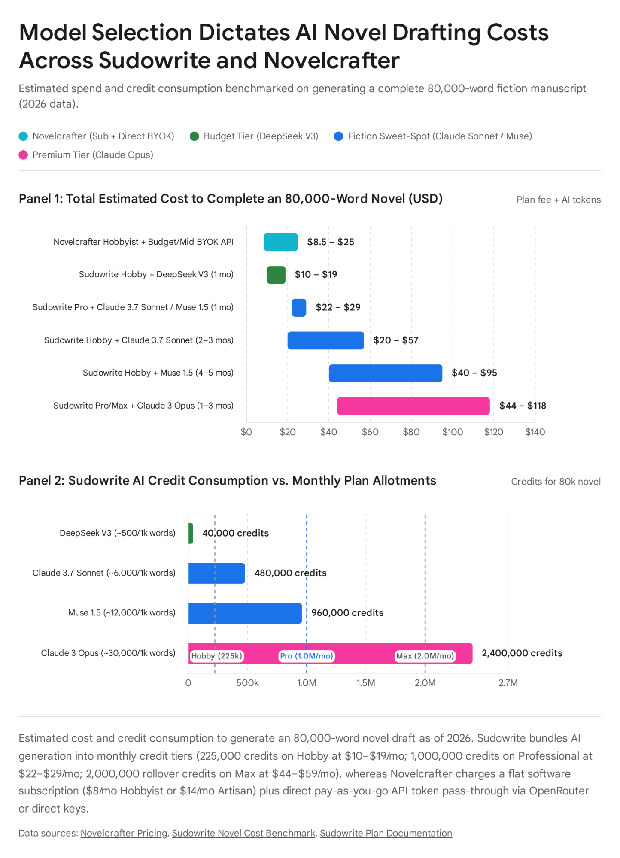
The economic and operational divergence between Novelcrafter and Sudowrite centers on how each platform mediates access to large language models (LLMs) and structures narrative context across an 80,000-word novel draft[19]. Sudowrite packages AI generation behind an internal credit economy (225,000 credits/month on Hobby at $10/mo annual or $19/mo monthly; 1,000,000 credits/month on Professional at $22/mo annual or $29/mo monthly; 2,000,000 rollover credits/month on Max at $44/mo annual or $59/mo monthly), where credit consumption fluctuates dramatically by model tier—from ~500 credits per 1,000 words on DeepSeek V3 (~40,000 credits for an 80,000-word novel) to ~6,000 credits on Claude 3.7 Sonnet (~480,000 credits/novel), ~12,000 credits on Sudowrite's fiction-tuned Muse 1.5 (~960,000 credits/novel), and ~30,000 credits on Claude's top-tier model (~2,400,000 credits/novel)[58]. Novelcrafter decouples software features from token markup, charging a flat platform fee ($4/mo Scribe without AI, $8/mo Hobbyist with BYOK beat generation, $14/mo Artisan with Workshop Chat, or $20/mo Specialist with team collaboration) while routing requests directly to commercial APIs (OpenRouter, Anthropic, OpenAI, Google AI Studio, Featherless) or free local models via Ollama[19].
| Comparison Dimension | Novelcrafter | Sudowrite (External Comparator) |
|---|---|---|
| Price & Billing Model | SaaS subscription + BYOK API pass-through: Scribe $4/mo ($40/yr, no AI), Hobbyist $8/mo ($80/yr, BYOK beat generation), Artisan $14/mo ($140/yr, adds Workshop Chat), Specialist $20/mo ($200/yr, adds collaboration); 21-day free trial (Oct 19, 2026)[19][19]. | All-inclusive credit subscription: Hobby & Student $19/mo ($10/mo annual = $120/yr, 225,000 credits/mo), Professional $29/mo ($22/mo annual = $264/yr, 1,000,000 credits/mo), Max $59/mo ($44/mo annual = $528/yr, 2,000,000 credits/mo with 12-month rollover); 10,000-credit free trial (Jan 7, 2026)[80][57]. |
| AI Model Access & Flexibility | Uncensored/unrestricted BYOK routing via OpenRouter, OpenAI (GPT models), Anthropic (Claude models), Google AI Studio (Gemini models), Mistral Medium 3.1, Featherless, GLM, MiMo, Aion, and free local models via Ollama[20]. | Curated built-in model menu including proprietary fiction-trained Muse 1.5 (~12,000 credits/1K words), Claude 3.7 Sonnet (~6,000 credits/1K words), Claude's top-tier models (~20,000–40,000+ credits/1K words), and budget DeepSeek V3 / GPT-4o Mini (~350–1,000 credits/1K words)[59]. |
| Story Bible & Continuity | Industry-leading relational Codex supporting custom categories, nicknames/aliases, series-wide inheritance across unlimited books, and automatic context injection into scene beat and chat prompts[19]. | Story Engine / Story Bible workflow that links braindumps, synopses, character sheets, and outlines to chapter beats, though lacking Novelcrafter's multi-book relational Codex inheritance and custom prompt logic functions[59]. |
| Prose Revision & Tools | Customizable prompt presets ("expand with inner thoughts", sensory details, POV/tense rephrasing, exact word-count targets, developmental editor chat personas) and /note inline exclusions[22]. | Specialized one-click fiction tools: Write (story continuation), Describe (sensory expansion), Rewrite (scene alternatives), My Voice (style training), and Feedback (exclusive to Professional and Max tiers)[58]. |
Scroll sideways to see all columns →
Decision Guide — Choose Novelcrafter if / Choose Sudowrite if: Choose Novelcrafter if the writing workflow spans multi-book series requiring a shared world-building Codex, if paying wholesale API token rates without monthly credit expiration is preferred, or if the project relies on local Ollama models, unfiltered Featherless/OpenRouter models, and custom prompt templates[19]. Choose Sudowrite if an all-in-one subscription with zero external API configuration is desired, if inline prose expansion tools (Describe, Rewrite, My Voice) are central to the editing process, and if drafting with Sudowrite's proprietary Muse 1.5 model—where an 80,000-word novel consumes ~960,000 credits inside a single $22–$29 Professional billing cycle—matches the creative style[58].
Recent Changes (2025–2026): Novelcrafter overhauled its prompting engine in May 2025[22], adding reusable prompt presets, customizable chat memory cutoffs beyond 14 message pairs, and instant Plan/Write/Chat switching[22]; added GPT-5 and Mistral Medium 3.1 on August 28, 2025[23][23]; introduced experimental AI thinking/reasoning support on January 9, 2026[63][63]; and refreshed its system model picker on October 2 and October 19, 2026[20], adding Gemini models, GLM, MiMo, and Aion while disabling OpenRouter auto-cache-write requests on GPT 5.6/6/6.1 after OpenRouter instituted a 25% cache-write surcharge[20]. Sudowrite updated its official plan structure on January 7, 2026[58], restricting the Feedback tool to Professional ($22/mo annual) and Max ($44/mo annual) tiers and limiting 12-month credit rollover exclusively to the Max plan[58].
2.6 Atticus vs. Vellum (External Formatting Benchmark Comparator)
Verdict: Atticus ($147.00 one-time, verified October 17, 2026)[25] wins for Windows, Linux, and Chromebook authors—as well as nonfiction writers requiring callout boxes and H2–H6 subheadings—whereas Vellum ($199.99 Ebooks / $249.99 Press one-time, verified November 2, 2026)[81] wins for macOS authors who demand native offline stability and superior print typography including widow and orphan control[26].
For nearly a decade, Vellum has served as the macOS gold standard for indie book formatting, generating Big-Five-caliber print and ebook interiors with minimal user configuration[42]. However, Vellum's strict macOS exclusivity forced Windows authors to rent laggy cloud Macs via MacInCloud[30]. Atticus entered the market in 2021 at $147.00—$102.99 less than Vellum Press—by building a cross-platform Progressive Web App (PWA) on Chromium that runs across Windows, Mac, Linux, and Chromebook while adding a full drafting environment and nonfiction layout elements (callout boxes and H3–H6 subheadings) that Vellum omits[24]. That PWA architecture represents Atticus's primary engineering trade-off: whereas Vellum's native macOS binaries run offline without hiccups, Atticus users in 2025–2026 have documented Chromium console errors, slow chapter transitions on image-heavy manuscripts, and missing widow/orphan controls in print PDFs[27].
| Comparison Dimension | Atticus (Atticus.io) | Vellum (180g / Vellum.pub — Comparator) |
|---|---|---|
| Price Model | $147.00 USD one-time payment for unlimited ebooks and print paperbacks; 30-day money-back guarantee (Oct 17, 2026)[25][25]. | Vellum Ebooks: $199.99 USD (£159.99 GBP + VAT) one-time; Vellum Press (Ebooks + Print): $249.99 USD (£199.99 GBP + VAT) one-time; free to download and preview indefinitely until exporting final files (Nov 2, 2026)[81][42]. |
| Platform & Architecture | Cross-platform Chromium Progressive Web App (PWA) running on Windows, macOS, Linux, and Chromebook; requires internet for full reliability and logs out secondary devices[25]. | Native macOS application exclusively (requires renting MacInCloud to use on a Windows PC); 100% offline, fast, and immune to browser cache or console errors[27]. |
| Drafting & Editing | Full linear word processor supporting scene breaks inside chapters, daily word-count goal trackers, ProWritingAid integration, multi-character CMD+Z undo, and co-author/editor collaboration[26]. | Primarily a post-drafting import/layout tool (imports .docx); single-letter CMD+Z undo behavior, no scene-level breakdown within chapters, no word-count habit trackers, and zero collaboration features[30]. |
| Nonfiction & Layout Elements | Supports H2 through H6 heading hierarchy, formatted Callout Boxes, custom theme builder, 1,500+ fonts, full-bleed images, and Two-Page Image Spreads (added Oct 2026)[25]. | Restricted to 26 curated chapter styles and H2 headings (no H3–H6 or Callout Boxes), though recent updates added footnotes, endnotes, and large-print editions[27]. |
| Typography & Print Polish | Lacks widow and orphan controls in print PDFs; callout boxes can split awkwardly across page breaks; Table of Contents omits page numbers on subheadings unless hacked as Parts[27]. | Industry-benchmark print typesetting that automatically manages widows, orphans, margins, drop caps, and multi-retailer ebook generation with zero broken internal links[27]. |
Scroll sideways to see all columns →
Decision Guide — Choose Atticus if / Choose Vellum if: Choose Atticus if the primary workstation runs Windows, Linux, or ChromeOS, if saving $102.99 over Vellum Press is desirable, if the book is a nonfiction title requiring callout boxes, two-page image spreads, and H2–H6 subheadings, or if drafting and formatting inside a single app is preferred[25]. Choose Vellum if the workstation is a Mac, if the catalog consists of fiction or narrative nonfiction where automatic widow and orphan control and error-free print/ebook compilation are paramount, and if a native offline macOS application is preferred over a browser-based PWA[27].
Recent Changes (2025–2026): Independent technical reviews in June and October 2025[27] and author discussions[56] highlighted Atticus's struggles with PWA lag on long or image-dense chapters, buggy print page-count calculations, callout boxes splitting across page breaks, and instability following the rollout of collaboration features[27]. Atticus countered between October 2025 and October 2026[28] with chapter-loading speed and cache improvements (October 29, 2025; April 28, 2026; July 8, 2026), Dark Mode (January 27, 2026), Unique Drop Caps (March 12, 2026), and Two-Page Image Spreads (October 20, 2026), while Vellum added footnotes, endnotes, and large-print support[28].
2.7 Google Docs vs. Microsoft Word
Verdict: Google Docs ($0, verified October 2026)[79] wins for real-time collaborative co-writing, beta-reader crowdsourcing, and zero-cost cross-device accessibility, whereas Microsoft Word Desktop ($99.99/year M365 Personal or $149.99 one-time Office Home 2024, verified October 7, 2026)[47] wins for solo authors preparing 100,000-word manuscripts for traditional publishing agents and editors who mandate .docx Track Changes and stable offline performance[9].
While Google Docs and Microsoft Word appear superficially similar as general-purpose word processors, their underlying document architectures diverge sharply above 50,000 words. Google Docs executes entirely inside the browser DOM, which enables frictionless simultaneous editing and link sharing for beta readers, but causes severe typing lag past 70,000–100,000 words and crashes mobile apps during global find-and-replace operations[9]. Microsoft Word splits its ecosystem between a stripped-down free browser version (word.cloud.microsoft)—which omits section breaks, gutter controls, Outline View, and PDF font embedding—and the full native Desktop application on Windows and macOS, which handles 150,000-word manuscripts offline without latency and remains the non-negotiable file standard for traditional publishing houses[9].
| Comparison Dimension | Google Docs | Microsoft Word (Desktop & Web) |
|---|---|---|
| Price Model | $0 free with a personal Google account (15 GB Drive storage) (Oct 2026)[79][9]. | Word for the Web: $0 free. Microsoft 365 Personal: $99.99/yr ($9.99/mo) US / £84.99/yr UK. M365 Family: $129.99/yr US / £104.99/yr UK. Office Home 2024 Perpetual: $149.99 USD (£119.99 GBP) one-time (Oct 7, 2026)[82][47]. |
| Drafting & Long-Document Stability | Browser-based architecture begins lagging noticeably past 70,000–100,000 words and frequently crashes on mobile during global find-and-replace operations[9]. | Native Word Desktop handles 150,000+ word files effortlessly offline with Outline View and Navigation Pane; Word for the Web shares browser rendering limits[9]. |
| Organization (Tabs vs. Headings) | Introduced hierarchical Document Tabs (2024–2025), allowing writers to separate chapters and research notes into nested sidebar tabs within one file (though paragraph styles do not propagate across tabs)[45]. | Relies on linear Heading styles (H1–H6) displayed in the collapsible Navigation Pane and collapsible Outline View, without multi-tab document silos[51]. |
| Export & Print Formatting | Exports to DOCX, EPUB, and PDF; printing a tabbed document inside the editor prints only the active tab, and the platform lacks print gutter or font-embedding controls[9]. | Word Desktop provides section breaks, mirror margins/gutters, custom trim sizes, and PDF font/PPI embedding required for print-on-demand (all stripped from free Word for the Web)[50]. |
| Collaboration & AI | Benchmark real-time simultaneous editing, Suggestion Mode, and link sharing; optional Gemini Workspace add-on ($19/mo)[9]. | Industry-standard .docx Track Changes for asynchronous agent/editor passes; M365 subscriptions bundle Microsoft Copilot AI sidebar[9]. |
Scroll sideways to see all columns →
Decision Guide — Choose Google Docs if / Choose Microsoft Word if: Choose Google Docs if the book is being co-authored in real time, if collecting inline comments from multiple beta readers via a shared URL is part of the revision workflow, or if writing on a Chromebook or Android tablet on a $0 budget while splitting chapters across Document Tabs to prevent browser lag[9]. Choose Microsoft Word Desktop if submitting manuscripts to literary agents and traditional publishing editors who exchange .docx files via Track Changes, or if desktop section breaks, gutter margins, and PDF font embedding are needed for manual print layout[9].
Recent Changes (2025–2026): On January 16, 2025, Microsoft enacted its first consumer subscription price hike in 12 years[52], raising Microsoft 365 Personal by $30/£25 to $99.99/year US (£84.99/year UK) and Family to $129.99/year US (£104.99/year UK) to bundle Microsoft Copilot AI credits (while relegating non-AI "Classic" plans to hidden cancellation retention offers), followed on October 1, 2025 by the launch of Microsoft 365 Premium (£189.99/year) and the withdrawal of standalone Copilot Pro[47]. Google Docs completed the rollout of Document Tabs across 2024–2025[45], adding multi-tab find-and-replace and nested tab hierarchies while leaving paragraph style changes siloed per tab[45].
2.8 Scrivener vs. Novelcrafter
Verdict: Scrivener wins for traditional offline authors who reject recurring subscriptions and generative AI in favor of a $59.99 local desktop workspace (verified October 22, 2026)[2], whereas Novelcrafter ($4–$20/month, verified October 19, 2026)[19] wins for series writers and AI-assisted plotters who want a dynamic relational Codex that feeds world-building metadata directly into LLM prompts[4].
| Comparison Dimension | Scrivener (Literature & Latte) | Novelcrafter |
|---|---|---|
| Price Model | $59.99 USD one-time per desktop OS (breaks even against Novelcrafter Hobbyist at 9 months and Artisan at 4.3 months) (Oct 22, 2026)[2][4]. | $4/mo ($40/yr) Scribe, $8/mo ($80/yr) Hobbyist, $14/mo ($140/yr) Artisan, $20/mo ($200/yr) Specialist + external BYOK API costs; 21-day free trial (Oct 19, 2026)[19][19]. |
| Series Bible & Plotting | Folder-based Binder, Corkboard, and Outliner restricted to a single local .scriv project file; cross-book continuity requires keeping an entire series inside one massive project file[4]. | Dedicated relational Codex (characters, locations, lore, rules) that links across multiple books in a Series or Universe and automatically highlights and tracks entities inside scenes[19]. |
| AI & Drafting Workflow | 100% human drafting environment with split-screen multimedia research panes and zero generative AI features[1]. | Integrated Plan, Write, Chat, and Review views with BYOK connections to OpenRouter, Claude, GPT models, Gemini, and local Ollama for beat-to-prose drafting and Workshop Chat brainstorming[19]. |
| Export & Offline Access | Full offline native app with industry-leading Compile exports (DOCX, EPUB 3, PDF/X-3, FDX)[7]. | Cloud-only web app (no offline desktop app) exporting basic DOCX, Markdown, and HTML; Scrivener and Excel import/export overhaul entered development in late 2025/202621. |
Scroll sideways to see all columns →
Decision Guide — Choose Scrivener if / Choose Novelcrafter if: Choose Scrivener if the writing process excludes generative AI, requires 100% offline reliability on planes or trains, involves storing hundreds of PDFs and research images inside the project package, and demands advanced print/ebook compilation under a one-time license[1]. Choose Novelcrafter if the project spans a multi-book fiction series requiring an interconnected character and lore wiki (available even on the $4/mo non-AI Scribe tier) or uses AI models via OpenRouter or local Ollama to brainstorm, summarize scenes, and generate prose from scene beats[19].
Recent Changes (2025–2026): In its September 2025 community update[21] and October 2026 changelog[20], Novelcrafter detailed an ongoing database architecture overhaul to introduce application-wide undo/redo, multi-tab browser safety, and native Scrivener .scriv project import/export[20].
2.9 Scrivener vs. Microsoft Word
Verdict: Scrivener ($59.99 one-time, verified October 22, 2026)[2] wins for drafting, organizing, and restructuring first drafts of complex novels and research books, whereas Microsoft Word ($99.99/year M365 Personal or $149.99 Office Home 2024, verified October 7, 2026)[47] wins for final manuscript editing and Track Changes collaboration with literary agents and publishing houses[4].
| Comparison Dimension | Scrivener (Literature & Latte) | Microsoft Word (Desktop) |
|---|---|---|
| Price Model | $59.99 USD one-time per desktop OS ($59.99 over 3 years) (Oct 22, 2026)[2][4]. | $99.99 USD/year M365 Personal ($299.97 over 3 years) or $149.99 USD one-time for Office Home 2024 (Oct 7, 2026)[82][47]. |
| Manuscript Architecture | Modular scene-and-chapter Binder where 100+ small text chunks can be viewed together in Scrivenings mode or rearranged via drag-and-drop on the Corkboard[1]. | Monolithic single-file document requiring continuous vertical scrolling or Heading Navigation Pane jumps[9]. |
| Editing & Publishing Standard | Document Snapshots for solo revision rollback, but cannot exchange native .scriv project packages with agents or editors; must compile to .docx first[7]. | Universal .docx Track Changes and inline commenting required by virtually every traditional literary agent, acquisitions editor, and copyeditor[9]. |
Scroll sideways to see all columns →
Decision Guide — Choose Scrivener if / Choose Microsoft Word if: Choose Scrivener if navigating a single 90,000-word scrolling file hinders creativity, if scenes are drafted out of chronological order, and if viewing research notes split-screen alongside the active chapter for a single $59.99 fee is desired[1]. Choose Microsoft Word if drafting linearly from Chapter 1 to the end, collaborating extensively with professional editors using Track Changes, or utilizing an existing Microsoft 365 subscription (most traditionally published novelists draft in Scrivener and compile to Word .docx for agent and editor submissions)[9].
Recent Changes (2025–2026): Microsoft's January 16, 2025 price increase on Microsoft 365 Personal (+$30/year to $99.99/year US, £84.99/year UK)[52] widened Scrivener's economic advantage: a single year of Microsoft 365 Personal now costs $40.00 more than owning a perpetual desktop license of Scrivener[48].
2.10 Scrivener vs. Google Docs
Verdict: Scrivener ($59.99 one-time, verified October 22, 2026)[2] wins for solo authors writing long, structurally complex manuscripts who need lag-free offline performance and integrated research binders, whereas Google Docs ($0, verified October 2026)[79] wins for collaborative writers, beta-reader feedback loops, and Chromebook/Android users[4].
| Comparison Dimension | Scrivener (Literature & Latte) | Google Docs |
|---|---|---|
| Price & Accessibility | $59.99 USD one-time desktop license; local installation on macOS/Windows + $23.99 iOS app (Oct 22, 2026)[2][4]. | $0 free across any web browser, Chromebook, iOS, or Android device with a Google account (Oct 2026)[79][9]. |
| Performance at Scale | Engineered to index and render 150,000+ word projects segmented into hundreds of Binder sub-documents without typing lag[4]. | Lags past 70,000–100,000 words in a single tab and crashes on mobile during large find-and-replace tasks, requiring authors to split chapters across Document Tabs[9]. |
| Organization & Collaboration | Corkboard index cards, Outliner metadata, and split-screen research views, but zero real-time multi-user collaboration[1]. | Hierarchical Document Tabs (added 2024–2025) and outline headings, paired with real-time multi-user editing and Suggestion Mode comments[9]. |
Scroll sideways to see all columns →
Decision Guide — Choose Scrivener if / Choose Google Docs if: Choose Scrivener if writing a solo novel or nonfiction book exceeding 50,000 words on a Mac or Windows PC where visual scene cards, custom metadata tracking, and local file ownership are essential[4]. Choose Google Docs if operating on a $0 budget, writing on a Chromebook or Android device, or sharing live manuscript links with co-authors, critique partners, and beta readers for inline Suggestion Mode feedback[9].
Recent Changes (2025–2026): Google Docs' rollout of Document Tabs in late 2024 and 2025[45] gave zero-budget novelists a built-in mechanism to separate chapters and notes inside one file, though paragraph style updates still fail to propagate across tabs[44].
2.11 Atticus vs. Dabble
Verdict: Atticus ($147.00 one-time, verified October 17, 2026)[25] wins for self-publishing authors on a two-to-three-year horizon because it includes professional print/ebook formatting and costs 18% less than a single year of Dabble Writer ($180/year), whereas Dabble ($15–$39/month billed annually, verified October 29, 2026)[32] wins for writers who prioritize a visual subplot Plot Grid and mobile phone drafting over book typesetting[25].
| Comparison Dimension | Atticus (Atticus.io) | Dabble (Dabble Writer) |
|---|---|---|
| Price & 3-Year Cost | $147.00 USD one-time lifetime payment ($147 over 3 years; breaks even against Dabble Writer monthly in 7.7 months and annual in 9.8 months) (Oct 17, 2026)[25][25]. | $180/yr Writer ($540 over 3 yrs), $276/yr Author ($828 over 3 yrs), $468/yr Bestseller ($1,404 over 3 yrs), or $699–$899 Lifetime (Oct 29, 2026)[32][32]. |
| Plotting & Drafting | Linear chapter/scene drafting with word-count trackers and ProWritingAid support, but zero plotting boards, index cards, or character notes[27]. | Interactive drag-and-drop Plot Grid linking subplot cards to scenes, dedicated Story Notes folders, sticky notes, and Read-to-Me audio playback on upper tiers[31]. |
| Formatting & Export | Complete print-on-demand PDF and EPUB interior layout engine with 17+ themes, 1,500+ fonts, full-bleed spreads, and live device previewer[7]. | Exports only raw .docx and .txt files; requires purchasing a separate formatting tool (like Atticus or Vellum) to publish[9]. |
Scroll sideways to see all columns →
Decision Guide — Choose Atticus if / Choose Dabble if: Choose Atticus if owning the software outright for $147.00 and exporting print-ready PDFs and validated EPUBs directly to Amazon KDP and IngramSpark are the primary goals[7]. Choose Dabble if mapping complex subplots to scenes via the visual Plot Grid and drafting on iOS or Android smartphones (where Atticus's desktop/tablet PWA is not designed to operate) are worth paying a recurring subscription plus a separate fee for formatting software later[9].
Recent Changes (2025–2026): Following Dabble's 2025–2026 pricing update (verified October 29, 2026)[32], which set the entry Writer annual plan at $180/year ($15/mo) and the Author annual plan at $276/year ($23/mo), a single year of Dabble now exceeds the entire $147.00 lifetime cost of Atticus[25].
2.12 Novelcrafter vs. Dabble
Verdict: Novelcrafter ($4–$20/month, verified October 19, 2026)[19] wins on both price and functionality for series plotters and AI-assisted authors—offering a relational Codex at $4/month ($40/year) and full BYOK AI at $8/month ($80/year)—whereas Dabble ($15–$39/month annual, verified October 29, 2026)[32] wins only for non-AI writers who prefer a minimalist visual card grid with offline browser caching[19].
| Comparison Dimension | Novelcrafter | Dabble (Dabble Writer) |
|---|---|---|
| Price Model | $4/mo ($40/yr) Scribe (non-AI), $8/mo ($80/yr) Hobbyist (BYOK AI), $14/mo ($140/yr) Artisan, $20/mo ($200/yr) Specialist; 21-day trial (Oct 19, 2026)[19][19]. | $19/mo ($180/yr annual) Writer, $29/mo ($276/yr annual) Author, $49/mo ($468/yr annual) Bestseller, or $699–$899 Lifetime; 14-day trial (Oct 29, 2026)[32][32]. |
| Plotting & World-Building | Relational multi-book Codex (characters, locations, lore, objects, custom labels) paired with act/chapter/scene beat views and custom prompt presets[19]. | Visual Plot Grid (chapters vs. subplot columns) and unstructured blank Story Notes folders without relational cross-linking or series inheritance[31]. |
| AI & Offline Capabilities | Deep BYOK AI integration (unlocked on $8+/mo plans), but requires an active internet connection and single-tab browser session[19]. | Zero generative AI (ProWritingAid grammar check only), but supports browser-cached offline drafting across desktop and mobile[31]. |
Scroll sideways to see all columns →
Decision Guide — Choose Novelcrafter if / Choose Dabble if: Choose Novelcrafter if a multi-book series bible and scene-beat planner for $40/year (78% cheaper than Dabble Writer's $180/year) or integrated BYOK LLM assistance for $80–$140/year is desired[19]. Choose Dabble if a non-AI drafting space with offline browser caching and a simple drag-and-drop subplot card grid is preferred[31].
Recent Changes (2025–2026): Novelcrafter held its Scribe ($4/mo) and Hobbyist ($8/mo) rates constant through October 2026 while launching its May 2025 prompting overhaul[19][19], whereas Dabble raised its entry Writer tier to $15/mo billed annually ($19/mo monthly)[32][32].
2.13 Dabble vs. Ulysses
Verdict: Ulysses ($39.99/year, verified October 28, 2026)[12] wins for Apple-ecosystem writers because it costs 78% less per year than Dabble Writer ($180/year, verified October 29, 2026)[32] while delivering superior native macOS/iOS speed and EPUB/PDF/blog exports, whereas Dabble wins for Windows, Android, and Chromebook novelists who want a built-in visual Plot Grid[9].
| Comparison Dimension | Dabble (Dabble Writer) | Ulysses (Ulysses GmbH) |
|---|---|---|
| Price Model | $15–$39/month billed annually ($180–$468/year) or $19–$49/month monthly; $699–$899 Lifetime (Oct 29, 2026)[32][32]. | $5.99/month or $39.99/year billed annually (Oct 28, 2026)[12][9]. |
| Plotting vs. Minimalism | Dedicated novel Plot Grid and Story Notes sidebar designed for scene-by-scene fiction outlining[35]. | Pure Markdown XL text sheets organized via library groups, keywords, and conditional filters; no visual plot grid[13]. |
| Platform & Export | Cross-platform browser/PWA (Windows, Mac, Linux, iOS, Android); exports only to .docx and .txt[9]. | Apple-only (macOS, iOS, iPadOS); exports formatted PDF, EPUB, DOCX, HTML, and publishes directly to WordPress, Ghost, and Medium[9]. |
Scroll sideways to see all columns →
Decision Guide — Choose Dabble if / Choose Ulysses if: Choose Dabble if the writing workflow spans Windows, Android, or Linux alongside Apple devices, or requires a visual chapter-by-subplot card board next to the manuscript[9]. Choose Ulysses if working exclusively on Mac, iPad, and iPhone, saving $140.01 to $428.01 per year in subscription fees is attractive, and direct EPUB, PDF, and blog exporting is needed[9].
Recent Changes (2025–2026): Ulysses added project templates with pre-populated groups and sheets in v41 (September 14, 2026) and two-sided PDF/DOCX previews in v42 (October 23, 2026)[17], while maintaining its $39.99/year subscription against Dabble's $180–$468/year tiers[16].
2.14 Compressed Verdicts for Low-Search-Volume Pairings
To ensure complete coverage across all 21 internal tool combinations, the remaining 10 low-search-volume pairings are summarized below with their primary decision boundaries:
| Pairing | One-Sentence Verdict & Decision Boundary |
|---|---|
| Ulysses vs. Novelcrafter | Ulysses ($39.99/yr, Oct 28, 2026)[12] wins for Apple minimalists drafting human-written prose offline in Markdown XL, whereas Novelcrafter ($40–$200/yr, Oct 19, 2026)[19] wins for cross-platform series plotters who need a relational character/lore Codex and BYOK AI prompt integration[13]. |
| Ulysses vs. Google Docs | Ulysses ($39.99/yr, Oct 28, 2026)[12] wins for solo Apple authors managing multi-chapter books and blog libraries who want distraction-free Markdown and EPUB/PDF stylesheet control, whereas Google Docs ($0, Oct 2026)[79] wins for cross-platform real-time co-authoring and beta-reader commenting[9]. |
| Ulysses vs. Microsoft Word | Ulysses ($39.99/yr, Oct 28, 2026)[12] wins for fast, distraction-free first-draft composition and multi-sheet reorganization on Mac and iPad, whereas Microsoft Word ($99.99/yr or $149.99 once, Oct 7, 2026)[82] wins for traditional publishing revisions requiring .docx Track Changes with literary agents[9]. |
| Novelcrafter vs. Atticus | Novelcrafter ($4–$20/mo, Oct 19, 2026)[19] and Atticus ($147 once, Oct 17, 2026)[25] are sequential workflow tools rather than substitutes: Novelcrafter wins for Codex-driven series plotting and AI-assisted drafting, whereas Atticus wins for typesetting the exported .docx manuscript into KDP print PDFs and EPUBs[19]. |
| Novelcrafter vs. Google Docs | Novelcrafter ($4–$20/mo, Oct 19, 2026)[19] wins for solo novelists managing scene beats, multi-book Codex lore, and BYOK LLM generation without 100,000-word browser lag, whereas Google Docs ($0, Oct 2026)[79] wins for free synchronous co-writing and beta-reader Suggestion Mode feedback[9]. |
| Novelcrafter vs. Microsoft Word | Novelcrafter ($4–$20/mo, Oct 19, 2026)[19] wins for structural scene planning, relational world-building, and AI-assisted first drafts, whereas Microsoft Word ($99.99/yr or $149.99 once, Oct 7, 2026)[82] wins for offline desktop stability and final Track Changes editing passes with professional editors[9]. |
| Atticus vs. Google Docs | Atticus ($147 once, Oct 17, 2026)[25] wins for indie authors ready to format and export validated KDP/IngramSpark print PDFs and EPUBs, whereas Google Docs ($0, Oct 2026)[79] wins for zero-cost cloud drafting and real-time collaborative editing with beta readers prior to formatting[9]. |
| Atticus vs. Microsoft Word | Atticus ($147 once, Oct 17, 2026)[25] wins for self-publishing interior book design—automating trim sizes, ornamental breaks, drop caps, and EPUB validation that are brittle in Word—whereas Microsoft Word ($99.99/yr or $149.99 once, Oct 7, 2026)[82] wins for traditional manuscript submissions and heavy Track Changes editing[9]. |
| Dabble vs. Google Docs | Dabble ($180–$468/yr annual, Oct 29, 2026)[32] wins for solo novelists who want dedicated chapter/scene folders and an interactive subplot Plot Grid without 100,000-word browser lag, whereas Google Docs ($0, Oct 2026)[79] wins for budget-conscious writers and co-authors who organize chapters using free Document Tabs[9]. |
| Dabble vs. Microsoft Word | Dabble ($180–$468/yr annual, Oct 29, 2026)[32] wins for nonlinear scene reorganization and visual subplot tracking in the browser, whereas Microsoft Word ($99.99/yr M365 or $149.99 Office 2024, Oct 7, 2026)[82] costs significantly less over three years ($299.97 or $149.99 vs. $540–$1,404) while providing industry-standard Track Changes and full offline desktop stability[31]. |
Scroll sideways to see all columns →
3. Price-Tier & Total Cost of Ownership (TCO) Analysis
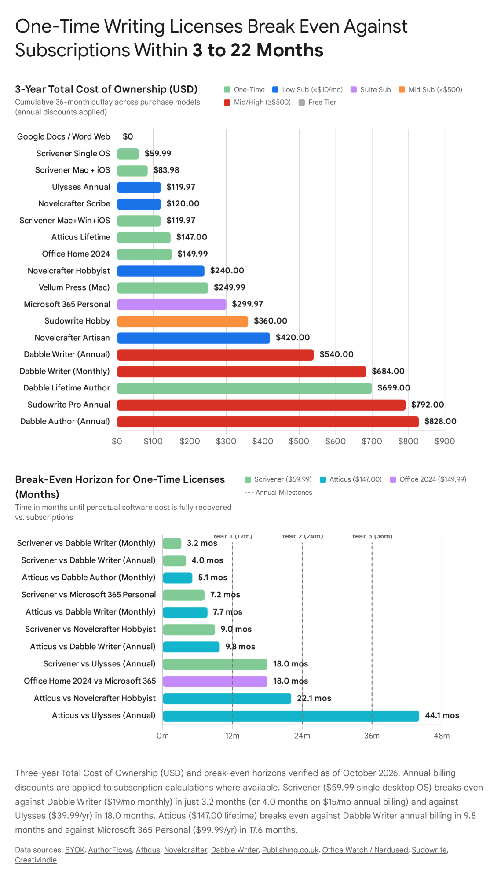
Evaluating creative writing software strictly by monthly entry price obscures substantial divergences in multi-year Total Cost of Ownership (TCO)[4]. Because solo novelists typically retain their core drafting environment across multi-year publishing cycles, the financial relationship between one-time licenses (Scrivener at $59.99, Atticus at $147.00, Office Home 2024 at $149.99, and comparator Vellum at $199.99–$249.99) and recurring SaaS subscriptions (Ulysses at $39.99/year, Novelcrafter at $40–$200/year, Microsoft 365 at $99.99/year, and Dabble at $180–$468/year) shifts rapidly between Month 3 and Month 2219.
3.1 Master Price-Tier & Break-Even Comparison Table
| Pricing Tier | Tool & Specific Plan (Verified Source & Date) | Upfront / Monthly / Annual Rate (USD) | 1-Year Cost (USD) | 3-Year Total Cost (USD) | 5-Year Total Cost (USD) | Break-Even Point vs. Adjacent Tier |
|---|---|---|---|---|---|---|
| Tier 1: Free Tier & Trials | Google Docs (Oct 2026)[79][9] | $0.00 free (15 GB Google Drive)[9] | $0.00 | $0.00 | $0.00 | Infinite cost advantage; trade-off is >70k-word lag and no book layout[9]. |
| Tier 1: Free Tier & Trials | Microsoft Word for the Web (Oct 2026)[83][50] | $0.00 free (5 GB OneDrive)[48] | $0.00 | $0.00 | $0.00 | Infinite cost advantage; strips section breaks, gutters, and PDF settings[50]. |
| Tier 1: Free Tier & Trials | Free Trial Allowances (Verified Oct 2026 across vendor sites)[6] | Scrivener: 30 active days; Novelcrafter: 21 days; Dabble: 14 days; Ulysses: 14 days; M365: 1 mo; Sudowrite: 10k credits; Vellum: Free until export; Atticus: No free trial (30-day refund)[6]. | $0.00 during trial window | N/A | N/A | Scrivener's 30 non-consecutive active days allow weekend writers (2 days/wk) to draft free for 15 weeks[6]. |
| Tier 2: One-Time Purchase | Scrivener (Single Desktop: Mac or Win) (Oct 22, 2026)[2][4] | $59.99 once (£55.00 / €69.99; $50.99 Edu)[3] | $59.99 | $59.99 | $59.99 (+~$ if major upgrade)[25][4] | Breaks even vs. Ulysses ($39.99/yr) at 18.0 mos (or 10.0 mos at $5.99/mo); vs. Novelcrafter Hobbyist ($80/yr) at 9.0 mos; vs. Dabble Writer ($19/mo) at 3.16 mos (~13.5 wks)[5]. |
| Tier 2: One-Time Purchase | Scrivener (Multi-Platform Combinations) (Oct 22, 2026)[2][4] | Mac + iOS: $83.98; Mac + Win Bundle: $95.98; Mac + Win Bundle + iOS: $119.97 ($143.97 unbundled)[4] | $83.98 – $143.97 | $83.98 – $143.97 | $83.98 – $143.97 | Mac + iOS ($83.98) breaks even vs. Ulysses ($39.99/yr) at 25.2 mos (2.1 years). |
| Tier 2: One-Time Purchase | Atticus (All-Platform Lifetime) (Oct 17, 2026)[25][25] | $147.00 once (includes lifetime updates)[25] | $147.00 | $147.00 | $147.00 | Breaks even vs. Novelcrafter Hobbyist ($80/yr) at 22.1 mos; vs. Dabble Writer ($180/yr annual) at 9.8 mos (or 7.7 mos at $19/mo monthly); vs. Ulysses ($39.99/yr) at 44.1 mos (3.68 yrs)[38]. |
| Tier 2: One-Time Purchase | Microsoft Office Home 2024 (Perpetual) (Oct 7, 2026)[70][48] | $149.99 once (£119.99 GBP / €149 EUR; 1 PC or Mac)[47] | $149.99 | $149.99 | $149.99 | Breaks even vs. Microsoft 365 Personal ($99.99/yr) at exactly 18.0 mos (1.5 years)[48]. |
| Tier 2: One-Time Purchase | Comparator: Vellum (Mac-Only) (Nov 2, 2026)[81][64] | Ebooks: $199.99 (£159.99); Press (Print+Ebook): $249.99 (£199.99) once[64] | $199.99 – $249.99 | $199.99 – $249.99 | $199.99 – $249.99 | Costs $52.99–$102.99 more than Atticus ($147), but pays for itself on a single $300 client formatting job[25]. |
| Tier 3: Low Subscription | Ulysses (Apple Ecosystem) (Oct 28, 2026)[12][9] | $39.99/yr annual ($3.33/mo) or $5.99/mo monthly (Note: legacy reviews cite $49.99/yr)[9] | $39.99 (annual) / $71.88 (mo) | $119.97 (annual) / $215.64 (mo) | $199.95 (annual) / $359.40 (mo) | Surpasses Scrivener ($59.99) after 1.5 years, but saves $140.01/year ($420.03 over 3 yrs) compared to Dabble Writer annual ($180/yr). |
| Tier 3: Low Subscription | Novelcrafter (Scribe / Hobbyist / Artisan / Specialist) (Oct 19, 2026)[19][19] | Scribe: $4/mo ($40/yr); Hobbyist: $8/mo ($80/yr); Artisan: $14/mo ($140/yr); Specialist: $20/mo ($200/yr) + BYOK API spend[19] | $40 / $80 / $140 / $200 (annual) | $120 / $240 / $420 / $600 (annual) | $200 / $400 / $700 / $1,000 (annual) | Scribe ($40/yr) matches Ulysses ($39.99/yr); Hobbyist ($80/yr) +~$10–$20 API tokens is 67% cheaper than Sudowrite Pro ($264/yr) and 55% cheaper than Dabble Writer ($180/yr)[19]. |
| Tier 4: Mid Subscription | Dabble (2026 Tiers: Writer / Author / Bestseller & Lifetime) (Oct 29, 2026)[32][32] | Writer: $15/mo annual ($180/yr) or $19/mo; Author: $23/mo annual ($276/yr) or $29/mo; Bestseller: $39/mo annual ($468/yr) or $49/mo; Lifetime: $699 (Author) / $899 (Bestseller) (Legacy tiers: $9/$15–$19/$20–$29)[32] | $180 / $276 / $468 (annual) | $540 / $828 / $1,404 (annual) or $684 / $1,044 / $1,764 (monthly)[34] | $900 / $1,380 / $2,340 (annual) | Dabble Writer ($180/yr) costs 3.0x Scrivener in Year 1 and 9.0x Scrivener over 3 years ($540 vs. $59.99); Lifetime Author ($699) breaks even against annual Author ($276/yr) at 2.53 years (30.4 mos)[5]. |
| Tier 4: Mid Subscription | Comparator: Sudowrite (Hobby / Pro / Max) (Jan 7, 2026)[80][57] | Hobby: $10/mo annual ($120/yr) or $19/mo; Pro: $22/mo annual ($264/yr) or $29/mo; Max: $44/mo annual ($528/yr) or $59/mo[57] | $120 / $264 / $528 (annual) | $360 / $792 / $1,584 (annual) | $600 / $1,320 / $2,640 (annual) | Sudowrite Pro ($264/yr) costs 3.3x Novelcrafter Hobbyist ($80/yr) before API tokens, or ~2.5x after factoring ~$25/yr in BYOK API spend[19]. |
| Tier 5: Full Suite Subscription | Microsoft 365 (Personal / Family / Premium) (Oct 7, 2026)[47][47] | Personal: $99.99/yr ($9.99/mo) US / £84.99/yr UK; Family (6 users): $129.99/yr ($12.99/mo) US / £104.99/yr UK; Premium: £189.99/yr UK[47] | $99.99 / $129.99 (US annual) | $299.97 / $389.97 (US annual)[48] | $499.95 / $649.95 (US annual)[48] | Counterintuitively, M365 Personal ($99.99/yr) is $80.01/year cheaper than Dabble Writer ($180/yr) while bundling Excel, PowerPoint, Copilot AI, and 1 TB of OneDrive storage[32]. |
Scroll sideways to see all columns →
3.2 Second-Order Economic Trade-Offs Across Tiers
The cross-tier financial data reveals a structural pricing inversion in the creative writing software market: Mid-Subscription standalone drafting tools (Tier 4) cost significantly more over three years than Full Productivity Suites (Tier 5) and Low-Subscription AI/Ecosystem tools (Tier 3), despite offering narrower technical capabilities[19]. Specifically, an author subscribing to Dabble's mid-level Author tier ($276.00/year billed annually, verified October 29, 2026)[32] pays $828.00 over three years for a browser text editor and subplot grid that cannot format an EPUB or print PDF[31]. For $528.03 less over that same three-year period ($299.97 total, verified September 24, 2026)[48], Microsoft 365 Personal delivers the full desktop Office suite, 1 TB of OneDrive cloud storage, and Copilot AI credits[47].
Furthermore, combining two Tier 2 one-time licenses—Scrivener for macOS or Windows ($59.99)[2] plus Atticus ($147.00)[25]—equips a self-publishing author with both an offline research and drafting environment and a lifetime cross-platform print and ebook formatter for a combined $206.99 one-time outlay[4]. This dual-tool ownership stack breaks even against a single Dabble Writer annual subscription ($180.00/year) in 13.8 months and saves the author $333.01 to $621.01 by Year 3 while eliminating recurring subscription risk[29].
4. "Best for X" Reader Profile Verdicts
4.1 Best for Plotters (Heavy Outlining, Beat Sheets, Timeline Management)
Scrivener wins for heavy plotters because its hierarchical Binder, index-card Corkboard, and customizable Outliner metadata columns allow writers to track complex scene beats, POV shifts, and research files within one local project[1]. Novelcrafter is the runner-up for authors who prefer web-based act/scene beat matrices linked directly to a dynamic character and lore Codex[19].
4.2 Best for Pantsers (Minimal Friction, Drafting-First, Structure Added Later)
Ulysses wins for discovery writers on Apple devices because its distraction-free Markdown XL sheets and unified iCloud library let authors draft immediately without configuring project folders, then split, merge, or rearrange scenes later[12]. Dabble is the cross-platform runner-up, offering an instant browser editor where pantsers can draft freely and organize chapters retroactively[5].
4.3 Best for Series Writers (Bible/Codex, Continuity Tracking, Cross-Book Notes)
Novelcrafter wins for multi-book series authors because its relational Codex and Series management architecture maintain persistent character, location, and world-building entries across unlimited novels at every subscription tier starting at $4/month[19]. Scrivener is the runner-up for offline writers who consolidate multi-book manuscripts into a master project Binder using sub-folders and Inspector Bookmarks[4].
4.4 Best for Screenwriters (Script Formatting, Collaboration, Industry-Standard Export)
Scrivener wins for solo scriptwriters among general authoring tools because it includes dedicated screenplay, stage play, and comic script formatting templates, pagination controls, dual-dialogue compilation, and Final Draft (.fdx) export[8]. Google Docs is the runner-up for writers who require real-time table reads and collaborative commenting before moving to dedicated software like Final Draft or Fade In[44].
4.5 Best for Collaboration (Shared Editing, Comments, Version History)
Google Docs wins for real-time co-authoring and beta-reader feedback because it provides zero-latency simultaneous multi-user editing, granular Suggestion Mode comments, and infinite version history across any browser for free[9]. Microsoft Word is the runner-up, remaining the mandatory industry standard for asynchronous developmental and line editing with literary agents via Track Changes[9].
4.6 Best for AI-Assisted Drafting (Built-In AI vs. BYOK, Model Flexibility)
Novelcrafter wins for AI-assisted novelists because its Bring-Your-Own-Key (BYOK) architecture ($8–$20/month) connects directly to OpenRouter, Anthropic Claude, OpenAI GPT models, Gemini, and local Ollama models while injecting Codex lore automatically into scene prompts[19]. Sudowrite ($10–$59/month) is the runner-up for authors who prefer a managed credit system featuring its proprietary fiction-trained Muse model[57].
4.7 Best for Self-Publishing (Formatting, Export to KDP/EPUB, Print Interior)
Atticus ($147 one-time) wins for cross-platform self-publishers because it combines drafting with a WYSIWYG interior formatter offering 17+ chapter themes, 1,500+ fonts, full-bleed spreads, e-reader previews, and validated KDP/IngramSpark PDF and EPUB exports on Windows and Mac[7]. Vellum ($199.99–$249.99) is the runner-up (and Mac leader) for superior offline typography[27].
4.8 Best for Minimalists / Distraction-Free Writing
Ulysses wins for minimalists because its Liquid Glass interface hides all sidebars and toolbars via CMD-. Focus Mode, leaving only a clean Markdown XL text canvas with optional line-highlight and typewriter scrolling[12]. Scrivener is the desktop runner-up, offering a customizable Compose Mode with line/sentence/paragraph fade-out focus controls[8].
4.9 Best for Apple-Only Users (Ecosystem Lock-In as a Feature, Not a Bug)
Ulysses ($39.99/year) wins for writers committed exclusively to Mac, iPad, and iPhone because its native codebase leverages instant iCloud synchronization, Apple Shortcuts, iOS widgets, macOS 27/iOS 27 Siri AI awareness, and iPhone Duo screen layouts under one subscription[13]. Scrivener ($59.99 Mac + $23.99 iOS) is the one-time-purchase runner-up[4].
4.10 Best for Windows/Android Users (Cross-Platform Reality Check)
Dabble ($15–$39/month billed annually) wins for Windows and Android novelists who need automatic cross-device cloud sync and visual scene plotting, because Scrivener and Ulysses offer zero Android apps[9]. Google Docs ($0) is the runner-up for budget writers who prioritize native Android offline mobile apps over dedicated novel-plotting boards[9].
5. Natural-Language Search & AI Answer Engine Query Map
| Target Entity / Category | High-Intent Search Queries & Conversational AI Prompts |
|---|---|
| Scrivener (Standalone) | "Is Scrivener worth it in 2026", "How much does Scrivener cost for Mac and Windows", "Does Scrivener have a one-time payment or subscription", "Scrivener 3.5 macOS Tahoe features", "How to sync Scrivener between Mac and iPad without corrupting files", "Does Scrivener have AI writing tools", "Scrivener student discount price"[4] |
| Ulysses (Standalone) | "Ulysses app pricing per month and per year 2026", "Is Ulysses available on Windows or Android", "Best Markdown writing app for Mac and iPad", "Does Ulysses have a free trial", "Ulysses vs iA Writer for novelists", "How to publish from Ulysses to WordPress Ghost and Substack"[9] |
| Novelcrafter (Standalone) | "Novelcrafter pricing tiers explained", "How does Novelcrafter BYOK OpenRouter work", "Can you use Novelcrafter without AI", "Novelcrafter Scribe vs Hobbyist vs Artisan", "How to connect local Ollama models to Novelcrafter", "Best writing software with a series bible codex"[19] |
| Atticus (Standalone) | "Is Atticus still worth it in 2026", "Atticus book formatting software price lifetime", "Does Atticus have a free trial", "Atticus offline mode limitations PWA", "Can you format full bleed children's books and two-page spreads in Atticus", "Atticus bugs slow chapters print preview"[25] |
| Dabble (Standalone) | "Dabble Writer pricing 2026 Writer Author Bestseller", "How much is Dabble lifetime access", "Dabble Writer review pros and cons", "Does Dabble export to EPUB or PDF", "Dabble student discount code", "Best cloud novel writing software with plot grid"[16] |
| Google Docs (Standalone) | "Is Google Docs good for writing a novel", "How to use Google Docs document tabs for chapters", "Why is Google Docs lagging at 100k words", "Best free book writing software for co-authors and beta readers", "Do paragraph styles carry over between tabs in Google Docs"[9] |
| Microsoft Word (Standalone) | "Microsoft 365 Personal price increase 2025 2026", "Office Home 2024 one-time purchase vs Microsoft 365 subscription", "How to get Microsoft 365 Classic without Copilot", "Word for the web vs Word desktop for book formatting", "Why do literary agents require Microsoft Word docx Track Changes"[9] |
| Scrivener vs. Ulysses | "Scrivener vs Ulysses which is better for novelists", "Scrivener vs Ulysses for MacBook Air performance", "Should I buy Scrivener or subscribe to Ulysses", "Ulysses vs Scrivener for academic and nonfiction writing"[13] |
| Scrivener vs. Atticus | "Scrivener vs Atticus for book writing and formatting", "Can Atticus replace Scrivener", "How to write in Scrivener and format in Atticus", "Atticus vs Scrivener compile for Amazon KDP"[7] |
| Scrivener vs. Dabble | "Dabble vs Scrivener for pantsers and plotters", "Is Dabble cheaper than Scrivener over 3 years", "Dabble Plot Grid vs Scrivener Corkboard", "Best Scrivener alternative with cloud sync"[3] |
| Ulysses vs. Atticus | "Ulysses vs Atticus for self-publishing ebooks", "Can Ulysses format print books like Atticus", "Atticus vs Ulysses pricing comparison"[9] |
| Novelcrafter vs. Sudowrite | "Novelcrafter vs Sudowrite which AI fiction tool is better", "How much does it cost to write an 80000 word novel in Sudowrite vs Novelcrafter", "Sudowrite Muse 1.5 vs Novelcrafter OpenRouter Claude", "Do Sudowrite credits roll over"[19] |
| Atticus vs. Vellum | "Atticus vs Vellum for nonfiction interior book design", "Best Vellum alternative for Windows PC in 2026", "Is Vellum worth $250 compared to Atticus $147", "Atticus vs Vellum callout boxes and subheadings"[27] |
| Google Docs vs. Word | "Google Docs vs Microsoft Word for writing a book", "Google Docs tabs vs Word Navigation Pane for novelists", "Can you format a print book in Google Docs or Word online"[9] |
| Secondary Pairings & Profiles | "Novelcrafter vs Scrivener for series writers", "Atticus vs Dabble total cost", "Dabble vs Ulysses for Mac writers", "Best writing software for Windows and Android sync", "Best distraction-free writing app for Apple users"[4] |
Scroll sideways to see all columns →
6. Recent Changes, Pricing Discrepancies, and Freshness Signals (2025–2026)
6.1 Documented Pricing Discrepancies Across Primary and Secondary Sources
Dabble Writer Tier Restructuring and Price Increases (2025 vs. 2026)
A major pricing discrepancy exists between older blog content on Dabble's domain[35][37] alongside 2025 third-party reviews (such as Self-Publishing School, Kindlepreneur, and Reedsy)[31] versus Dabble's live 2026 checkout page (verified September 23 and October 29, 2026)[32][31]. The legacy sources report Dabble's tiers as Basic ($9.00 or $10.00/month), Standard ($15.00 or $19.00/month), and Premium ($20.00 or $29.00/month), with a single Lifetime license quoted at $499.00 or $699.0031. Direct verification of[32] in September and October 2026 confirms that Dabble renamed and increased its subscription tiers to Writer at $19.00/month ($15.00/month billed annually at $180.00/year), Author at $29.00/month ($23.00/month billed annually at $276.00/year), and Bestseller at $49.00/month ($39.00/month billed annually at $468.00/year), while splitting its one-time buyout into Lifetime Author Access ($699.00 once) and Lifetime Bestseller Access ($899.00 once)[5].
Ulysses Annual Subscription Rate ($39.99/year vs. $49.99/year)
Secondary review sites display conflicting annual prices for Ulysses: Kindlepreneur's review[15] states that Ulysses costs $49.99/year or $5.99/month[15], whereas multiple independent 2026 audits—including BYOK[9], RewriteBar[13], ProMapRanker (verified October 28, 2026)[16], and TutionHelpBD[42]—verify the standard US annual price as $39.99/year or $5.99/month[9]. Because Ulysses GmbH distributes exclusively through the Apple App Store[14], regional App Store pricing tiers and legacy subscription cohorts explain the $39.99/year versus $49.99/year divergence[14].
Microsoft Office Home 2024 Perpetual Retail Price ($149.99 vs. $179.99)
In its 2026 book-writing software roundup, BYOK[9] cites the one-time purchase price of Microsoft Office Home 2024 as $179.99[9]. However, official Microsoft store listings and specialized 2026 software licensing audits—including Nerdused (verified September 24, 2026)[48], Lark[43], Lulu[50], and Microsoft UK (verified October 7, 2026)[70]—confirm that the official retail price for Office Home 2024 (covering 1 PC or Mac for non-commercial use) is $149.99 USD (£119.99 GBP in the UK and €149.00 EUR in Europe)[43].
6.2 Chronological Analysis of 2025–2026 Product Updates & User Complaints
Scrivener (Literature & Latte Ltd.)
On September 3 and October 1, 2025, Literature & Latte released Scrivener 3.1.6 for Windows[55], backporting architectural bug fixes and UI refinements developed during work on the company's upcoming writing application, including improved binder right-click selection behavior, streamlined image export when compiling to Markdown or plain text, Jump to Selection in Scrivenings mode, and a mandatory 64-bit Windows 10+ operating system floor[10]. On macOS, Literature & Latte shipped Scrivener 3.5 (October 1/16, 2025), 3.5.1 (November 5/13, 2025), and 3.5.2 (December 18/19, 2025)[8][6], introducing full compatibility with macOS 26 Tahoe, a redesigned Liquid Glass application icon, paused UI validation during live scrolling for smoother trackpad responsiveness, freeform corkboard card placement fixes, and expanded support for system-level Apple Writing Tools[3]. Despite these maintenance releases, 2026 user evaluations (verified October 22, 2026)[7][4] continue to flag the absence of native cloud sync, Dropbox packet corruption risks, the multi-week Compile learning curve, and the dated Windows visual interface[4].
Ulysses (Ulysses GmbH & Co. KG)
Between November 2025 and November 2026, Ulysses executed four major version cycles documented on its official release log (verified November 5, 2026)[17][17]. Version 39 (November 17, 2025, followed by 39.1 on November 27 and 39.2 on December 8, 2025) introduced a Liquid Glass Design Overhaul across macOS and iOS, relocating Revision Mode into a persistent Dashboard tab, adding CMD-. Hide Interface focus toggles, enabling side-aware trackpad swipe gestures, supporting zipped project archive sharing, and adding "Copy for Substack" and "Copy for Basecamp" shortcuts[17]. Version 40 (May 5, 2026) unified the iPad main menu with macOS, added permanent writing history statistics views, exported math equations as native Word OMML objects, and expanded the ULSS PDF/DOCX stylesheet engine with custom headers and footers, colspan multi-column initial paragraphs, small caps, old-style figures, and PDF baseline grid alignment[17]. Version 41 (September 14, 2026) delivered native iOS/macOS 27 visual integration, Siri AI on-screen awareness ("Ask Siri" and "Write with Siri", with a macOS disable toggle), customizable macOS toolbars, and pre-populated Project Templates[17]. Finally, Version 41.2 (October 6, 2026) enabled indefinite retention of monthly backups, Version 42 (October 23, 2026) added native layout and pose optimization for Apple's iPhone Duo alongside a scrollable iPhone markup bar and two-sided PDF/DOCX export previews, and Version 42.1 (November 5, 2026) added MacBook Pro PROLED XDR Display support[17].
Novelcrafter
In May 2025, Novelcrafter deployed a comprehensive overhaul of its New Prompting System[22][62], replacing static prompt previews with one-click reusable Prompt Presets, customizable chat memory cutoffs (removing the legacy 14-message-pair truncation limit), exact word-count targets for scene summarization (80, 120, or 300 words) and scene expansion/shortening, a /note editor command that creates yellow annotation blocks excluded from word counts and AI context, multi-panel pinning, and near-instantaneous switching across Plan, Write, and Chat views[22]. Subsequent updates on August 15 and August 28, 2025[23] resolved Gemini blockquote rendering bugs, added GPT-5 and Mistral Medium 3.1 to system model lists, and extended local Ollama connection timeouts from 50 seconds to 3 minutes[23]. In its September 2025 community update[21], the development team confirmed that opening Novelcrafter across multiple simultaneous browser tabs remains unsupported and risks data loss, outlining a backend re-architecture to add multi-tab safety, application-wide undo/redo, and native Scrivener and Excel Codex import/export[21]. On January 9, 2026, Novelcrafter added experimental support for AI thinking/reasoning models[63][63], and on October 2 and October 19, 2026[20], it added Gemini models, GLM, MiMo, and Aion, fixed Featherless model picker hangs via a new search modal, and disabled automatic cache-write requests for GPT 5.6/6/6.1 on OpenRouter after OpenRouter imposed a 25% cache-write surcharge[20].
Atticus (Atticus.io)
Atticus's official changelog (verified October 20, 2026)[28] documents a steady cadence of feature and stability releases across 2025 and 2026: syncing and chapter-to-chapter load speed improvements (April 9 and October 29, 2025), PDF export reliability patches (May 20, 2025 and April 7, 2026), Alt Text for Accessibility (June 24, 2025), DropCap compliance updates for side-loaded Kindle ebooks (September 26, 2025), Safari browser improvements (October 2, 2025), EPUB validation protections (November 18, 2025), a Dark Mode Theme (January 27, 2026), Unique Drop Caps (March 12, 2026), EPUB page flip, draft mode, and full book view rendering (June 1, 2026), additional copyright page and header/footer templates (June 9 and June 23, 2026), Image Folders (August 12, 2026), 10+ new author social media icons (September 3, 2026), and Two-Page Image Spreads (October 20, 2026)[28]. Alongside these updates, independent reviews published between June and October 2025[27] and indie author forum threads[56] document user complaints regarding Chromium PWA lag on long or image-heavy chapters, broken print page-count previews that block PDF exports, lack of widow and orphan pagination controls, callout boxes splitting across print pages, missing page numbers on subheadings in the Table of Contents, and regressions introduced with collaboration features[27].
Microsoft Word & Microsoft 365
On January 16, 2025, Microsoft implemented its first consumer price increase in 12 years (verified September 24, 2026)[52][48], raising Microsoft 365 Personal by $30.00/£25.00 to $99.99/year US (£84.99/year UK, €99.00/year EU)—a 42% jump in the UK—and Microsoft 365 Family to $129.99/year US (£104.99/year UK, €129.00/year EU) to bundle Microsoft Copilot AI usage credits into the base subscription[47]. Notably, on Microsoft 365 Family plans, Copilot AI features are restricted solely to the primary subscription owner rather than shared across the six household members, and existing subscribers who initiate cancellation are presented with unadvertised temporary "Classic" Personal and Family plans without Copilot at pre-2025 rates[53]. Subsequently, on October 1, 2025, Microsoft launched Microsoft 365 Premium (£189.99/year or £18.99/month)[47] above the Family tier with expanded Copilot allowances while withdrawing standalone Copilot Pro from consumer sale[47].
7. Consolidated Verification Log
| Entity / Claim Cluster | Verified Figures & Technical Claims | Primary / Audited Source URL | Verification Date | Discrepancy / Freshness Notes |
|---|---|---|---|---|
| Scrivener Pricing & Versions | $59.99 USD (£55.00 / €69.99) Mac or Win; $95.98 bundle; $23.99 iOS; $50.99 Edu; $37.95 cross-grade; 30 active-day trial. Versions: macOS v3.5.2, Windows v3.1.6, iOS v1.2.4[2]. | [2][6][8] | Oct 22, 2026 (Pricing) Dec 19, 2025 (macOS 3.5.2) Sept/Oct 2025 (Win 3.1.6)[4] | Consistent across all 2025–2026 sources; macOS 3.5 added macOS 26 Tahoe & Liquid Glass icon[8]. |
| Ulysses Pricing & Releases | $5.99/mo or $39.99/yr (14-day trial). Releases through v42.1 (PROLED XDR, iPhone Duo, Siri AI on-screen awareness, ULSS PDF/DOCX engine, Liquid Glass)[9]. | [12][17][14] | Nov 5, 2026 (v42.1 Release) Oct 28, 2026 (Pricing)[16] | Kindlepreneur review cites $49.99/yr[15]; 2026 audits (BYOK, RewriteBar, ProMapRanker) verify $39.99/yr[9]. |
| Novelcrafter Pricing & Changelog | Scribe $4/mo ($40/yr), Hobbyist $8/mo ($80/yr), Artisan $14/mo ($140/yr), Specialist $20/mo ($200/yr); 21-day free trial. Gemini models, GPT models, Ollama, May 2025 prompt overhaul[19]. | [19][20][21] | Oct 19, 202619 | Zero pricing discrepancies; multi-tab browser warning and Scrivener import roadmap verified Sept 202521. |
| Atticus Pricing, Updates & Reviews | $147.00 USD one-time lifetime license; no free trial; 30-day money-back guarantee. Updates through Oct 20, 2026 (Two-Page Image Spreads, Dark Mode, EPUB page flip)[25]. | [25][28][27] | Oct 20, 2026 (Updates) Oct 17, 2026 (Pricing)[26] | Price uniform at $147 across all sources; PWA performance and print pagination bugs documented June–Oct 202526. |
| Dabble Pricing & Tier Restructuring | 2026 Official: Writer $19/mo ($15/mo annual = $180/yr), Author $29/mo ($23/mo annual = $276/yr), Bestseller $49/mo ($39/mo annual = $468/yr); Lifetime $699 / $899; 14-day trial[9]. | [32][5][31] | Oct 29, 2026 (dabblewriter.com/pricing) Sept 23, 2026 (publishing.co.uk)[5] | Discrepancy documented: 2025 blogs cite legacy Basic/Standard/Premium ($9–$10 / $15–$19 / $20–$29) vs. 2026 Writer/Author/Bestseller tiers[32]. |
| Google Docs Pricing & Tabs | $0 free (15 GB Drive); Document Tabs hierarchy, multi-tab find/replace, style non-propagation, >70k–100k word browser lag[9]. | [79][45] | Oct 2026 (Pricing) May–June 2025 (Tabs audit)[42] | Document Tabs rollout confirmed across all personal and Workspace accounts in 2024–202545. |
| Microsoft Word & M365 Pricing | Web: $0. M365 Personal: $99.99/yr US (£84.99/yr UK). Family: $129.99/yr US (£104.99/yr UK). Premium: £189.99/yr UK. Office Home 2024: $149.99 USD (£119.99 GBP / €149 EUR)[47]. | [47][52] | Oct 7, 2026 (UK/US M365) Sept 24, 2026 (US 5-yr TCO)[47] | BYOK cites $179.99 for Office Home 20249; Microsoft retail and licensing guides verify $149.99 USD / £119.99 GBP[43]. |
| External Comparators (Vellum & Sudowrite) | Vellum: Ebooks $199.99 (£159.99), Press $249.99 (£199.99) once[64]. Sudowrite: Hobby $10/mo annual ($19/mo, 225k credits), Pro $22/mo annual ($29/mo, 1M credits), Max $44/mo annual ($59/mo, 2M rollover credits)[57]. | [81][58][59] | Nov 2, 2026 (Vellum) Jan 7, 2026 (Sudowrite Docs)[58] | Capterra lists legacy Sudowrite word limits (30k/90k/3M words)[46], whereas official Jan 2026 Sudowrite docs verify the credit system (225k/1M/2M)[58]. |
Scroll sideways to see all columns →
References
- Literature & Latte (n.d.) #1 Novel & Book Writing Software For Writers. Available at: https://www.literatureandlatte.com/scrivener/overview (Accessed: 6 November 2026). ↩
- Literature & Latte (n.d.) Buy Scrivener. Available at: https://www.literatureandlatte.com/store/scrivener (Accessed: 6 November 2026). ↩
- Extypis (n.d.) Free Scrivener Alternatives: 9 Programs Compared in 2026. Available at: https://extypis.app/en/blog/scrivener-alternatives-free (Accessed: 6 November 2026). ↩
- authorflows.com (n.d.) AuthorFlows vs Scrivener: Honest 2026 Comparison. Available at: https://www.authorflows.com/blogs/authorflows-vs-scrivener (Accessed: 6 November 2026). ↩
- publishing.co.uk (n.d.) Scrivener vs Dabble: £55 Once or $19 a Month Forever. Available at: https://publishing.co.uk/guides/scrivener-vs-dabble/ (Accessed: 6 November 2026). ↩
- Literature & Latte (n.d.) Download. Available at: https://www.literatureandlatte.com/download (Accessed: 6 November 2026). ↩
- writeabookai.com (n.d.) Scrivener vs Atticus in 2026: Which Book Tool to Choose. Available at: https://writeabookai.com/blog/scrivener-vs-atticus-book-writing-formatting-2026 (Accessed: 6 November 2026). ↩
- App Store (n.d.) Scrivener 3. Available at: https://apps.apple.com/gb/app/scrivener-3/id1310686187?mt=12 (Accessed: 6 November 2026). ↩
- BYOK (n.d.) Best Book Writing Software (2026): 10 Apps Compared. Available at: https://byok.io/best-book-writing-software (Accessed: 6 November 2026). ↩
- Literature & Latte Forums (n.d.) Latest Announcements topics. Available at: https://forum.literatureandlatte.com/c/general/announcements/45 (Accessed: 6 November 2026). ↩
- Apple (n.d.) Ulysses: Writing App - App Store. Available at: https://apps.apple.com/es/app/ulysses-writing-app/id1225570693?l=en-GB&platform=vision (Accessed: 6 November 2026). ↩
- ulysses.app (n.d.) Ulysses. Available at: https://ulysses.app/ (Accessed: 6 November 2026). ↩
- rewritebar.com (n.d.) The Best Writing Apps for Mac: A 2026 Comparison Guide. Available at: https://rewritebar.com/articles/writing-apps-for-mac (Accessed: 6 November 2026). ↩
- Ulysses Help (n.d.) Subscription Options. Available at: https://help.ulysses.app/en_US/subscription-synchronization/subscription-options- (Accessed: 6 November 2026). ↩
- Kindlepreneur (n.d.) Ulysses Review: Read This Before You Purchase!. Available at: https://kindlepreneur.com/ulysses-review/ (Accessed: 6 November 2026). ↩
- ProMapRanker (n.d.) Best Software for Writers in 2026. Available at: https://promapranker.com/blog/best-software-for-writers (Accessed: 6 November 2026). ↩
- Ulysses (n.d.) Release Notes. Available at: https://ulysses.app/release-notes/ (Accessed: 6 November 2026). ↩
- elephas.app (n.d.) Scrivener 2026 Detailed Review: Pros, Cons, Pricing and Alternatives. Available at: https://elephas.app/blog/scrivener-review (Accessed: 6 November 2026).
- Novelcrafter (n.d.) Our Plans and Pricing. Available at: https://www.novelcrafter.com/pricing (Accessed: 6 November 2026). ↩
- Novelcrafter (n.d.) Changelog. Available at: https://www.novelcrafter.com/changelog (Accessed: 6 November 2026). ↩
- Novelcrafter (n.d.) Community Update September 2025. Available at: https://www.novelcrafter.com/blog/2025-09-community-update (Accessed: 6 November 2026). ↩
- Novelcrafter (n.d.) May 2025 Update: The New Prompting System. Available at: https://www.novelcrafter.com/blog/may-2025-new-prompting-system-update (Accessed: 6 November 2026). ↩
- Novelcrafter (2025) August 28, 2025. Available at: https://www.novelcrafter.com/changelog/august-28-2025 (Accessed: 6 November 2026). ↩
- Reedsy (n.d.) Atticus Review: Is It Worth The Money?. Available at: https://reedsy.com/studio/resources/atticus-review/ (Accessed: 6 November 2026). ↩
- An Author's Best Friend (n.d.) Atticus. Available at: https://www.atticus.io/ (Accessed: 6 November 2026). ↩
- Extypis (n.d.) Atticus Alternative: 2026 comparison, free and paid. Available at: https://extypis.app/en/atticus-alternative (Accessed: 6 November 2026). ↩
- jeremyshapiro.com (2025) Vellum vs. Atticus for Non-Fiction Interior Book Design. Available at: https://www.jeremyshapiro.com/2025/06/vellum-vs-atticus-for-non-fiction-interior-book-design/ (Accessed: 6 November 2026). ↩
- atticus.io (n.d.) Atticus Updates. Available at: https://www.atticus.io/updates/ (Accessed: 6 November 2026). ↩
- scribecount.com (n.d.) Atticus: The Cross-Platform Writing and Formatting Tool for Indie. Available at: https://scribecount.com/author-resource/writing-tools-for-authors/atticus-writing-app (Accessed: 6 November 2026). ↩
- kindlepreneur.com (n.d.) Atticus vs. Vellum: Which Formatting Tool is Better for Authors?. Available at: https://kindlepreneur.com/atticus-vs-vellum/ (Accessed: 6 November 2026). ↩
- Reedsy (n.d.) Dabble Review: What Authors Should Know in 2026. Available at: https://reedsy.com/studio/resources/dabble-writing-review/ (Accessed: 6 November 2026). ↩
- Dabble Writer (n.d.) Pricing. Available at: https://www.dabblewriter.com/pricing (Accessed: 6 November 2026). ↩
- plotlens.ai (n.d.) PlotLens and Dabble: Features and Plans Compared. Available at: https://plotlens.ai/alternatives/dabble/ (Accessed: 6 November 2026).
- publishing.co.uk (n.d.) Dabble vs NovelPad: $19 a Month Against $15, or $89 Once. Available at: https://publishing.co.uk/guides/dabble-vs-novelpad/ (Accessed: 6 November 2026). ↩
- dabblewriter.com (n.d.) Dabble vs. Ulysses: Which Should You Write With?. Available at: https://www.dabblewriter.com/blog/dabble-vs-ulysses (Accessed: 6 November 2026). ↩
- self-publishingschool.com (n.d.) Dabble Writer Review: How To Make The Decision. Available at: https://self-publishingschool.com/dabble-writer-review/ (Accessed: 6 November 2026). ↩
- dabblewriter.com (n.d.) Dabble vs. Novlr: Which is Best for Writers?. Available at: https://www.dabblewriter.com/blog/dabble-vs-novlr (Accessed: 6 November 2026). ↩
- Kindlepreneur (n.d.) Dabble Writer Review: Pros, Cons, and Pricing. Available at: https://kindlepreneur.com/dabble-writer/ (Accessed: 6 November 2026). ↩
- dabble-writer.tenereteam.com (n.d.) Dabble Writer Coupons & Promo Codes with 60% off November 2026. Available at: https://dabble-writer.tenereteam.com/coupons (Accessed: 6 November 2026).
- thewritepractice.com (n.d.) Dabble Review: Will it Streamline Your Book Writing Process?. Available at: https://thewritepractice.com/dabble-review/ (Accessed: 6 November 2026).
- skywork.ai (n.d.) Dabble Writer: An In-depth Review for AI Users and SEO Professionals. Available at: https://skywork.ai/skypage/en/Dabble-Writer-An-In-depth-Review-for-AI-Users-and-SEO-Professionals/1972856839342190592 (Accessed: 6 November 2026).
- tutionhelpbd.com (n.d.) Best Writing Software for Authors in 2026: 8 Tools Compared. Available at: https://tutionhelpbd.com/best-writing-software-for-authors (Accessed: 6 November 2026). ↩
- Lark (n.d.) Microsoft Office Pricing and Plans Explained. Available at: https://www.larksuite.com/en_us/blog/microsoft-office-pricing (Accessed: 6 November 2026). ↩
- Reddit (n.d.) Is Google Docs great for writing?. Available at: https://www.reddit.com/r/writing/comments/1lhyrp9/is_google_docs_great_for_writing/ (Accessed: 6 November 2026). ↩
- tidbits.com (2025) New Tab Feature in Google Docs Improves Document Organization. Available at: https://tidbits.com/2025/03/28/new-tab-feature-in-google-docs-improves-document-organization/ (Accessed: 6 November 2026). ↩
- Capterra (n.d.) Sudowrite Software Pricing, Alternatives & More 2026. Available at: https://www.capterra.com/p/10016204/Sudowrite/ (Accessed: 6 November 2026). ↩
- microsoft.com (n.d.) Compare Microsoft 365 Plans & Pricing (Formerly Office 365). Available at: https://www.microsoft.com/en-gb/microsoft-365/buy/compare-all-microsoft-365-products (Accessed: 6 November 2026). ↩
- nerdused.com (n.d.) Office Lifetime Licence vs Microsoft 365: Cost & Features (2026). Available at: https://www.nerdused.com/blogs/guides/microsoft-office-lifetime-license-vs-microsoft-365-subscription-which-is-worth-it (Accessed: 6 November 2026). ↩
- macrosoft.store (n.d.) How Much Does the Office Package Cost? Price Guide 2026. Available at: https://macrosoft.store/gb/blog/post/58-how-much-does-the-office-package-cost-prices-and-comparison-2026 (Accessed: 6 November 2026).
- Lulu Blog (n.d.) Using Microsoft Word for Your Book Writing & Formatting. Available at: https://blog.lulu.com/microsoft-word/ (Accessed: 6 November 2026). ↩
- Wikipedia (n.d.) Microsoft Word. Available at: https://en.wikipedia.org/wiki/Microsoft_Word (Accessed: 6 November 2026). ↩
- software-supplies.co.uk (2026) Microsoft 365 Price Rises: The Full History and What's Next. Available at: https://software-supplies.co.uk/2026/09/09/microsoft-365-price-rises-history/ (Accessed: 6 November 2026). ↩
- wincdkey.com (n.d.) Microsoft 365 Family vs Personal: Which to Choose in 2026. Available at: https://wincdkey.com/microsoft-365-family-vs-personal/ (Accessed: 6 November 2026). ↩
- reddit.com (n.d.) What's so great about scrivener? Is it worth the price? : r/writing. Available at: https://www.reddit.com/r/writing/comments/1qma49b/whats_so_great_about_scrivener_is_it_worth_the/ (Accessed: 6 November 2026).
- Literature & Latte Forums (n.d.) Scrivener 3.1.6 for Windows Released. Available at: https://forum.literatureandlatte.com/t/scrivener-3-1-6-for-windows-released/150115 (Accessed: 6 November 2026). ↩
- reddit.com (n.d.) Is Atticus Still Worth It? Best Formatting Program? : r/selfpublish. Available at: https://www.reddit.com/r/selfpublish/comments/1pcsiok/is_atticus_still_worth_it_best_formatting_program/ (Accessed: 6 November 2026). ↩
- sudo.coupons (n.d.) Sudowrite Pricing 2026: Best Plans for Authors Revealed✍️. Available at: https://sudo.coupons/sudowrite-pricing-plans/ (Accessed: 6 November 2026). ↩
- Documentation (n.d.) What plans are available? - Sudowrite. Available at: https://docs.sudowrite.com/plans--account/wBnmhtSyMcWtk2BLzifGkz/what-plans-are-available/mwfVvj2rGcKYs1BQy4Pdcb (Accessed: 6 November 2026). ↩
- Sudowrite (n.d.) Cost of Writing a Novel with AI: Full Breakdown (2026). Available at: https://sudowrite.com/blog/cost-of-writing-novel-with-ai/ (Accessed: 6 November 2026). ↩
- authorflows.com (n.d.) AuthorFlows vs Sudowrite: An Honest Comparison (2026). Available at: https://www.authorflows.com/blogs/authorflows-vs-sudowrite (Accessed: 6 November 2026).
- revavenues.ai (n.d.) Sudowrite Review 2026 — Best AI Tool for Fiction & Novel Writing. Available at: https://www.revavenues.ai/blogs/sudowrite-review-2026-the-best-ai-writing-tool-for-fiction-writers-and-novelists (Accessed: 6 November 2026).
- Novelcrafter Help (n.d.) My prompts say they need updating? - AI. Available at: https://www.novelcrafter.com/help/faq/ai-and-prompting/new-prompting-system (Accessed: 6 November 2026). ↩
- Novelcrafter (2026) January 9, 2026 - AI Thinking support. Available at: https://www.novelcrafter.com/changelog/january-9-2026-ai-thinking-support (Accessed: 6 November 2026). ↩
- Creativindie (n.d.) Book Formatting Software: Vellum, Atticus + Free Picks. Available at: https://www.creativindie.com/is-vellum-worth-it-review-best-book-formatting-software-for-pc-or-mac/ (Accessed: 6 November 2026). ↩
- publishing.co.uk (n.d.) Atticus vs Vellum (2026): Which One Should You Buy?. Available at: https://publishing.co.uk/guides/vellum-vs-atticus/ (Accessed: 6 November 2026).
- learn.microsoft.com (n.d.) MS Word Web Version different from MS Word Desktop Version. Available at: https://learn.microsoft.com/en-us/answers/questions/5520463/ms-word-web-version-different-from-ms-word-desktop (Accessed: 6 November 2026).
- Lifehacker (n.d.) Here's How to Use Google Docs' New Tabs Feature. Available at: https://lifehacker.com/tech/how-to-use-google-docs-tabs (Accessed: 6 November 2026).
- Blind Access Journal (n.d.) tips. Available at: https://blindaccessjournal.com/category/tips/ (Accessed: 6 November 2026).
- Novelcrafter (2024) July 4th 2024. Available at: https://www.novelcrafter.com/changelog/july-4th-2024 (Accessed: 6 November 2026).
- microsoft.com (n.d.) Buy Office Home 2024 for PC or Mac (formerly Home & Student). Available at: https://www.microsoft.com/en-gb/microsoft-365/p/office-home-2024/cfq7ttc0pqvj (Accessed: 6 November 2026). ↩
- PCMag UK (n.d.) The Best Writing Apps for 2026. Available at: https://uk.pcmag.com/migrated-33115-productivity/89326/the-best-writing-apps (Accessed: 6 November 2026).
- Make Tech Easier (n.d.) Why Tabs Are My Favorite Google Docs Feature. Available at: https://maketecheasier.com/google-docs-tabs/ (Accessed: 6 November 2026).
- TidBITS (n.d.) Scrivener 3.5. Available at: https://tidbits.com/watchlist/scrivener-3-5/ (Accessed: 6 November 2026).
- Setapp (n.d.) Scrivener vs. Ulysses in 2026: My detailed comparison. Available at: https://setapp.com/app-reviews/scrivener-vs-ulysses (Accessed: 6 November 2026).
- HMD Publishing (n.d.) The Best Vellum Alternative for Windows in 2026. Available at: https://hmdpublishing.com/blog/vellum-alternative-for-windows-guide (Accessed: 6 November 2026).
- Ulysses (n.d.) New Features. Available at: https://ulysses.app/en/releases/ (Accessed: 6 November 2026).
- Novelcrafter (2025) August 15, 2025. Available at: https://www.novelcrafter.com/changelog/august-15-2025 (Accessed: 6 November 2026).
- extypis.app (n.d.) Writing a novel: Google Docs or Extypis? 2026 comparison. Available at: https://extypis.app/en/google-docs-alternative (Accessed: 6 November 2026).
- docs.google.com (n.d.) docs.google.com. Available at: https://docs.google.com (Accessed: 6 November 2026). ↩
- docs.sudowrite.com (n.d.) docs.sudowrite.com. Available at: https://docs.sudowrite.com/ (Accessed: 6 November 2026). ↩
- vellum.pub (n.d.) vellum.pub. Available at: https://vellum.pub (Accessed: 6 November 2026). ↩
- microsoft.com (n.d.) microsoft.com. Available at: https://www.microsoft.com/ (Accessed: 6 November 2026). ↩
- word.cloud.microsoft (n.d.) word.cloud.microsoft. Available at: https://word.cloud.microsoft (Accessed: 6 November 2026). ↩
Generated by Gemini 4 Argon, Deep Research


