

This comparison covers six tools for grammar, style, readability and manuscript revision. Their strengths differ: a proofreader for everyday correspondence is doing a different job from a tool that examines pacing, dialogue or story structure. The useful choice depends on the kind of writing, the applications already in use, and the length of time the software is needed.
Prices and published features were checked against vendor documentation on 7 November 2026. Dollar amounts below are US dollars; LanguageTool’s independently confirmed figures are in euros, and are kept separate. Prices are published list prices rather than a promise about a particular checkout: regional rates, tax, discounts and renewal terms can differ. Recommendations are judgements about documented features and workflow fit. [14]
1. Tool-by-Tool Structured Data Extraction
| Tool & Primary Category | Free-Tier Limits & Gated Features | Paid Pricing (Monthly / Quarterly / Annual / Lifetime) | Billing Model | Core Strength (One Sentence) | Key Limitation (One Sentence) | Best For (Primary Use Case) | AI Capability & Architecture | Supported Platforms & Integrations | Primary Source & Check Date |
|---|---|---|---|---|---|---|---|---|---|
| Grammarly (General & Business Grammar / AI Suite) | $0 for basic grammar, spelling and tone detection; 100 AI prompts/month. Pro adds full-sentence rewrites, tone adjustment, plagiarism and AI-text detection, and 2,000 prompts/member/month. | Pro: $30/member/month, $60/member/quarter, or $144/member/year ($12/month equivalent), up to 149 seats. Enterprise: quote. Compare Superhuman’s suite separately. | Per-seat subscription. | Broad writing assistance across supported applications and browsers. | A general writing assistant, rather than a dedicated fiction pacing or manuscript-analysis suite. | Everyday correspondence, professional documents, students and teams. | Generative rewriting and composition, grammar suggestions and detection tools; detection scores require human judgement. | Desktop, supported browsers, Word, Google Docs and mobile; check current compatibility for a particular app. | Grammarly pricing and features; billing details. Checked 7 November 2026. |
| ProWritingAid (Long-Form Manuscript & Style Editor) | 500 words at a time; two runs of each line-editing report per day, 10 Rephrases, 3 Sparks and 3 Creative Nudges/day. Chapter Critique is paid. | Premium: $30/month, $120/year, $399 lifetime. Premium Pro: $36/month, $144/year, $699 lifetime. Full-manuscript Story Credits cost extra. | Subscription or lifetime licence, with optional credits. | Detailed line-editing reports and author-oriented manuscript workflows. | Subscription and lifetime fees do not include unlimited use of the separate whole-book credit tools. | Fiction, long-form English prose and screenwriting. | Sparks and Rephrase, plus Chapter Critiques: 1/day Premium, 30/day Premium Pro. Separate Story Credits run whole-manuscript analyses. | Web and desktop integrations including Word, Google Docs and Scrivener; Desktop Editor supports Scrivener projects and Final Draft .fdx files. | Plans; plan comparison; supported files. Checked 7 November 2026. |
| LanguageTool (Multilingual & Open-Source Proofreader) | Free website access remains. The hosted browser extension requires Premium after its trial; connecting the extension to a self-hosted server is an exception. Check the live editor for the current free text limit. | Published help-centre rates: €19.90/month, €39.90/quarter, €59.89/year, €99.90/two years. Teams: €56.90/user/year for up to 20 users. Local checkout can differ. | Hosted subscription; open-source server available separately. | Multilingual grammar and style checking with an optional self-hosted basic engine. | The self-hosted engine does not include the hosted AI-based rules or synonym service. | Multilingual writers and technically capable users who need local checking. | Hosted grammar/style and AI paraphrasing; Premium advertises 150,000 characters per text field and unlimited paraphrasing. | Web, browser and office add-ons, desktop applications and integrations with a local HTTP server; individual integration capabilities vary. | Premium; subscription rates; extension announcement. Checked 7 November 2026. |
| Hemingway Editor (Readability & Prose Editor) | The classic web editor offers readability highlighting. The classic desktop purchase and Editor Plus subscription are distinct products. | Classic desktop: $19.99 once, Mac or Windows. Plus Individual 5K: $25/month or $100/year. Individual 10K: $30/month or $150/year. Team 10K: $30/user/month or $150/seat/year. | Free classic web tool, one-time classic desktop purchase, or separate Plus subscription. | Highlights dense sentences, passive voice, adverbs and complicated wording. | A low readability grade does not establish that a sentence is accurate or appropriate for a novel; classic desktop excludes Plus AI features. | A focused readability and clarity pass. | Plus adds AI sentence rewriting, grammar fixes and document feedback. The 5K and 10K limits are monthly AI-sentence allowances, not a cap on every feature. | Classic desktop for Mac/Windows; Plus in the browser. Classic exports include Word, PDF, text, HTML and Markdown. | Classic desktop; Plus plans, including the monthly toggle. Checked 7 November 2026. |
| AutoCrit (Fiction Developmental & Genre Benchmark Suite) | Free Forever has an unlimited-word writing workspace and selected Adverbs, Word Choice and Readability tools. Support also describes one free Fiction Analyzer run on a story of up to 10,000 words. | Pro: $30/month, or $15/month billed annually ($180/year). No general lifetime offer is listed on the checked page. | Subscription. | Genre comparisons and manuscript analysis focused on story and revision. | Pro’s Story Analyzers require chapters between 200 and 10,000 words; unrestricted workspace word count does not remove this analysis limit. | Novelists examining pacing, dialogue and story structure. | Story Analyzer+, Inspiration Studio and automated Alpha/Beta Reader profiles; Pro support states no daily analysis limit. | Browser-based writing and editing workspace; document import, formatting and export features vary by membership. | Pricing page; analysis limits. Checked 7 November 2026. |
| Sapling (Business Writing, Support Workflows & AI Detection) | Basic writing assistance; 20 snippets. The free AI detector checks 2,000 characters, with five files/batch. Those detector limits should not be presented as a general grammar-checking quota. | Pro: $25/month or $144/year ($12/month equivalent). Enterprise: custom, starting at 10 seats and $15/seat/month. API: metered, with a one-time $5 minimum. | Subscription or separately metered API. | Predictive writing and reusable responses for customer-facing teams. | Not a dedicated novel-craft or developmental-editing suite; API billing is separate from Pro. | Customer support, sales teams and software integrations. | Autocomplete, Rephrase and Enterprise Chat Assist; AI detection supports 100,000 characters/check on Pro/Enterprise and 200,000/request through the API. | Chrome, Google Docs, Word, Outlook, supported business sites and developer integrations; Enterprise lists self-hosting. | Plans; detector and limitations. Checked 7 November 2026. |
Scroll sideways to see all columns →
Deep-Dive Verification of Category Boundaries, Quotas, and Pricing Discrepancies
Evaluating writing software requires upfront category differentiation because these six platforms do not compete in a single software vertical. Grammarly functions as a real-time grammar and communication assistant across supported applications. ProWritingAid focuses on English-language line editing and manuscript workflows. LanguageTool offers multilingual proofreading and a separately self-hostable basic engine. Hemingway’s classic editor concentrates on readability, while Editor Plus adds AI rewriting and grammar fixes. AutoCrit combines a writing workspace with genre-oriented revision and story tools. Sapling targets business communication, customer-support workflows and developer integrations. These distinctions matter more than a single overall ranking. [1][3][5][13][16][19][20][21][24]
The same care is needed with billing. Standalone Grammarly Pro is listed at $30/month, $60/quarter or $144/year. Superhuman Pro is a separate suite purchase, publicly advertised at $15/month or $144/year in USD, with Grammarly, Docs and Go listed among its products. Its Business suite is $40/month or $396/year and adds Mail. Compare the specific purchase route and entitlements shown before checkout instead of assuming the two subscriptions have identical terms. [2][4]
LanguageTool illustrates why currencies should not be silently mixed. Its help centre lists €19.90/month, €39.90/quarter, €59.89/year and €99.90/two years. The stated €4.90 monthly equivalent beside €59.89/year is not the arithmetic result: €59.89 ÷ 12 = €4.99, rounded. The team rate is €56.90/user/year for up to 20 users. The figures here use that published EUR schedule. The regional checkout can show different prices and currency; euro prices are not presented as dollar equivalents or used to calculate cross-currency savings. [14]
ProWritingAid currently lists Premium at $30/month, $120/year or $399 lifetime, and Premium Pro at $36/month, $144/year or $699 lifetime. Both paid tiers include unlimited line-editing report runs; their daily Chapter Critique allowances differ. These are distinct from Story Credits, which are bought separately for whole-manuscript analyses. On the EUR credit page checked here, a single credit costs €50 on Free, €35 on Premium or €25 on Premium Pro. Ten-credit packs cost €450, €300 and €175 respectively. A quoted €17.50 per credit is therefore the Premium Pro ten-pack unit price, not the universal cost of one credit. The vendor describes a trial credit at signup; Free receives a partial analysis, while a paid plan unlocks the full analysis. Core annual and lifetime plans have a published three-day money-back guarantee; Story Credits and monthly subscriptions are excluded from that refund policy. [5][6][7][8][12]
AutoCrit lists Free Forever without a workspace word limit, alongside selected editing tools. A free writing workspace does not mean unlimited free developmental analysis: the support page describes one Fiction Analyzer run on up to 10,000 words. Pro is $30/month or $180/year and permits repeated analysis, with chapters of 200–10,000 words for the Story Analyzers. Use the displayed plan and checkout amounts when comparing billing periods. [21][22]
Hemingway requires a similar product distinction. The $19.99 classic desktop editor works offline and excludes the new AI features. Editor Plus Individual 5K currently costs $25/month or $100/year and includes 5,000 AI sentence rewrites/month; the annual price is equivalent to about $8.33/month, but is paid upfront. Individual 10K and Team 10K are $30/month or $150/year, with 10,000 rewrites/month. The plan page separately describes unlimited grammar fixes and document feedback. A sentence-rewrite allowance should not be applied as a quota to those other features. [19][20]
2. Comprehensive Pairing Matrix ("X vs. Y" Decision Engine)
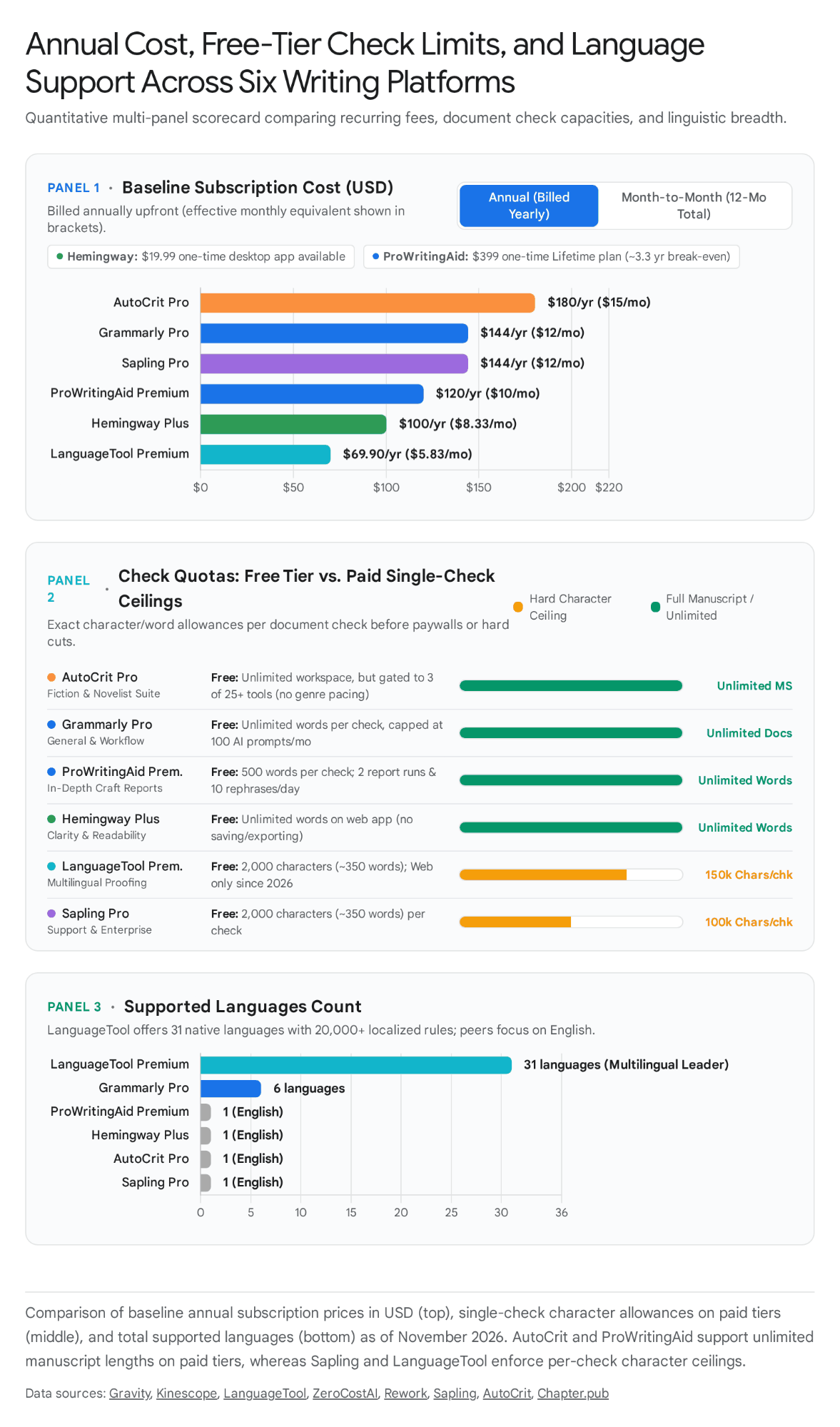
To anchor the head-to-head comparisons quantitatively, the visual below maps the annual subscription costs, single-check free and paid character limits, and total supported languages across all six platforms as of November 2026.
Priority Pairing 1: Grammarly vs. ProWritingAid
Verdict: Grammarly wins for everyday business professionals, students, and fast typists who need broad real-time proofreading across supported desktop, browser and mobile workflows, whereas ProWritingAid wins for long-form fiction authors, screenwriters, and self-editors who need 25+ deep manuscript craft reports, native Scrivener integration, and a $399 one-time lifetime licence (https://prowritingaid.com, checked 7 November 2026). [2][5][9]
| Dimension | Grammarly (Free / Pro / Enterprise) | ProWritingAid (Free / Premium / Premium Pro) | Recommendation & Reason |
|---|---|---|---|
| Grammar & Spelling | Basic grammar/spelling on Free, with more rewriting and style assistance on Pro. | Grammar/spelling plus detailed line-editing reports; a different emphasis from general correspondence. | No common accuracy benchmark is asserted. Test both on representative prose; percentages from unrelated benchmarks are not directly comparable. |
| Style & Craft Depth | General correctness, clarity, tone and rewriting features; no comparable dedicated fiction pacing report is established by the checked plan page. | 25+ specialised reports (Pacing, Sticky Sentences, Echoes, Clichés, Sensory Words, Dialogue Tags, Alliteration, Homonyms) + Chapter Critiques. | ProWritingAid for detailed author-oriented reports; the recommendation concerns feature fit, not a universal quality score. |
| Pricing & Billing Model | Free ($0); Pro at $30/mo, $60/qtr, or $144/yr ($12/mo); no lifetime option (https://www.grammarly.com/plans, checked 7 November 2026). | Free ($0, 500-word cap); Premium at $30/mo, $120/yr ($10/mo), or $399 Lifetime; Premium Pro at $36/mo, $144/yr ($12/mo), or $699 Lifetime (https://prowritingaid.com, checked 7 November 2026). | ProWritingAid ($24/yr cheaper on base annual; Lifetime breaks even in 3.33 yrs). |
| Platform Coverage | Supported desktop, browser, Word, Google Docs and mobile workflows. Compatibility varies by application; this is not a claim of support in every text field. | Desktop Everywhere supports compatible applications; Desktop Editor opens Scrivener projects and .fdx files. This should not be confused with every report running natively inside Final Draft. | Workflow-dependent: check the vendor’s current integration instructions for the actual app. |
| AI Features | 100 prompts/mo (Free) or 2,000 prompts/mo (Pro); 1-click full-sentence rewrites, plagiarism & AI detector. | Sparks AI (3/day Free, 5/day Premium, 50/day Pro), Chapter Critiques (1/day Premium, 30/day Pro), separately paid Story Credits (price depends on plan, currency and pack size). | Grammarly for general rewriting; ProWritingAid for manuscript chapter critiques. |
Scroll sideways to see all columns →
Sources for this table: [2][5][6][7][8][9]
Choose Grammarly if / Choose ProWritingAid if: Choose Grammarly if the workflow centres on emails, business reports, client proposals, or short-form articles across Slack, Gmail, LinkedIn, and Google Docs, requires integrated plagiarism and AI-content detection, or demands a 2-to-6-month quarterly bridge subscription ($60/quarter on https://www.grammarly.com/plans, checked 7 November 2026) without committing to an annual lock-in. Choose ProWritingAid if drafting or revising a novel, screenplay, or dissertation exceeding 10,000 words, using supported Scrivener workflows or editing Final Draft (.fdx) files through the Desktop Editor, needing granular diagnostic reports on pacing and repetitive phrasing, or purchasing the $399 Lifetime licence (https://prowritingaid.com, checked 7 November 2026) to eliminate recurring SaaS bills after 40 months. [2][5][9]
Current plan position: Both ProWritingAid lifetime tiers remain listed on the official pricing page. Premium Pro currently includes 30 Chapter Critiques per day. Grammarly’s support page lists Pro as the replacement for Business; Superhuman publishes its suite plans separately. Use the current plan comparison for a purchase decision, and check the renewal price attached to an existing subscription. [2][4][5][6]
Priority Pairing 2: Grammarly vs. LanguageTool
Verdict: LanguageTool is the stronger fit when a writer specifically needs its language coverage or a self-hosted basic engine. Grammarly is a practical choice for general cross-app proofreading, paid rewriting and plagiarism features. Grammarly now advertises 20+ languages, so this is no longer an English-only-versus-multilingual comparison. Check the exact language, feature and integration rather than declaring a winner from a language-count headline. [1][3][13][16]
| Dimension | Grammarly (Free / Pro / Enterprise) | LanguageTool (Free / Premium / Self-Hosted) | Recommendation & Reason |
|---|---|---|---|
| Multilingual & Dialect Coverage | Grammarly’s current language page advertises writing assistance in 20+ languages, with advanced rewrite availability varying by language. | LanguageTool advertises 30+ languages; its Premium page distinguishes enhanced checks in seven named languages. | Compare the specific language and feature, rather than treating Grammarly as English-only. |
| Privacy & Self-Hosting | Hosted service with enterprise security options; no consumer self-hosted grammar engine is offered on the checked pages. | An open-source basic server can run locally. Hosted AI rules and synonyms are excluded; configure the client to use the local endpoint. | LanguageTool for a local basic engine. Local operation depends on configuration; it is not an automatic promise about every extension or integration. |
| Free-Tier Usability | Basic writing assistance across supported apps and extensions, plus 100 AI prompts/month. Product and document limits still apply. | Free website access remains; hosted browser-extension use requires Premium after the trial. Self-hosted-server users are an exception. | Grammarly for convenient hosted, cross-app free proofreading; LanguageTool for its free website or a configured local engine. |
| Paid Pricing (Annual & 2-Year) | $144/year, $60/quarter or $30/month for standalone Pro. | Published EUR schedule: €59.89/year or €99.90/two years; €19.90/month or €39.90/quarter. | Different currencies: compare the actual regional checkout prices, not an unsupported percentage saving across USD and EUR. |
| Document Length Caps | Document-size and usage limits depend on the Grammarly product and integration. A free plan is not a guarantee of unlimited book-length checking. | Premium advertises up to 150,000 characters per text field. Character counts are not a fixed number of words. | Check the actual document: length support alone does not establish better editing quality. |
Scroll sideways to see all columns →
Sources for this table: [2][3][14][13][15][16]
Choose Grammarly if / Choose LanguageTool if: Choose Grammarly if writing primarily in English, relying on the currently free browser extension for everyday email and Google Docs proofreading, or requiring integrated plagiarism scanning and 2,000 monthly generative AI drafting prompts ($144/year on https://www.grammarly.com/plans, checked 7 November 2026). Choose LanguageTool if switching daily between English and European languages (such as German, French, Spanish, Dutch, Polish, or Portuguese), seeking a paid grammar and style checker for €4.16/month equivalent on the two-year plan (€99.90 billed upfront on https://languagetool.org/premium, checked 7 November 2026), or managing an organisation of 50 to 500+ seats that requires an air-gapped, self-hosted grammar server with $0 per-user licensing fees (https://github.com/languagetool-org/languagetool, checked 7 November 2026). [2][3][14][15][16]
Current plan position: LanguageTool’s official announcement confirms the hosted browser-extension paywall and expressly preserves free website use and the self-hosted-server exception. Check each office integration separately; the announcement specifically concerns the hosted browser extension. Its terms effective 21 August 2026 name Learneo, Inc. as operator. This corporate statement alone does not establish where every user’s data is processed. [13][15][16][18]
Priority Pairing 3: ProWritingAid vs. AutoCrit
Verdict: ProWritingAid wins as an editing workstation for authors who need a grammar checker, 25+ line-editing reports, native Scrivener integration, and a $399 lifetime option (https://prowritingaid.com, checked 7 November 2026), whereas AutoCrit wins specifically for developmental fiction revision where authors want to benchmark pacing, dialogue, and tropes against published genre bestsellers and test chapters on 20+ automated Alpha/Beta reader avatars (https://www.autocrit.com/pricing/, checked 7 November 2026). [5][9][21]
| Dimension | ProWritingAid (Free / Premium / Premium Pro) | AutoCrit (Free Forever / Pro) | Recommendation & Reason |
|---|---|---|---|
| Genre Bestseller Benchmarking | Writing reports and an Author Comparison feature are listed on paid plans. | Direct genre-comparison scores and guided editing modes for fiction and non-fiction. | AutoCrit for its genre-focused workflow; ProWritingAid also offers author comparisons, so it should not be described as having none. |
| Developmental & Beta Reader AI | Included Chapter Critiques: one/day Premium, 30/day Premium Pro. Whole-manuscript analyses use separately purchased Story Credits. | Pro support describes unlimited daily analysis, with Story Analyzer chapter lengths of 200–10,000 words, plus automated Alpha/Beta Reader profiles. | AutoCrit for frequent included analysis; compare the particular reports and word limits rather than assuming equivalent outputs. |
| Grammar & Line-Editing Layer | Grammar and style reports, with the Free tier limited to two runs of each report per day on up to 500 words; paid tiers remove those report limits. | Historically omitted grammar entirely; now includes a basic Spelling & Grammar checker only on Pro ($30/mo or $180/yr), excluded from Free Forever (https://www.autocrit.com/pricing/, 2026). | ProWritingAid for its line-editing workflow; no common accuracy benchmark is asserted. |
| Workspace & App Integrations | Edits directly inside Scrivener, Final Draft, MS Word, Google Docs, and browsers without leaving the author's drafting app. | Closed web workspace only; requires importing/writing inside AutoCrit (though Free Forever includes an unlimited-word writing workspace and selected editing tools). | ProWritingAid (Fits directly into established author workflows). |
| Cost Over 1 to 3 Years | Premium: $120/year ($360 over three years) or $399 lifetime. Premium Pro: $144/year ($432 over three years) or $699 lifetime. Story Credits are extra. | Pro: $180/year ($540 over three years), or $30/month. | Use frequency matters: no universal number of manuscript runs makes one cheaper, because credit packages, discounts and the reports used differ. |
Scroll sideways to see all columns →
Sources for this table: [5][6][7][8][9][21][22]
Choose ProWritingAid if / Choose AutoCrit if: Choose ProWritingAid if seeking a single software purchase ($120/year or $399 lifetime on https://prowritingaid.com, checked 7 November 2026) to handle both mechanical copy-editing (grammar, punctuation, sticky sentences, echoes) and chapter-level style polish through the supported Scrivener, .fdx and Word workflows. Choose AutoCrit if already relying on a separate grammar checker or human copyeditor and needing a dedicated developmental diagnostic engine ($180/year or $30/month on https://www.autocrit.com/pricing/, checked 7 November 2026) to fix sagging middle-act pacing, dialogue-to-narrative ratios, timeline contradictions, and genre trope alignment using unlimited Story Analyzer+ and Beta Reader Avatar runs. [5][9][21][22]
Current plan position: AutoCrit’s rendered pricing page displays $0 Free Forever, $30/month Pro and $15/month billed annually. The annual $15/month equivalent means an upfront $180 annual bill, not a $15 monthly subscription. ProWritingAid separates daily Chapter Critiques from paid, whole-manuscript Story Credits. [5][6][7][8][21]
Priority Pairing 4: Hemingway Editor vs. Grammarly
Verdict: Grammarly wins as a primary writing assistant because it actually corrects spelling, grammar, and punctuation across supported applications (https://www.grammarly.com/plans, checked 7 November 2026), whereas Hemingway Editor wins as a free secondary clarity filter—or $19.99 one-time offline desktop app (https://hemingwayapp.com, checked 7 November 2026)—that ruthlessly highlights dense sentences, passive voice, and adverb bloat. [2][19]
| Dimension | Hemingway Editor (Free Web / $19.99 Desktop / Plus) | Grammarly (Free / Pro / Enterprise) | Recommendation & Reason |
|---|---|---|---|
| Core Linguistic Function | Readability & Prose Density: Flags adverbs, passive voice, complex phrases, and sentences rated "hard" or "very hard" via the Automated Readability Index (https://hemingwayapp.com, Oct 2026). | Grammar, Mechanics & Tone: Fixes subject-verb agreement, comma splices, typos, word choice, tone, and conciseness (https://www.grammarly.com/plans, Nov 2026). | Complementary Categories (Grammarly for correctness; Hemingway for punchiness). |
| Grammar & Spell-Checking | Classic focuses on readability highlighting. Editor Plus adds grammar fixes; the classic desktop purchase explicitly excludes the new AI features. | Free includes basic grammar/spelling; Pro adds rewriting, tone adjustment and detection features. | Grammarly for everyday proofreading; compare Editor Plus, not classic alone, when discussing Hemingway’s grammar features. |
| Friction & Account Requirements | Classic versus Plus: the classic web tool is separate from a paid Plus account on https://hemingwayapp.com (verified Oct 2026). | An account is needed for hosted account features; installation depends on whether the browser, desktop or mobile integration is used. | Hemingway Editor (Instant anonymous browser paste-and-edit). |
| Pricing & Ownership Model | Classic: free web or $19.99 desktop. Plus Individual 5K: $25/month or $100/year; Individual 10K: $30/month or $150/year. | Free; standalone Pro at $144/year, $60/quarter or $30/month. | Different products: classic desktop has a lower cash cost, but does not replace the paid AI or cross-app feature set. |
Scroll sideways to see all columns →
Sources for this table: [2][19][20]
Choose Hemingway Editor if / Choose Grammarly if: Choose classic Hemingway for a focused readability pass, or its $19.99 desktop app when an offline workflow and export to text, Word, PDF, HTML or Markdown are useful. The desktop page also lists direct WordPress publishing. Choose Grammarly for grammar and tone assistance across its supported applications, with paid rewriting and detection features on Pro. If AI rewriting inside Hemingway is the requirement, compare Editor Plus rather than assuming that the classic desktop purchase includes it. A free proofreading workflow and a readability pass can complement one another, while the author decides which suggestions improve the text. [2][19][20]
Current plan position: Hemingway currently separates classic desktop from Editor Plus. The Plus page has Individual 5K, Individual 10K, Team 10K and Enterprise plans. Its live monthly toggle shows $25 for Individual 5K, and $30 for Individual 10K or Team 10K; the corresponding annual rates are $100 and $150. Classic desktop remains $19.99 and excludes these AI features. [19][20]
Priority Pairing 5: LanguageTool vs. ProWritingAid
Verdict: LanguageTool suits multilingual checking and technical self-hosting. ProWritingAid suits English-language authors who need detailed style reports, manuscript workflows and a lifetime purchase option. The verified LanguageTool prices below are in euros and ProWritingAid prices in dollars; a percentage saving between them would require an explicit exchange rate and comparable checkout terms. [5][14][16]
| Dimension | LanguageTool (Free / Premium / Self-Hosted) | ProWritingAid (Free / Premium / Premium Pro) | Recommendation & Reason |
|---|---|---|---|
| Language Coverage | 30+ languages (20,000+ deep style rules across English, German, French, Spanish, Dutch, Polish, Portuguese) (https://languagetool.org/premium, Oct 2026). | English only (supports US, UK, Australian, Canadian, and General English dialect settings). | LanguageTool (Essential for any non-English or bilingual workflow). |
| Long-Form Manuscript Tools | 150,000-character limit per field (~25,000 words) on Premium; checks grammar, punctuation, custom style rules, and sentence paraphrasing. | Unlimited word count on paid tiers; 25+ manuscript reports (pacing, dialogue, sticky sentences, echoes), Chapter Critiques, and native Scrivener integration. | ProWritingAid (Built specifically for book-length craft and structure). |
| Free-Tier Restrictions | Free website remains available; the hosted extension is Premium-only after a trial, with a self-hosting exception. Check the live editor for text limits. | Up to 500 words, two runs of each line-editing report/day, 10 Rephrases/day; no included Chapter Critique on Free. | Compare the workflow: a web-only check, an extension and a manuscript report are different things. |
| Subscription & Lifetime Math | €59.89/year or €99.90/two years in the official help-centre schedule. Self-hosted basic server has no subscription licence fee. | Premium $120/year or $399 lifetime; Premium Pro $144/year or $699 lifetime. | Do not calculate a cross-currency winner without an exchange rate. Same-plan ProWritingAid break-even figures appear below. |
Scroll sideways to see all columns →
Sources for this table: [5][6][9][11][14][13][15][16]
Choose LanguageTool if / Choose ProWritingAid if: Choose LanguageTool for supported multilingual grammar and paraphrasing workflows, or a configured local basic engine. Its help-centre schedule lists €59.89/year and €99.90/two years (€4.16/month equivalent on the latter). Choose ProWritingAid for English-language novels, screenplays or nonfiction when detailed style reports, supported Scrivener workflows and .fdx file compatibility are priorities. Premium is $120/year or $399 lifetime. The two prices use different currencies and the tools perform different jobs, so a cheaper headline alone does not establish the better purchase. [5][9][14][16]
Current plan position: LanguageTool’s website remains free, while its hosted extension requires Premium after the trial; self-hosting remains possible. ProWritingAid’s checked pricing page lists subscription and lifetime options, and distinguishes included Chapter Critiques from paid Story Credits. Check the current offer and the terms of any existing subscription before assuming a lifetime or promotional price is available. [5][6][7][8][14][15][16]
Priority Pairing 6: Grammarly vs. Sapling
Verdict: Grammarly wins for individual writers, students, and general corporate teams needing broad app coverage, tone adjustment, and plagiarism scanning (https://www.grammarly.com/plans, checked 7 November 2026), whereas Sapling wins for customer-support teams, B2B sales teams, and software developers who need CRM macro snippets, inline predictive Autocomplete Everywhere, a 100,000-character AI content detector, or a metered JSON API (https://sapling.ai/pricing, checked 7 November 2026). [1][24][25]
| Dimension | Grammarly (Free / Pro / Enterprise) | Sapling (Free / Pro / Enterprise / API) | Recommendation & Reason |
|---|---|---|---|
| Primary Workflow Target | General business writing, email, documents (Google Docs, Word), and collaborative workspaces (Superhuman Docs/Mail). | Customer-support ticketing & CRM platforms (Zendesk, Salesforce, Intercom, Outlook, Chrome) + developer API pipelines (https://sapling.ai/pricing, Nov 2026). | Grammarly for general office work; Sapling for support/CRM velocity. |
| Support Agent Productivity | Provides brand tones, style guides (1 on Pro, unlimited on Enterprise), and generative AI drafting prompts. | Provides Autocomplete Everywhere, shared Snippets (20 on Free, unlimited on Pro/Enterprise), Chat Assist (Suggest), and conversational insights. | Sapling (Purpose-built for rapid ticket resolution and macro expansion). |
| AI Content Detection | Included in Grammarly Pro ($144/yr) and Superhuman Pro; integrated inside the writing editor. | Standalone & integrated AI Detector: 2,000 chars/check (5 files/batch) on Free; 100,000 chars/check (10 files/batch, shareable links) on Pro; 200,000 chars/request on API (https://sapling.ai/pricing, Nov 2026). | Sapling (Offers dedicated batch file scanning, shareable links, and a metered API). |
| Pricing & Seat Minimums | Standalone Pro: $144/year or $30/month per member, or $60/quarter; up to 149 seats. | Pro: $144/year or $25/month. Enterprise starts at 10 seats and $15/seat/month, with a custom quote. API is separately metered. | Equal published individual annual totals, with different features. The Enterprise floor is $150/month or $1,800/year before any additional contractual charges. |
Scroll sideways to see all columns →
Sources for this table: [2][4][24][25]
Choose Grammarly if / Choose Sapling if: Choose Grammarly for general writing assistance in supported applications, with standalone Pro at $144/year, $60/quarter or $30/month. Compare Superhuman’s suite separately if Docs, Go or Mail are also needed. Choose Sapling for support and sales workflows built around reusable snippets, predictive writing or Enterprise Chat Assist, and for separately metered developer APIs. Sapling Pro is $25/month or $144/year; Enterprise starts at ten seats and $15/seat/month, with a custom quote. The API has a separate one-time $5 minimum and usage charges. These are different workflow purchases, not an accuracy ranking. [2][4][24]
Current plan position: Sapling’s pricing page separates writing features from AI-detector allowances and metered API billing. The detector’s own changelog records a multilingual expansion on 4 November 2026. Grammarly’s current language page also documents support beyond English, while its standalone Pro and Superhuman suite prices need to be compared separately. [2][3][4][24][25]
Compressed One-Line Matrix for Low-Volume Pairings
| Low-Volume Pairing | One-Line Verdict & Category Distinction (With Verified Pricing & Source URLs) |
|---|---|
| Hemingway Editor vs. ProWritingAid | ProWritingAid ($120/yr or $399 lifetime at https://prowritingaid.com, checked 7 November 2026) is a comprehensive grammar and 25-report manuscript editor for long-form authors, whereas Hemingway Editor ($0 web / $19.99 desktop at https://hemingwayapp.com, checked 7 November 2026) is a supplementary readability highlighter with classic readability features rather than the Plus AI feature set that writers use for a final sentence-tightening pass. |
| Hemingway Editor vs. LanguageTool | LanguageTool (€59.89/year at https://languagetool.org/premium, checked 7 November 2026) wins for actual grammar, spelling, and style correction across 30+ languages, whereas Hemingway Editor ($0 web / $19.99 desktop at https://hemingwayapp.com, checked 7 November 2026) concentrates on readability highlights rather than a multilingual proofreading workflow; Editor Plus is a separate grammar and AI-editing comparison. |
| Hemingway Editor vs. AutoCrit | AutoCrit ($180/yr at https://www.autocrit.com/pricing/, checked 7 November 2026) is a full-scale fiction developmental suite comparing pacing, dialogue, and tropes against genre bestsellers, whereas Hemingway Editor ($0 web / $19.99 desktop at https://hemingwayapp.com, checked 7 November 2026) is a minimalist readability tool that flags complex sentences and adverbs in short-form prose without analysing story structure. |
| Hemingway Editor vs. Sapling | Hemingway Editor ($0 web / $19.99 desktop at https://hemingwayapp.com, checked 7 November 2026) is built for solo copywriters and bloggers simplifying prose readability, whereas Sapling ($12/mo annual Pro; $15/seat/mo Enterprise at https://sapling.ai/pricing, checked 7 November 2026) is an enterprise customer-support autocomplete tool and 100,000-character AI detector. |
| LanguageTool vs. AutoCrit | LanguageTool (€59.89/year at https://languagetool.org/premium, checked 7 November 2026) is a multilingual grammatical proofreader and open-source server for general and international writing, whereas AutoCrit ($180/yr at https://www.autocrit.com/pricing/, checked 7 November 2026) is a fiction-focused developmental platform for novelists benchmarking manuscripts against published bestsellers. |
| LanguageTool vs. Sapling | LanguageTool (€59.89/yr; €56.90/user/yr Teams at https://help.languagetool.org, checked 7 November 2026) wins for multilingual grammar checking (30+ languages) and free LGPL 2.1 Docker self-hosting, whereas Sapling ($144/yr Pro; $15/seat/mo Enterprise at https://sapling.ai/pricing, checked 7 November 2026) wins for English CRM support snippets, predictive autocomplete, and batch AI-text detection. |
| ProWritingAid vs. Sapling | ProWritingAid ($120/yr or $399 lifetime at https://prowritingaid.com, checked 7 November 2026) is designed for solo novelists, screenwriters, and academics editing long-form manuscripts in Scrivener or Word, whereas Sapling ($144/yr Pro; $15/seat/mo Enterprise at https://sapling.ai/pricing, checked 7 November 2026) is designed for customer-facing support teams and developers needing CRM macros and AI detection APIs. |
| AutoCrit vs. Grammarly | Grammarly ($144/yr Pro at https://www.grammarly.com/plans, checked 7 November 2026) is an everyday real-time grammar, tone, and plagiarism checker for business and academic prose, whereas AutoCrit ($180/yr Pro at https://www.autocrit.com/pricing/, checked 7 November 2026) is a specialised fiction revision workspace that analyses story beats, pacing, dialogue, and genre tropes via automated reader avatars. |
| AutoCrit vs. Sapling | AutoCrit ($180/yr Pro at https://www.autocrit.com/pricing/, checked 7 November 2026) and Sapling ($144/yr Pro at https://sapling.ai/pricing, checked 7 November 2026) serve different primary workflows: AutoCrit is a creative fiction manuscript analyser for novelists, while Sapling is a B2B customer-support ticket accelerator and AI content detector. |
Scroll sideways to see all columns →
3. Price-Tier and Billing-Model Analysis (3-Year TCO & Break-Even Math)
Grouping writing software strictly by advertised monthly headline rates obscures structural differences in total cost of ownership, billing cycles and the features being bought. The table separates upfront bills from monthly equivalents. All three-year totals assume unchanged list prices, continuous use, one user unless stated otherwise, and no tax, promotions or optional credit purchases. A cheaper tool is not necessarily a substitute for a different editing job. EUR totals are not converted into USD.
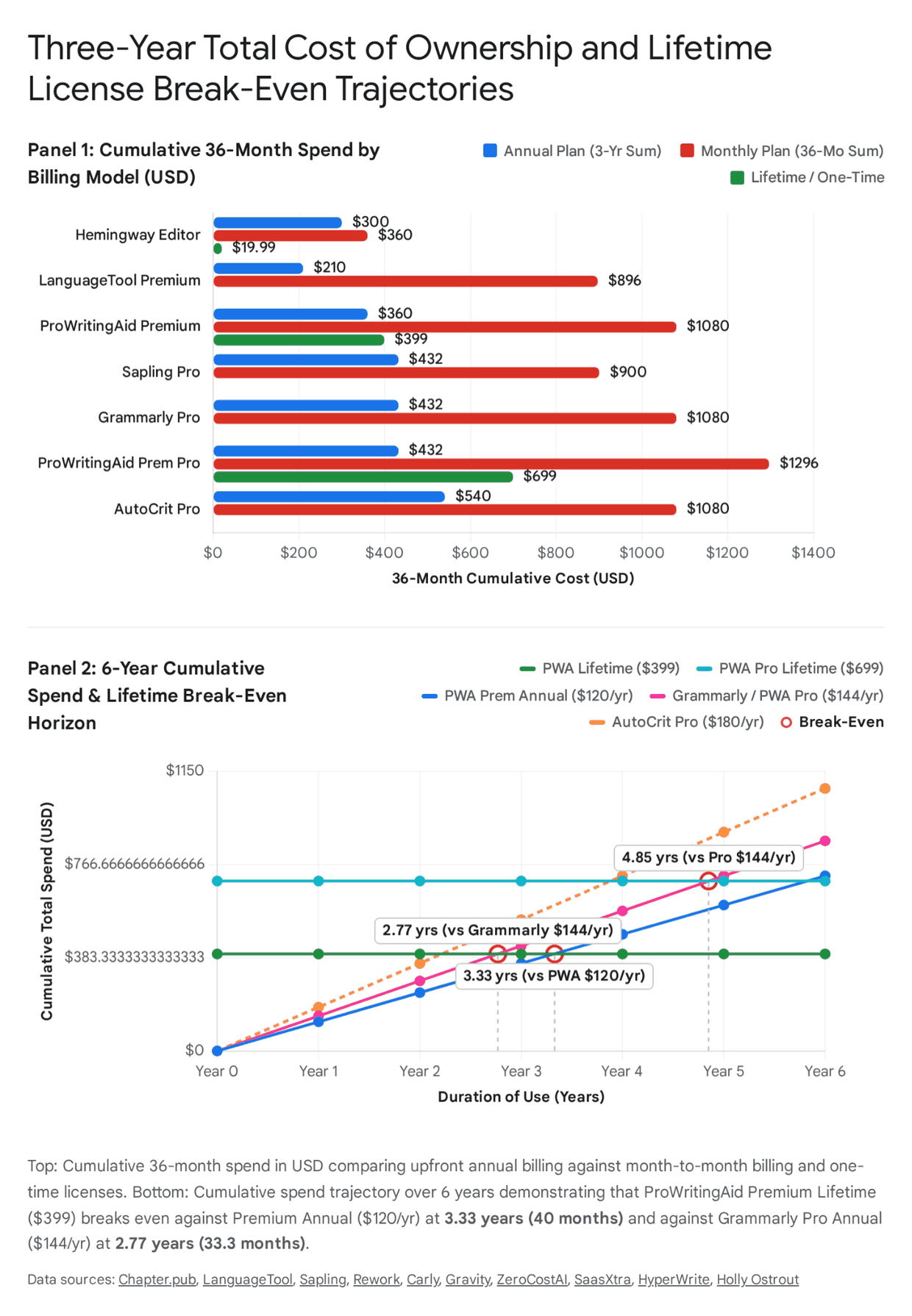
Complete Billing-Model & 3-Year TCO Comparison Table
| Tool or Plan | Monthly Bill | Upfront Annual / Multi-Year / One-Time Bill | Three Years on Monthly Billing | Three Years on Annual or Specified Billing | Saving Against Monthly Billing | Billing Comparison |
|---|---|---|---|---|---|---|
| Grammarly Free | $0 | $0 | $0 | $0 | — | Basic grammar/spelling and 100 AI prompts/month; paid features remain separate. |
| Hemingway Classic Web | $0 | $0 | $0 | $0 | — | Readability-focused browser tool; do not confuse it with Editor Plus. |
| LanguageTool Free Website | No subscription fee | No subscription fee | No subscription fee | No subscription fee | — | Hosted extension requires Premium after trial; local-server users are an exception. |
| LanguageTool Self-Hosted Basic Server | No subscription licence fee | Hardware, hosting and maintenance depend on the setup | Not assumed to be zero overall | Not assumed to be zero overall | — | Hosted AI rules and synonyms are not included. Docker is optional, not a requirement of the vendor’s HTTP-server setup. |
| AutoCrit Free Forever | $0 | $0 | $0 | $0 | — | Unlimited writing-workspace words, selected editing tools and a limited free Fiction Analyzer opportunity; not unlimited Pro analysis. |
| Sapling Free | $0 | $0 | $0 | $0 | — | Basic writing help and 20 snippets; detector allowance is 2,000 characters/check, five files/batch. |
| LanguageTool Premium — annual, EUR | €19.90 | €59.89/year | €716.40 | €179.67 | €536.73 | €59.89 ÷ €19.90 ≈ 3.01 months on a continuous-cost basis. In actual whole-month payments, the annual bill is lower from month four. |
| LanguageTool Premium — two years plus one year, EUR | €19.90 | €99.90 for two years, then €59.89 for one year | €716.40 | €159.79 | €556.61 | Assumes both published offers remain available and can be used in that sequence. This is a scenario, not a guaranteed renewal price. |
| Hemingway Plus Individual 5K | $25 | $100/year | $900 | $300 | $600 | Four monthly payments equal the annual bill; annual is cheaper once a fifth month would be paid. |
| Hemingway Plus Individual 10K | $30 | $150/year | $1,080 | $450 | $630 | Five monthly payments equal the annual bill; annual is cheaper from the sixth paid month. |
| Hemingway Plus Team 10K, per seat | $30 | $150/seat/year | $1,080 | $450 | $630 | Same published per-seat rate as Individual 10K; team administration is a separate feature distinction. |
| ProWritingAid Premium | $30 | $120/year | $1,080 | $360 | $720 | Four monthly payments equal an annual bill; annual is cheaper from the fifth paid month. |
| ProWritingAid Premium Pro | $36 | $144/year | $1,296 | $432 | $864 | Four monthly payments equal an annual bill. Story Credit purchases are extra. |
| Grammarly Pro — standalone | $30 | $144/year, or $60/quarter | $1,080 | $432 (annual); $720 (quarterly) | $648 against annual billing | A quarter costs the same as two monthly payments. Two quarters cost $120; three cost $180, exceeding the $144 annual bill. |
| Superhuman Pro suite | $15 | $144/year | $540 | $432 | $108 | Separate suite offer. Compare included features, account eligibility and purchase route; confirm the selected plan’s included products and features. |
| Sapling Pro | $25 | $144/year | $900 | $432 | $468 | $144 ÷ $25 = 5.76 months; the annual bill is below six monthly payments ($150). API use is billed separately. |
| AutoCrit Pro | $30 | $180/year | $1,080 | $540 | $540 | Six monthly payments equal the annual bill; annual is cheaper from the seventh paid month. |
| Superhuman Business suite | $40 | $396/year | $1,440 | $1,188 | $252 | Includes Mail in the published suite listing. No assumed saving against a separately quoted Mail subscription is included. |
| Sapling Enterprise — starting ten-seat floor | Starts at $150 total/month | Starting floor equivalent to $1,800/year | Starting-floor scenario $5,400 | Starting-floor scenario $5,400 | Not a standard-plan discount calculation | Ten seats × $15 × 36 months. Actual Enterprise contract pricing requires a quote. |
| Hemingway Classic Desktop | Not applicable | $19.99 once | $19.99 | $19.99 | Not a like-for-like comparison with Plus | Classic excludes the new AI features. $19.99 ÷ 36 ≈ $0.56/month over three years. |
| ProWritingAid Premium Lifetime | Not applicable | $399 once | $399 | $399 | Compared with the same-tier annual plan, lifetime costs $39 more over three years | The annual plan totals $480 when year four is purchased; lifetime is then $81 lower. Optional credits remain extra. |
| ProWritingAid Premium Pro Lifetime | Not applicable | $699 once | $699 | $699 | Compared with the same-tier annual plan, lifetime costs $267 more over three years | Annual payments reach $720 when year five is purchased; lifetime is then $21 lower. Optional credits remain extra. |
Scroll sideways to see all columns →
Sources for this table: [2][3][4][5][6][7][8][14][15][16][19][20][21][22][24][25]
The billing inputs come from the vendors’ pricing pages and Grammarly’s billing support article, checked 7 November 2026. The totals and break-even comparisons are calculations from those inputs, rather than vendor claims. Lifetime refers to the vendor’s licence terms; it is not a promise of perpetual company operation or every future add-on. [2]
Cumulative Upfront Payments Across Six Years
The continuous-cost equations below are useful ratios, but these actual annual-payment totals show when cash spent crosses a lifetime price. Rates are assumed unchanged; optional credits and taxes are excluded. Amounts are USD.
| Year Purchased | ProWritingAid Premium Annual | Premium Lifetime | Premium Pro Annual | Premium Pro Lifetime | Grammarly Pro Annual | AutoCrit Pro Annual |
|---|---|---|---|---|---|---|
| Year 1 | $120 | $399 | $144 | $699 | $144 | $180 |
| Year 2 | $240 | $399 | $288 | $699 | $288 | $360 |
| Year 3 | $360 | $399 | $432 | $699 | $432 | $540 |
| Year 4 | $480 | $399 | $576 | $699 | $576 | $720 |
| Year 5 | $600 | $399 | $720 | $699 | $720 | $900 |
| Year 6 | $720 | $399 | $864 | $699 | $864 | $1,080 |
Scroll sideways to see all columns →
Sources for this table: [2][5][21]
Analytical Synthesis of Billing Trade-Offs
Free Tier as the Product: Operational Ceilings
Among the six tools, Grammarly Free is a practical starting point for daily proofreading in supported applications. Its paid rewriting, plagiarism features and higher AI allowance are separate decisions. Calling it unlimited for every full-length document would go beyond the checked plan page. LanguageTool Free remains usable on the website; the hosted extension is now paid after a trial, but its own announcement preserves the self-hosting exception. Neither product’s free availability should be described as guaranteed permanently. [1][3][13][15][16]
Hemingway Classic Web offers a focused readability pass, while classic desktop adds an offline workflow. ProWritingAid Free allows reports on 500-word chunks, with two runs of each report per day; that can be useful for evaluating the tool, but is less convenient for repeated whole-chapter editing than a paid plan. AutoCrit Free Forever permits unlimited writing-workspace words and selected tools, with the separate limited Fiction Analyzer opportunity described in its support centre. Sapling Free includes basic writing assistance and 20 snippets. Its 2,000-character and five-file limits refer to the AI detector, not a blanket quota on all grammar suggestions. [5][6][19][20][21][22][24][25]
Short-Term Contract Arbitrage vs. Multi-Year Subscriptions
Buyers needing a paid tool for one semester, a single edit or a freelance contract should compare actual upfront payments. A lower advertised monthly equivalent does not mean the annual plan is cheaper for a two-month job. Standalone Grammarly Pro is $30/month, $60/quarter or $144/year. Two monthly payments and one quarter both cost $60; the quarter becomes cheaper than monthly billing over three months. Two quarters cost $120 for up to six months. At a seventh month, a third quarter would bring the bill to $180, more than the annual $144. Four months on monthly billing and two quarters both cost $120. These are cash comparisons assuming whole billing periods, rather than a claim of savings at every duration. [2]
LanguageTool’s EUR quarterly bill is €39.90, compared with €59.70 for three monthly payments. Its annual €59.89 bill is slightly more than three months at €19.90 (€59.70), so the annual plan first becomes cheaper when a fourth monthly bill would be paid. Hemingway Plus Individual 5K’s $100 annual bill equals four current $25 monthly bills, so the annual bill becomes lower when a fifth monthly payment would be needed. Sapling’s $144 annual bill is below six $25 monthly bills. The right comparison also depends on whether the same features are available in each purchase route and whether the subscription is cancelled before another renewal. [14][20][24]
ProWritingAid Lifetime vs. Annual Break-Even Equations
For long-term writers evaluating ProWritingAid Premium
Lifetime ($399) against ProWritingAid Premium Annual
($120/year) (https://prowritingaid.com checked 7
November 2026), the continuous mathematical break-even horizon is:
$399 ÷ $120 per year = 3.325 years, or 39.9 months
Because annual subscriptions bill upfront in full increments of $120 on
Day 1 of each year, an annual subscriber pays $120 in Year 1, $240
cumulative in Year 2, $360 cumulative in Year 3, and $480
cumulative on Day 1 of Year 4 (month 37). Consequently, in
actual cash-flow terms, Premium Lifetime becomes cash-flow positive at
the start of Year 4 (the 37th month), saving $81 in
Year 4 and $120 every subsequent year. Against monthly billing
($30/month), Premium Lifetime breaks even at a continuous-cost
equivalent of 13.3 months (the fourteenth $30 payment
crosses $399). A dollar total compared with Grammarly is only a cash
comparison between different products, not evidence that their features
are interchangeable.
For ProWritingAid Premium Pro Lifetime ($699) versus
Premium Pro Annual ($144/year) (https://prowritingaid.com/pricing,
checked 7 November 2026), the continuous break-even equation is:
$699 ÷ $144 per year = 4.854 years, or 58.25 months
In discrete cash-flow terms, an annual Premium Pro subscriber pays $576
over four years and crosses $720 on Day 1 of Year 5
(month 49), making Premium Pro Lifetime cash-flow positive at the
start of Year 5. Furthermore, comparing the $300
upfront spread between Premium Lifetime ($399) and Premium Pro Lifetime
($699) against the $24/year annual spread ($120 vs. $144/year)
demonstrates that upgrading the lifetime tier takes $300 ÷ $24 per year
= 12.5 years to amortize on subscription fees alone unless the author
regularly uses the 30 daily Chapter Critiques and the larger Story
Credit discounts. In the checked EUR ten-packs, Premium is €300
(€30/credit) and Premium Pro is €175 (€17.50/credit); the single-credit
prices are instead €35 and €25. Do not mix a bulk unit price with a
single-credit price or assume these EUR figures are USD. [2][5][6][7][8]
4. "Best for X" Reader Profiles (Front-Loaded Verdicts)
1. Best for Fiction Writers and Novelists
ProWritingAid Premium ($120/year or $399 lifetime) is the strongest starting point here for fiction writers seeking detailed line-editing reports, supported Scrivener workflows and a daily Chapter Critique. Its reports examine prose habits including repetition, sticky sentences, sensory language and pacing. AutoCrit Pro ($180/year) is the alternative when the priority is genre comparisons, repeated story analysis and automated reader profiles. These are recommendations based on the documented toolsets: a writer should try both on a representative chapter rather than treat a report score as a verdict on a novel. Full-book ProWritingAid analyses use separate Story Credits; AutoCrit’s Story Analyzers apply a 200–10,000-word chapter range. [5][6][7][8][9][21][22]
2. Best for Academic Writing
Grammarly Pro ($144/year for standalone annual Pro) is a practical fit for academic writers who need supported Word/Google Docs workflows, formal rewriting and plagiarism checking. It is not a guarantee that references are correct or that a text is original. ProWritingAid Premium ($120/year) is an alternative for English-language long-form style analysis. Its feature set should be judged against the particular document and integration, using the same representative passage. AI-detector scores must not be treated as proof of authorship or academic misconduct; the research and citations still need human checking. [2][3][5]
3. Best for Business and Professional Communication
Grammarly is the broad everyday choice for correspondence, reports and supported cross-application writing. Start with Free if its basic suggestions are enough; standalone Pro is $30/month, $60/quarter or $144/year for the paid feature set. Sapling is the specialist alternative when shared snippets, predictive writing and customer-support workflows matter more than manuscript craft. Sapling Pro is $25/month or $144/year; Enterprise starts at ten seats and $15/seat/month and requires a quote. Superhuman’s Pro and Business suite offers should be evaluated separately from a standalone Grammarly subscription, especially where Mail and team features are part of the decision. [2][4][24]
4. Best for Non-Native English Speakers
LanguageTool is a strong option for writers moving between supported languages, with 30+ languages advertised and deeper Premium checks available for a specified subset. The published EUR annual rate is €59.89; a two-year bill is €99.90. Grammarly is also multilingual, with writing assistance advertised in 20+ languages and advanced rewrite availability varying by language. The useful test is whether the exact language, dialect and feature are supported in the application being used. ProWritingAid remains English-only, with General, British, US, Australian and Canadian English settings; its manuscript reports may suit a non-native writer working specifically in English. [2][3][5][11][14]
5. Best for Students on a Budget
Grammarly Free is a sensible first step for routine proofreading, while LanguageTool’s free website, ProWritingAid’s 500-word report checks and Hemingway’s classic web editor offer other ways to assess grammar, style or readability without an annual commitment. Check whether an institution already supplies a paid licence. LanguageTool’s help centre advertises an educational discount of up to 20% for eligible students, teachers and professors. Grammarly also publishes educational offers, but an eligibility-dependent promotional price should be checked at the time of purchase rather than treated as a universal $72 first-year or $30 quarterly rate. [2][3][5][6][14][19][20]
6. Best for Privacy-Sensitive Writers
LanguageTool’s self-hosted basic server is the clearest local-processing option in this comparison for technically capable users. It has no subscription licence fee, but requires setup and ongoing maintenance; the client must actually be configured to send text to the local endpoint. Hosted AI rules and the synonym service are not part of that basic server. Hemingway Classic Desktop ($19.99) provides an offline readability workflow. A local editor does not automatically make every browser extension or other application local, and an offline readability check is a different task from a cloud developmental critique. Review the vendor’s current privacy terms before sending confidential material to a hosted feature. [13][15][16][19][20]
7. Best for Screenwriters and Script Writers
ProWritingAid is the best-documented script-file workflow in this group. The vendor’s Desktop Editor compatibility list includes Final Draft .fdx files and Scrivener projects. Its screenwriting guide describes uploading an .fdx file and recognising script formatting, then applying reports such as style, consistency, repeats, sticky sentences and grammar. This is not the same as promising that every feature runs inside Final Draft itself. Follow the current integration instructions, work on a copy and check formatting after saving. Grammarly can be useful for accompanying emails, pitches and supported text fields, but that does not make it a specialist screenplay-format editor. [1][5][9]
8. Best for Minimalists
Hemingway Classic is the focused option: use the web readability tool or buy the $19.99 Mac/Windows desktop app for an offline pass. It highlights complicated sentences, passive voice, adverbs and wording that may be simplified. Treat a highlight as a prompt to read the sentence, not an instruction to flatten every piece of fiction to the same grade level. LanguageTool’s website is another lightweight route for grammar checks. If AI rewriting and grammar fixes are required, compare Hemingway Editor Plus separately: Individual 5K is currently $25/month or $100/year, with an allowance of 5,000 AI sentence rewrites per month. [13][19][20]
9. Best Free Grammar Checker Overall
Grammarly Free is the broadest convenient starting point for everyday hosted proofreading across its supported applications. That is a workflow judgement, not a universal accuracy score or a promise of unlimited document sizes. LanguageTool’s free website remains an alternative for supported languages, and a configured local LanguageTool server is an option for technical users. ProWritingAid Free is useful for testing specific reports on 500-word chunks, with two runs of each report/day. Hemingway Classic adds a readability pass, while Sapling Free includes basic writing assistance and snippets. Choose according to the actual checking task rather than the word “free” alone. [1][3][5][6][13][16][19][20][24]
10. Best Value for Long-Term Serious Writers
ProWritingAid Premium Lifetime ($399) is worth evaluating when the same Premium toolset will be used over several years. Three $120 annual bills total $360; purchasing year four brings the total to $480, so the lifetime price is then $81 lower. Premium Pro’s $699 lifetime price first falls below five $144 annual bills ($720). These comparisons exclude Story Credits, discounts, changes to renewal prices and the time value of money. LanguageTool’s €99.90 two-year subscription is a different multilingual option with a shorter commitment. A lower cumulative bill only creates value if the software remains useful for the writer’s actual work. [5][7][8][14]
5. Natural-Language Query-Matching Map
| Target Tool or Pairing | Exact Natural-Language Search Phrasings (User & AI Engine Queries) | Primary Search Intent | Direct Factual Answer Anchor (With Verified Dates & URLs) |
|---|---|---|---|
| Grammarly (Standalone & Superhuman) | "Is Grammarly Premium worth it in 2026"; "Is Grammarly Pro worth it in 2026"; "Grammarly free vs premium difference"; "Grammarly Pro vs Superhuman Pro pricing"; "Cheapest way to buy Grammarly for one semester" | Pricing validation, feature-gate audit, and bundle arbitrage. | Standalone Pro is $30/month, $60/quarter or $144/year. Free has 100 AI prompts/month; Pro has 2,000. Superhuman publishes separate Pro/Business suite offers; compare the selected purchase route and included features. |
| ProWritingAid (Annual & Lifetime) | "ProWritingAid lifetime licence worth it"; "Did ProWritingAid remove lifetime plan 2026"; "ProWritingAid Premium vs Premium Pro difference"; "What are ProWritingAid Story Credits" | Break-even math, plan stability, and hidden add-on costs. | Premium is $120/year or $399 lifetime; Premium Pro is $144/year or $699 lifetime. The current official page lists both lifetime tiers. Chapter Critiques are one/day versus 30/day. Whole-manuscript reports use separate Story Credits. |
| LanguageTool (Cloud & Self-Hosted) | "Is LanguageTool browser extension still free 2026"; "LanguageTool sold to Learneo privacy alternative"; "Best grammar checker for non-native English speakers"; "How to self-host LanguageTool with Docker" | Extension paywall check, GDPR/ownership audit, and multilingual fit. | The hosted extension requires Premium after its trial; the website remains free and local-server users are an exception. Help-centre prices are €59.89/year or €99.90/two years. Terms effective 21 August 2026 name Learneo, Inc. as operator. Local basic checking is a separate deployment choice. |
| Hemingway Editor | "Is Hemingway Editor still worth it"; "Does Hemingway Editor check grammar and spelling"; "Hemingway Desktop app vs Hemingway Plus difference" | Category clarification and one-time vs. subscription cost. | Classic web focuses on readability; classic Mac/Windows desktop is $19.99 and excludes new AI features. Editor Plus Individual 5K is $25/month or $100/year, with 5,000 sentence rewrites/month and separately listed grammar/feedback features. |
| AutoCrit | "Is AutoCrit Pro worth $180 a year"; "AutoCrit Free Forever word count limit 2026"; "Does AutoCrit have a grammar checker" | Fiction craft justification and free-tier workspace limits. | Free Forever has no writing-workspace word limit and includes selected tools; free Fiction Analyzer use is limited. Pro is $30/month or $180/year. Pro support states no daily analysis cap, with Story Analyzer chapter lengths of 200–10,000 words. |
| Sapling | "Sapling AI detector character limit free vs Pro"; "Best writing assistant for customer support teams"; "Sapling vs Grammarly for business" | Enterprise support velocity and AI detection limits. | Free has basic writing assistance and 20 snippets; its AI detector checks 2,000 characters, five files/batch. Pro is $25/month or $144/year, with 100,000-character detector checks. API billing is separate; Enterprise starts at ten seats and $15/seat/month. |
| Cross-Tool Pairings & Use Cases | "Grammarly vs ProWritingAid for fiction"; "AutoCrit vs ProWritingAid for novelists"; "LanguageTool vs Grammarly privacy"; "Cheapest grammar checker for long documents"; "Best grammar checker for academic writing" | Direct head-to-head purchasing selection. | Match the task: ProWritingAid for English manuscript reports, AutoCrit for repeated genre/story analysis, Grammarly for broad supported-app proofreading, LanguageTool for multilingual/local basic checking, Hemingway for a focused readability pass, and Sapling for support workflows. Prices alone do not establish feature equivalence. |
Scroll sideways to see all columns →
Sources for this table: [2][3][4][5][6][7][8][14][15][16][18][19][20][21][22][24][25]
6. "Is X Worth It?" Decision Case Studies
Case Study 1: Is Grammarly Pro Worth It in 2026?
Grammarly Pro is worth considering for daily business communicators, academics and editors who regularly use the paid rewriting, tone and detection features. Casual proofreaders should first test whether Free is sufficient. The standalone annual bill is $144 ($12/month equivalent), compared with $30/month or $60/quarter. Free provides spelling, grammar and tone detection with 100 AI prompts/month; Pro adds full-sentence rewrites, tone adjustment, plagiarism and AI-text detection, and 2,000 prompts/member/month. A feature list does not by itself establish a numerical grammar-accuracy advantage on a particular manuscript. [2]
The right billing interval depends on the job. One $60 quarter equals two monthly bills and is below three monthly bills ($90). Two quarters cost $120 for up to six months. At the point a third quarter is needed, the $180 commitment exceeds the annual $144 bill. For a four-month job, four monthly bills and two quarters both total $120. The calculation assumes ordinary standalone list prices; an eligible promotion or institution-provided licence changes it. Superhuman’s public Pro suite is a separate offer at $15/month or $144/year in USD, with Grammarly, Docs and Go listed, while Business adds Mail at $40/month or $396/year. Check entitlements and account eligibility before treating one purchase route as equivalent to another. AI-detector output should be used as a signal for further review, never standalone proof that a person used AI. [2][4]
Case Study 2: Is the ProWritingAid Lifetime License Worth It in 2026?
The ProWritingAid Premium Lifetime licence ($399) can make sense for a committed writer expecting to keep using the Premium toolset into a fourth year. An author testing the software or needing a short edit should compare Free, monthly and annual access first. Dividing $399 by $120/year gives a continuous-cost equivalent of 3.325 years, or 39.9 months. Annual billing is discrete: the writer pays $120 for year one, $240 cumulatively for year two and $360 for year three. Purchasing year four takes cumulative annual payments to $480, exceeding lifetime by $81 at the third renewal. Monthly billing crosses $399 on the fourteenth $30 payment ($420). [5][6]
For Premium Pro, $699 ÷ $144/year is about 4.854 years on a continuous basis, while the fifth annual bill takes actual cumulative payments to $720. Lifetime is therefore $21 lower when year five is purchased. The extra $300 between the two lifetime tiers should be justified by the features actually needed, such as the higher Chapter Critique allowance or credit discounts. It should not be treated as an automatic bargain: the ordinary annual price difference is only $24/year, so $300 ÷ $24 is 12.5 years before considering other benefits. [5][6][7][8]
Both lifetime tiers are listed on the checked official page. Lifetime does not include unlimited separate whole-manuscript analyses: those use Story Credits, bought singly or in packs. The vendor describes an initial trial credit and gives paid members discounts. The quoted annual and lifetime plans carry a three-day money-back guarantee; monthly subscriptions and Story Credits are excluded from that refund policy. Existing-account and promotional terms should be read before purchase rather than inferred from a historic claim that lifetime availability was removed or reinstated. [5][7][8][12]
Case Study 3: Is AutoCrit Pro Worth $180/Year Over ProWritingAid?
AutoCrit Pro is worth considering at $180/year for authors who want its genre-oriented revision workspace, repeated Story Analyzer+ runs and automated Alpha/Beta Reader profiles. ProWritingAid is the alternative when detailed English line-editing reports and supported manuscript integrations are the priority. AutoCrit’s monthly rate is $30. Its Pro support page says there is no daily analysis cap, but Story Analyzer chapters must be between 200 and 10,000 words. That differs from the whole-manuscript ProWritingAid credit tools, for which the vendor recommends roughly 6,000–300,000 words. An unlimited run count does not establish that the outputs or scope are identical. [5][7][8][21][22]
ProWritingAid Premium costs $120/year and Premium Pro $144/year, with additional credits needed for whole-book reports after any included trial credit. AutoCrit’s $180 annual bill is $60 or $36 higher than those base subscriptions. Whether it becomes cheaper overall depends on the particular reports used, the number of runs, credit pack sizes, account discounts and currency. There is no defensible universal threshold such as “three manuscript passes” that can be applied to every author. The checked EUR credit schedule also cannot simply be subtracted from USD subscription prices without a currency conversion. [5][7][8][21]
An author running repeated developmental passes should trial AutoCrit’s feedback against the actual manuscript, while an author primarily correcting prose inside a supported writing application should test ProWritingAid’s integration and report workflow. AutoCrit’s pricing lists genre comparisons, story tools and reader avatars; these are automated assessments rather than evidence of how real readers will respond. A tool can help reveal a revision question, but the author still decides whether the suggested change serves the book. [5][21]
7. Documented 2025–2026 Market, Pricing, and Governance Changes
| Platform | Date / Basis | Category | Confirmed Position | Primary Source |
|---|---|---|---|---|
| Grammarly / Superhuman | Current pages checked 7 November 2026 | Plans, suite purchase routes and language coverage | Grammarly support lists Pro as replacing Business and gives the $30 monthly / $60 quarterly / $144 annual standalone rates. Superhuman publishes separate suite plans. Grammarly now advertises writing assistance in 20+ languages. Check the current plan and renewal terms before purchasing. | Pro billing, suite plans, languages. |
| ProWritingAid | Current pages checked 7 November 2026 | Subscription, lifetime and credit distinctions | Both lifetime tiers are currently listed. Premium includes one Chapter Critique/day; Premium Pro includes 30/day. Separate whole-manuscript analyses use Story Credits. Avoid assuming current prices establish the date or amount of a previous price rise. | Plans, Story Credits, credit use. |
| LanguageTool | Announcement checked 7 November; terms effective 21 August 2026 | Hosted extension access and service operator | The official extension announcement confirms Premium access after a trial, free website use and a local-server exception. The dated terms name Learneo, Inc. as operator. This does not itself establish a universal extension cutover date or every user’s data-processing location. | Extension announcement, terms. |
| AutoCrit | Rendered page and support checked 7 November 2026 | Free workspace, paid analysis and billing | Free Forever has no writing-workspace word limit and selected tools; support describes a limited free Fiction Analyzer run. Pro is $30/month or $180/year, with repeated analysis and a 200–10,000-word Story Analyzer chapter range. | Plans, limits. |
| Hemingway Editor | Both billing toggles checked 7 November 2026 | Classic versus Plus product tiers | Classic desktop remains $19.99 and excludes new AI features. Plus Individual 5K is $25/month or $100/year; Individual 10K and Team 10K are $30/month or $150/year per user/seat as applicable. | Classic desktop, Plus. |
| Sapling | Detector changelog 4 November 2026; plans checked 7 November | Multilingual detector, quotas and business plans | The detector’s changelog documents expanded multilingual support. Published detector limits are 2,000 characters on Free, 100,000 on Pro/Enterprise and 200,000/request through the separately billed API. These are not general grammar-checking quotas. | Detector and changelog, plans. |
Scroll sideways to see all columns →
8. Consolidated Verification Audit Log & Decision Synthesis
| Tool | Primary Vendor Endpoints | Currency Used Here | Check Date | Verification Notes |
|---|---|---|---|---|
| Grammarly / Superhuman | Grammarly plans, billing help, Superhuman plans | USD published rates; regional checkout may differ | 7 November 2026 | Standalone and suite offers are separate. Grammarly’s own language page supersedes an English-only description. No comparable independent accuracy percentage is claimed here. |
| ProWritingAid | Plans, credits, file compatibility | USD subscription/lifetime figures; EUR credit examples are labelled separately | 7 November 2026 | Two Free runs per report/day; one versus 30 paid Chapter Critiques/day. Credit prices depend on plan and pack. Lifetime, annual and monthly billing are not interchangeable cash flows. |
| LanguageTool | Premium, help-centre rates, local server | EUR help-centre schedule | 7 November 2026 | €59.89/year works out to €4.99/month, rounded. No USD equivalent is assumed. Free website and local-server exception remain; hosted AI rules are excluded from the basic local engine. |
| Hemingway Editor | Classic desktop, Plus plans | USD | 7 November 2026 | Plus monthly and annual toggles checked separately. Classic’s $19.99 purchase is a different product from Plus; the current 5K monthly price is $25. |
| AutoCrit | Plans, analysis limits | USD | 7 November 2026 | Live rendered plan amounts checked: $0, $30/month and $15/month billed annually. Writing-workspace capacity is separate from free-analysis and Story Analyzer limits. |
| Sapling | Plans, detector and limitations | USD | 7 November 2026 | AI-detector allowances are distinguished from writing assistance; Pro does not include metered API billing. Enterprise has a starting ten-seat floor and requires a quote. |
Scroll sideways to see all columns →
Executive Decision Synthesis
Selecting the optimal writing platform requires matching the software’s documented features to the writer’s primary task, document format and budget horizon. For daily communication and general proofreading, Grammarly is a strong starting point, with Free available for basic suggestions and standalone Pro at $144/year, $60/quarter or $30/month. It now supports writing assistance beyond English. Superhuman’s suite offers are a separate purchasing comparison, especially when Docs, Go or Mail are needed. [2][4]
For long-form English prose and screenwriting workflows, ProWritingAid combines detailed reports with supported manuscript integrations. Premium’s $399 lifetime licence first becomes cheaper than its $120 annual plan when the fourth annual bill would be paid. Premium Pro’s $699 lifetime price crosses below five $144 annual bills. Whole-book Story Credits remain a separate cost, and the lower bulk unit price should not be presented as the price of a single credit. [5][7][8]
For genre-oriented fiction revision and repeated story analysis, AutoCrit Pro is $180/year, with the Story Analyzer’s chapter-length limits still applying. LanguageTool offers multilingual checking and a separately self-hostable basic engine; its published EUR annual/two-year prices should be compared with the reader’s local checkout. Hemingway Classic provides a focused readability pass, while Editor Plus is a separate AI subscription starting at $25/month or $100/year for Individual 5K. Sapling is the specialist option for customer-support workflows, snippets, predictive writing and developer integration. Its detector can be useful for screening, but false positives and negatives mean it should not establish authorship by itself. [14][16][19][20][21][22][24][25]
The final decision should follow a trial on real work: a chapter with dialogue and repeated names, an academic passage with citations, or the support messages a team actually sends. Count useful suggestions, unwanted changes, integration friction and the bill over the period of use. A tool earns its place by helping the writer make better decisions, not merely by generating a higher score or offering the longest feature list.
Sources and references
Vendor pages and support documentation checked on 7 November 2026. Prices are published list prices in the currencies identified above; billing calculations assume unchanged rates and exclude tax, promotions and optional add-ons. Recommendations are editorial judgements about documented features.
- Grammarly (n.d.). Prices and plans. Accessed 7 November 2026.↩
- Grammarly (n.d.). How much does Grammarly Pro cost? Accessed 7 November 2026.↩
- Grammarly (n.d.). Communicate confidently across languages. Accessed 7 November 2026.↩
- Superhuman (n.d.). Suite pricing and plans. Accessed 7 November 2026.↩
- ProWritingAid (n.d.). Pricing. Accessed 7 November 2026.↩
- ProWritingAid (n.d.). What is the difference between Free, Premium, and Premium Pro? Accessed 7 November 2026.↩
- ProWritingAid (n.d.). Credits for story editing. Accessed 7 November 2026.↩
- ProWritingAid (n.d.). How do I use Story Credits? Accessed 7 November 2026.↩
- ProWritingAid (n.d.). Which file types are compatible with ProWritingAid? Accessed 7 November 2026.↩
- Altair, Z. (2020). Editing for screenwriters: ProWritingAid and Final Draft. Accessed 7 November 2026.
- ProWritingAid (n.d.). How do I change the language of my documents? Accessed 7 November 2026.↩
- ProWritingAid (n.d.). How do I get a refund? Accessed 7 November 2026.↩
- LanguageTool (n.d.). Premium. Accessed 7 November 2026.↩
- LanguageTool (n.d.). What subscriptions does LanguageTool offer? Accessed 7 November 2026.↩
- LanguageTool (n.d.). Upgrade required to use the LanguageTool browser extension. Accessed 7 November 2026.↩
- LanguageTool (n.d.). Embedded HTTP server. Accessed 7 November 2026.↩
- LanguageTool contributors (n.d.). GNU Lesser General Public License. Accessed 7 November 2026.
- LanguageTool (2026). General terms and conditions. Accessed 7 November 2026.↩
- Hemingway (n.d.). Hemingway Editor 3 for Mac and PC. Accessed 7 November 2026.↩
- Hemingway (n.d.). Hemingway Editor Plus plans and features. Accessed 7 November 2026.↩
- AutoCrit (n.d.). Pricing. Accessed 7 November 2026.↩
- AutoCrit (n.d.). How many times can I analyze per day? Accessed 7 November 2026.↩
- AutoCrit (n.d.). Annual Professional Membership. Accessed 7 November 2026.
- Sapling (n.d.). Plans and pricing. Accessed 7 November 2026.↩
- Sapling (n.d.). AI detector, limitations and changelog. Accessed 7 November 2026.↩
- ProWritingAid (n.d.). Why are my changes not saving to Scrivener? Accessed 7 November 2026.
- ProWritingAid (n.d.). What is new in our Chrome extension? Accessed 7 November 2026.
- ProWritingAid (n.d.). What is Manuscript Analysis? Accessed 7 November 2026.
Generated by Gemini 4 Argon, Deep Research


