

| Rank | Tool | One-line verdict against Grammarly | Best for | Price (checked Nov 2026) |
|---|---|---|---|---|
| Baseline | Grammarly | The broadest all-rounder for inline grammar and AI rewriting across apps, yet costly month-to-month, subject to documented high-volume word caps, and set to train on individual drafts unless you opt out (Grammarly Support, accessed Nov 2026)[1]. | Everyday cross-app proofreading, tone rewriting, and small business teams (Flozic, Oct 2026; HyperWrite, Jul 2026)[4] | Free ($0); Pro $144/year ($12/month), $60/quarter, or $30/month (Grammarly Support[1], checked Nov 2026; regional GBP checkout shown at upgrade, with third-party UK trackers citing £120/year or £25/month per GrammarDiscount[8], checked Jan 2026, and DemandSage[9], checked Feb 2026); Enterprise custom (Grammarly Plans[7], checked Nov 2026)[1] |
| #1 | Harper | Beats Grammarly decisively on cost, speed, Scrivener-on-Mac support, and zero-cloud privacy, though its deterministic Rust engine misses subtler syntax errors that Grammarly catches (Practical Picks, Oct 2026; Harper site, accessed Nov 2026)[10]. | Privacy-first writers, offline drafting, open-source workflows, Scrivener on macOS, and Markdown or code-adjacent prose (Harper Desktop; browsers.to, accessed Nov 2026)[11] | £0 / $0 forever (Apache-2.0 open source; writewithharper.com[10], checked Nov 2026)[10] |
| #2 | Microsoft Editor | Beats Grammarly inside Microsoft Word on Track Changes stability, unlimited desktop manuscript length, and no-training privacy, but loses everywhere outside Microsoft 365 and Edge after Microsoft retired its Chrome and Edge extensions on 31 October 2025 (Microsoft Support; Chapter, accessed Nov 2026)[16]. | Microsoft 365 subscribers editing long .docx manuscripts with Track Changes (Chapter, 2026; Novelos, 2026)[17] | Free basic checks in Edge and Word for the Web (£0); full Editor bundled with Microsoft 365 Personal £84.99/year (£8.49/month; intro offer £58.99 first year) or Family £104.99/year (£10.49/month) (Microsoft UK[21], checked Nov 2026)[20] |
| #3 | Sapling | Outperforms Grammarly for CRM/support replies, developer APIs, and self-hosted enterprise compliance, but matches Grammarly Pro's annual price while offering far less for fiction or solo authors (Sapling; Grammarist, accessed Nov 2026)[22]. | Customer support and sales teams, house-style API enforcement, and HIPAA or self-hosted deployments (Sapling Docs; Grammarist, accessed Nov 2026)[24] | Free ($0); Pro $144/year ($12/month) or $25/month (1-month free trial); Enterprise from $15/seat/month (10-seat min);API metered($5 one-time min credit) (sapling.ai/pricing[22], checked Nov 2026)[22] |
| #4 | Ginger | Undercuts Grammarly on promotional annual pricing and adds 60+ language translation plus text-to-speech, yet lags behind on independent grammar accuracy, breaks on Word Track Changes, lacks a Mac Word add-in, and caps desktop checks at 6,000 characters (Ginger Support; EyeSift, May 2026)[28]. | Non-native English writers, dyslexic writers needing read-aloud tools, and mobile keyboard users (Ginger site; ContentForce, accessed Nov 2026)[32] | Free ($0, capped); UK iOS IAP £2.49 / £17.49 mobile-only (Apple App Store UK[36], checked Nov 2026)[35]; cross-platform web store inaccessible Nov 2026 (gingersoftware.com[37])[37] — independent reviews report $13.99/month or $6.99/month annual(~$83.88/year, Kindlepreneur[38], Oct 2025; promo rates down to ~$45/year, WalterWrites[39], Aug 2026)[38] |
| #5 | Virtual Writing Tutor | Stronger than Grammarly Free for IELTS/TOEFL essay rubrics and structured ESL drills at $0–$36/year, but unsuitable as a daily writing replacement because it is web-only with no inline editing or app integrations (VWT; ProWritingAid review, accessed Nov 2026)[40]. | ESL learners, IELTS/TOEFL exam candidates, and English teachers (VWT; IJSSHR, Jun 2026; SaaSHarvest, 2026)[40] | Free non-member ($0,500 words);Free member($0, 3,000 words); Paid one-off (never auto-renews) $3/week, $8/month, $16/3 months, or $36/year (virtualwritingtutor.com[40] and VWT Blog[45], checked Nov 2026)[40] |
| #6 | WhiteSmoke | Cheaper on paper than Grammarly Pro, yet severely outdated with no free tier, a 10,000-character desktop limit, poor UK English handling, a 2016 privacy policy, and a 1.2/5 Trustpilot support record—skip it (WhiteSmoke; Trustpilot UK, accessed Nov 2026)[46]. | Very narrow case: budget translation and legacy templates if you tolerate annual lock-in (otherwise none) (TechBlog SDStudio, 2026; The Marketing Agency, 2026)[50] | No free tier or trial; Web $59.95/year ($5/month), Premium $79.95/year ($6.66/month, 1 PC), Business $137.95/year ($11.50/month, 3 PCs) — standing 50% promo off list (buy.whitesmoke.com[47], checked Nov 2026)[47] |
Scroll sideways to see all columns →
| Tool | Pricing (free, subscription, lifetime, per-manuscript) | Platform & British English support | Export & how edits apply | Learning curve for fiction writers | Best for | Failure mode (fiction style, caps, manuscript privacy) |
|---|---|---|---|---|---|---|
| Grammarly (Baseline) | Free ($0, 100 AI prompts/mo); Pro $144/yr ($12/mo), $60/qtr, or $30/mo (Grammarly Support[1], Nov 2026; UK ~£120/yr per GrammarDiscount[8], Jan 2026); Enterprise custom (Grammarly Plans[7], Nov 2026)[1]. No lifetime or per-manuscript fees (Grammarly Support, Nov 2026)[1]. | Windows/Mac apps, Chrome/Edge/Firefox/Safari, iOS/Android, Word & Outlook (Win/Mac), Google Docs (Grammarly Support; Practical Picks, Oct 2026)[12]. Scrivener: listed in marketing copy, yet independent novelist reviews confirm unofficial desktop overlay only that breaks on updates (Grammarly Office; StoryWith, Oct 2026)[53]. UK English: full across 5 English dialects (Grammarly Support, Nov 2026)[54]. | Inline underlines and suggestion cards; Classic web Editor exports original .doc/.docx/.odt/.txt/.rtf plus PDF stats report (unavailable in new Coda-based Docs; independent testing found standard exports omit full plagiarism breakdowns) (Grammarly Support; Phrasly, 2026)[2]. Conflicts with Word Track Changes (Grammarly Support, Nov 2026)[59]. | Moderate–High. Default General domain flags deliberate fragments and dialect; Creative domain and rule toggles require Pro, cannot save custom defaults, and do not work inside Word or desktop apps (Grammarly Support; StoryWith, Oct 2026)[55]. | Line-level grammar, tone rewrites, everyday cross-app proofing, and small-team brand rules (HyperWrite, Jul 2026; SaaSCentury, 2026)[4]. | Flattens voice and dialogue unless tuned (StoryWith, Oct 2026)[55]; peer-reviewed 2026 study recorded 51% recall on L2 essays (Practical Picks, Oct 2026)[12]; web cap 100k chars; 50k words/24h and 150k words/30d caps (documented for Free and Premium accounts, Grammarly Support, Nov 2026)[2]; cloud-stored and AI training ON by default for individual/web-Pro accounts (opt-out required, Grammarly Privacy, Nov 2026)[3]. |
| #1 Harper | £0 / $0 forever (Apache-2.0; writewithharper.com[10], Nov 2026)[10]. No paid tiers, lifetime, or per-manuscript fees; commercial work permitted (Practical Picks, Oct 2026)[12]. | Chrome/Brave, Edge, Firefox (no Safari); macOS 14+ Desktop beta (system-wide incl. Scrivener); Windows desktop beta via GitHub (v2.10–v3.3); Obsidian, WordPress, VS Code/Neovim/Zed, CLI/LSP, community harper-py (Harper Docs; GitHub Releases, Nov 2026)[11]. No dedicated Word add-in (Practical Picks, Oct 2026)[12]. UK English: full (v3.3 refined licence/practise, GitHub Releases, Nov 2026)[11]. | Inline local underlines and one-click fixes in apps and browsers; harper-cli exports terminal text or --format json reports (GitHub Issues, accessed Nov 2026)[68]. No Track Changes or PDF reports. | Low for basics; technical for custom rules. Recognises informal speech (gonna, wanna); every built-in rule toggles off; personal dictionary plus custom Weirpacks silence false alarms (Harper Desktop & Weir Docs, Nov 2026)[11]. | Offline/private grammar checking, Scrivener on macOS, Markdown/Obsidian, open-source and Python linting (Harper Desktop; browsers.to; GitHub #4690, Nov 2026)[11]. | Deterministic rules miss subtler grammar and syntax errors (Practical Picks, Oct 2026)[12]; no AI rewrites or plagiarism check (browsers.to, Nov 2026)[13]; English only[13]; minor Google Docs highlight bugs (Practical Picks, Oct 2026)[12]. Zero word caps; 100% local (zero cloud or AI training) (Harper site, Nov 2026)[10]. |
| #2 Microsoft Editor | Free basic in Edge and Word Web (£0); full Editor requires Microsoft 365 Personal £84.99/yr (£8.49/mo) or Family £104.99/yr (£10.49/mo) (Microsoft UK[21], Nov 2026)[20]. One-time Office Home 2024 (£119.99, Microsoft UK[20], Nov 2026) excludes full Editor (Microsoft Q&A, May 2026)[20]. No per-manuscript fees. | Native in Word (Win/Mac/Web/mobile), Outlook, Teams, OneNote, PowerPoint, and Microsoft Edge (Microsoft UK, Nov 2026)[21]. Chrome and Edge extensions retired 31 Oct 2025 (Microsoft Support, Nov 2026)[16]. No Google Docs or Scrivener (Sapling; Chapter, 2026)[71]. UK English: full native proofing across 20+ grammar and 80+ spellcheck languages (Microsoft Support, Nov 2026)[21]. | Inline underlines, Editor side pane, and readability stats (Microsoft Support, Nov 2026)[73]. Native Word Track Changes and Comments (Chapter; Novelos, 2026)[17]. Direct .docx saving; no standalone report export. | Moderate. Conservative, business-flavoured defaults fight dialogue and fragments (eWeek; Chapter, 2026)[17]; requires unchecking stylistic rules in Word's Grammar & Refinements menu and adding invented names to the dictionary (Microsoft Support, Nov 2026)[73]. | Long-form Word manuscripts, publisher Track Changes handoffs, and zero-extra-cost checking for M365 owners (Flozic, Oct 2026; Chapter, 2026)[5]. | Absent outside Edge and M365 (PrivateText, Oct 2026; Revise, 2026)[76]; shallower error catch than Grammarly (eWeek; John & Woll, 2020)[75]. No desktop word cap (ProofreaderPro, 2026)[79]. Cloud Connected Experiences do not train LLMs, with a local offline fallback in Word (Microsoft Learn, Jun 2026; Microsoft Support, Nov 2026)[18]. |
| #3 Sapling | Free ($0); Pro $144/yr ($12/mo) or $25/mo (1-mo trial); Enterprise from $15/seat/mo (10+ seats);API metered($5 one-time min) (sapling.ai/pricing[22], Nov 2026)[22]. No lifetime or per-manuscript fees. | Chrome, Edge, Firefox; Google Docs; Word add-in (Win/Mac); Windows (10/11) and macOS (14–27) desktop apps (Sapling Docs, Nov 2026)[71]. No Scrivener or mobile keyboard documented (Sapling Desktop Docs, Nov 2026)[83]. UK English: supported alongside US/CA/AU and multilingual checking (Sapling; Chrome Web Store, Nov 2026)[85]. | Inline highlights in browser/desktop (Alt+O/Ctrl+O); right-hand side pane in Word (✓/×) (Sapling Docs, Nov 2026)[82]. JSON API reports and 3-day AI-detector links (Sapling, Nov 2026)[87]. Track Changes compatibility undocumented (Sapling Support, Nov 2026)[82]. | High (poor fit). Single business/support tone, no Creative domain, skips grammar explanations (Grammarist, accessed Nov 2026)[24]; custom Style Guide (up to 20 rules) serves corporate brand compliance, not fiction craft (Sapling API Docs, Nov 2026)[26]. | Support and sales messaging (snippets, autocomplete), team house-style APIs, and HIPAA/self-hosted enterprises (Sapling; Grammarist, Nov 2026)[24]. | Ill-suited to fiction voice (Grammarist, Nov 2026)[24]; no plagiarism check[24]; weak independent AI detector (76–79.3% accuracy, 11.5% false positives, aidetector.ac, Mar 2026; AIDetectors.io, Apr 2026)[89]; Free/Pro policy stores content to improve service with no consumer opt-out (zero-retention/self-host for API/Enterprise only, Sapling Privacy & Data Docs, Nov 2026)[91]. |
| #4 Ginger | Free ($0, capped); UK iOS IAP £2.49 / £17.49 mobile-only (Apple App Store UK[36], Nov 2026)[35]. Web store inaccessible Nov 2026 (gingersoftware.com[37])[37]; independent reviews cite $13.99/mo or $6.99/mo annual(~$83.88/yr, Kindlepreneur[38], Oct 2025; promos ~$45/yr, WalterWrites[39], Aug 2026; unverified ~$149 lifetime, TechBlog SDStudio[93], 2026)[38]. No per-manuscript fees. | Chrome, Edge, Safari (no Firefox); Windows and Mac desktop; iOS and Android apps/keyboards; Windows Office add-in only (no Mac Word add-in) (Ginger site & Support; Dreamgrow, 2025)[31]. Google Docs claimed by vendor yet reported broken by reviewers (Ginger Support; Kindlepreneur, Oct 2025)[38]. No Scrivener. UK English: explicit US/UK toggle (Ginger site, Nov 2026)[32]. | Inline underlines plus one-click Correct All; desktop uses Ctrl/Cmd+C+C clipboard popup or "Edit in App" then Replace (Ginger Support, Nov 2026)[29]. Cannot review Word Track Changes, footnotes, or citations (Ginger Support, Nov 2026)[30]. No report export. | High. Personal dictionary only; lacks genre modes or granular rule toggles (G2; Dreamgrow, 2025)[94]. Rigid rephrasing can alter intended meaning (WalterWrites, Aug 2026; G2)[39]. | Non-native English writers, dyslexia accessibility (WCAG 2.1, text-to-speech), and mobile keyboard with 60+ language translation (Ginger site; Kindlepreneur, Oct 2025)[32]. | Lower independent accuracy (75% in EyeSift, May 2026)[28]; 6,000-char desktop cap (~1,000 words; 150–600 chars free, Ginger Support; WalterWrites, Aug 2026)[29]; no plagiarism check (DemandSage, 2026)[98]; cloud-collected and aggregated to improve software (no opt-out), mobile ad-network ID sharing, and unencrypted Play Store flag (Ginger Support & Privacy; Google Play UK, Sep 2026)[96]. |
| #5 Virtual Writing Tutor | Free non-member ($0,500 words);Free member($0, 3,000 words); Paid one-off (never auto-renews) $3/wk, $8/mo, $16/3 mo, or $36/yr (virtualwritingtutor.com[40], Nov 2026)[40]. No lifetime or per-manuscript fees. | Web browser only (plus Moodle LTI links and developer API) (VWT; WebsiteSpellChecker, accessed Nov 2026)[40]. Zero extensions, desktop apps, Word/Docs add-ins, mobile apps, or Scrivener support (ProWritingAid review; WebsiteSpellChecker, Nov 2026)[42]. UK English: no dedicated UK dialect toggle confirmed (WebsiteSpellChecker, Nov 2026)[102]. | Report below text box (no inline clicking—must scroll up to edit manually) (VWT; ProWritingAid review, Nov 2026)[40]. Exports .doc, printable feedback, PDF feedback with audio comments, and MP3 audio (VWT Docs, Nov 2026)[103]. No Track Changes. | High (unsuitable for fiction). Hard-wired for academic essays, IELTS/TOEFL rubrics, and ESL error drills; no fiction presets or custom style rules (VWT, Nov 2026)[40]. | ESL learners, IELTS/TOEFL practice, academic vocabulary profiling, and classroom self-study (VWT; IJSSHR, Jun 2026)[40]. | Copy-paste workflow only (ProWritingAid review, Nov 2026)[42]; 500-word anonymous / 3,000-word member cap (VWT, Nov 2026)[45]; <50% overall ESL error coverage in peer-reviewed testing (John & Woll, 2020)[78]; stores logged-in text up to 1 year (deletable) and developers may use excerpts to refine rules (VWT Privacy, Nov 2026)[106]. |
| #6 WhiteSmoke | No free tier or trial. Standing 50% promo annual upfront: Web $59.95/yr ($5/mo), Premium $79.95/yr ($6.66/mo, 1 PC), Business $137.95/yr ($11.50/mo, 3 PCs) (buy.whitesmoke.com[47], Nov 2026)[47]. No monthly or reliable lifetime plans (Designrr, 2025; Trustpilot UK, Nov 2026)[107]. | Web plus Chrome/Firefox/Edge/Opera (Online Assistant excludes Safari and still lists Internet Explorer); Windows/Mac desktop (checkout still cites Windows 7, 8, 10 plus Office and Gmail) (WhiteSmoke Checkout & Online Assistant, Nov 2026)[47]. No Scrivener, Google Docs add-in, or verified 2026 mobile apps (DemandSage, 2026)[111]. UK English: unconfirmed on vendor pages; reviewers report UK-to-US conversion (Sharon Hurley Hall; G2)[49]. | Colour-coded highlights in legacy compose window plus basic writing score (length, redundancy, voice) (TechRadar; Sharon Hurley Hall)[49]. No Track Changes or modern PDF/JSON export (EditGPT, Nov 2026)[109]. | High. Minimal customisation; robotic "too informal" flags strip creative voice and contradict earlier edits across chunked sessions (DemandSage; EditGPT, Nov 2026)[109]. | Legacy translation (50–55+ languages) and business letter templates (better served by LanguageTool) (TechBlog SDStudio, 2026; SE Ranking, 2026)[50]. | 10,000-char desktop / 1,000-char online caps (DemandSage; WhiteSmoke Online Assistant, Nov 2026)[110]; 2016 Privacy Policy retains manuscripts for product development and forwards plagiarism checks to partner databases; 2011 Terms warn against confidential uploads (WhiteSmoke Legal, Nov 2026)[48]; 1.2/5 Trustpilot score and revoked-lifetime complaints (Trustpilot UK, Nov 2026)[46]. |
| LanguageTool (Secondary benchmark — unranked) | Free Basic ($0, web 2k chars, 3 AI rephrases/day); Premium $69.90/yr ($5.83/mo), $49.90/qtr, $24.90/mo, or $119.80/2 yrs (languagetool.org/premium[116], Oct–Nov 2026; UK £59.90/yr, £39/qtr, £99.90/2 yrs per The Novel Kit[118], 2026)[116]. No lifetime. | Word, Google Docs, LibreOffice, Apple Pages, Windows/Mac/iOS apps; browser extension became Premium-only in early 2026 unless self-hosted (Windows Central, Feb 2026; SigmaBrowser, Oct 2026)[118]. No official Scrivener support (The Novel Kit, 2026)[118]. UK English: dedicated (6 English variants, 30+ languages, WebsiteSpellChecker, Nov 2026)[102]. | Inline underlines and AI paraphraser; no Track Changes export or PDF manuscript reports (LanguageTool Premium; The Novel Kit, 2026)[116]. | Low–Moderate. Lightest-handed mainstream tool on fragments and dialect, though invented names require manual dictionary entries and style rules favour business prose (The Novel Kit, 2026)[118]. | Multilingual writers (30+ languages), lower-cost annual alternative to Grammarly, and self-hostable open-source core (FlickThru, 2026; The Novel Kit, 2026)[63]. | Free browser extension paywalled in 2026 (Windows Central, Feb 2026)[119]; 2k-char free / 150k-char Premium field caps (LanguageTool, Nov 2026)[116]; Learneo cloud servers (though no-training is default, LanguageTool Privacy, Oct 2026)[123]; local LGPL server needs Java plus ~16–20 GB n-grams and omits AI rules (Automattic/harper; dacbreakpoint; MalwareTips, Feb 2026)[15]. |
Scroll sideways to see all columns →
None of the seven tools—nor secondary benchmark LanguageTool—charges per-manuscript fees, because every product here operates as a line-level or sentence-level proofing checker rather than a whole-book developmental editor (vendor pricing pages, accessed Nov 2026)[1]. Yet headline monthly equivalents conceal a steep billing distortion: across the dedicated cloud grammar subscriptions (Grammarly, Sapling, Virtual Writing Tutor, and LanguageTool), paying month-to-month imposes a 2.1× to 4.3× annualised surcharge over paying annually, while Microsoft 365 Personal carries a gentler 1.2× monthly premium (vendor pricing pages, Oct–Nov 2026)[1].
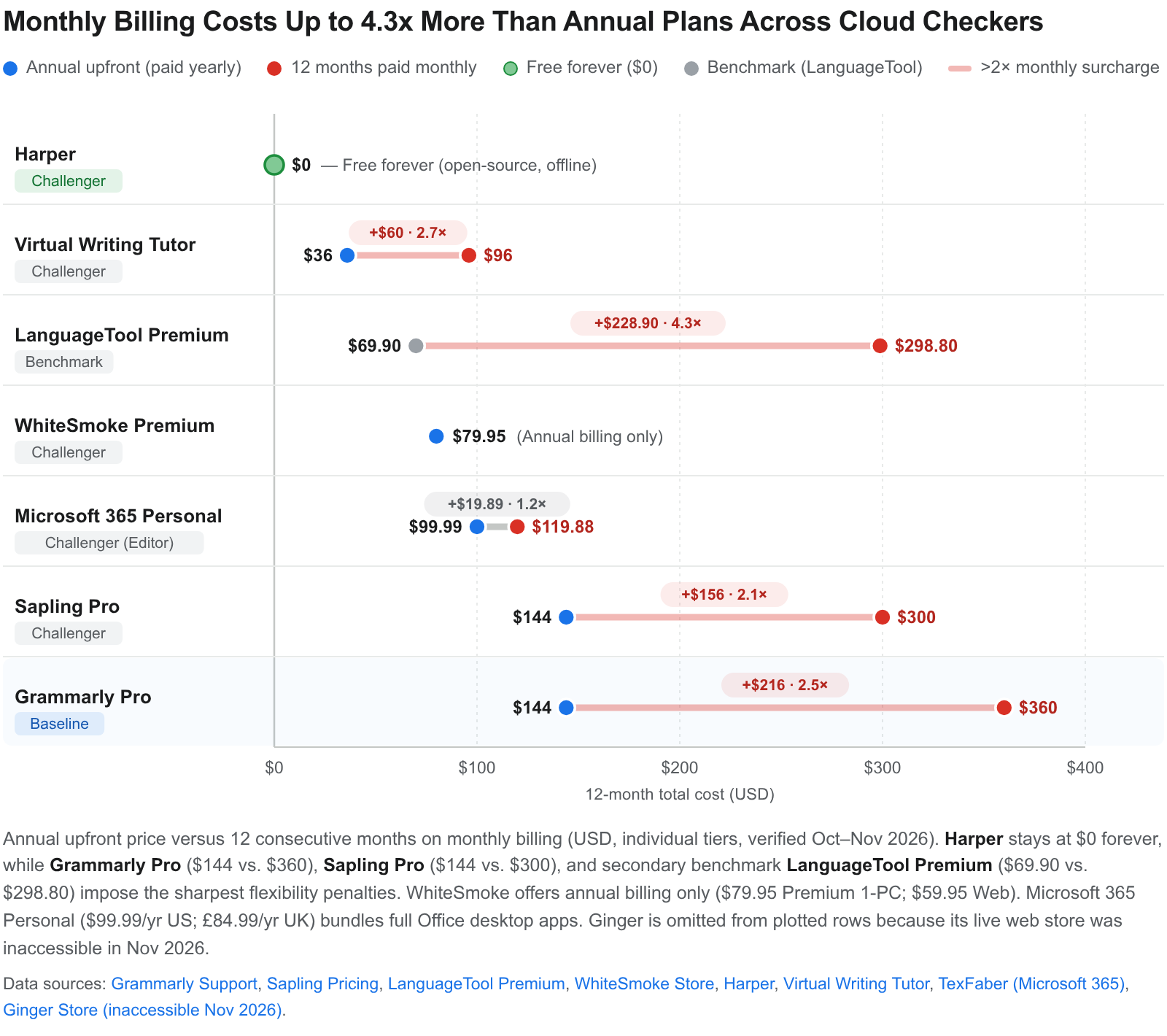
Two practical pricing takeaways stand out for UK and freelance writers. First, if you edit seasonally—polishing a book over two to six months—Grammarly's quarterly billing ($60 per three months, Grammarly Support[1], checked Nov 2026; third-party UK trackers cite £50 per quarter, GrammarDiscount[8], checked Jan 2026) undercuts both month-to-month billing ($30/month)and a full annual plan($144/year) (Gravity analysis, Oct 2026)[1]. Second, secondary benchmark LanguageTool Premium cuts Grammarly Pro's annual price roughly in half—£59.90/year (£4.99/month) in the UK (The Novel Kit[118], checked 2026) or $69.90/year in the US (languagetool.org/premium[116], checked Oct–Nov 2026)—yet punishes month-to-month users at $24.90/month ($298.80/year, or 4.27× the annual rate) (WhatheTech, 2026)[116]. By contrast, Harper removes subscription maths at £0 forever (writewithharper.com[10], checked Nov 2026)[10], while Microsoft 365 Personal (£84.99/year UK, Microsoft UK[21], checked Nov 2026; $99.99/year US, Texfaber[126], checked Oct 2026) costs less than standalone Grammarly Pro (~£120/year UK per GrammarDiscount[8], Jan 2026; $144/year US per Grammarly Support[1], Nov 2026) while bundling full Office apps and 1 TB of cloud storage[1]. Nor is Grammarly infallible on accuracy: a 2026 peer-reviewed study in the Journal of Second Language Writing (testing 53 argumentative essays by second-language writers against two human annotators) found that Grammarly's triggered corrections were highly accurate, yet it achieved only 51% recall, missing almost half of sentence-level errors (Practical Picks, Oct 2026)[12].
1. Harper — best free, private, and offline Grammarly alternative
Harper beats Grammarly decisively on cost (£0 forever, writewithharper.com[10], checked Nov 2026), latency, open-source transparency, Scrivener-on-Mac support, and zero-cloud privacy, though its deterministic Rust engine misses subtler syntax errors that Grammarly's AI catches (Practical Picks, Oct 2026; Harper site, accessed Nov 2026)[10].
Maintained by creator Elijah Potter and 172 contributors under Automattic, Harper reached v3.3.0 on 18 November 2026 under the permissive Apache-2.0 licence, which explicitly allows commercial and client editing (GitHub Automattic/harper releases, Nov 2026; Practical Picks, Oct 2026)[12]. Because Harper runs a compiled Rust engine strictly on your device—and via WebAssembly inside Chrome, Edge, and Firefox (v3.2.0 on Chrome Web Store updated 13 November 2026, ~30,000 users, 4.2/5)—it checks text offline with no account, no GPU, and zero cloud transmission (Chrome Web Store; Automattic/harper README, accessed Nov 2026)[10]. According to the project's own benchmarks, Harper lints in under 10 ms using less than 1/50th of the RAM required by a self-hosted LanguageTool server, which demands Java plus ~16–20 GB of n-gram datasets (Automattic/harper README, accessed Nov 2026; dacbreakpoint, 2022)[10]. For Python developers and technical writers, community contributor Maksim-Burtsev also published harper-py (pip install harper-py, v0.1.0) on PyPI on 25 October 2026—built with PyO3 over harper-core 2.13.0 with prebuilt Linux, macOS, and Windows wheels mirroring harper.js—eliminating the need for a Java LanguageTool server in Python prose pipelines, though upstream adoption into the main repository remains an open proposal (GitHub Issue #4690, updated 18 Nov 2026; Safety CLI, accessed Nov 2026)[67].
For UK and fiction writers, Harper matured rapidly across 2026. It supports British, American, Canadian, Australian, and Indian English, and v3.3.0 refined British/Commonwealth versus American distinctions including licence/license, practice/practise, and learnt/burnt/leapt (Harper Releases, Nov 2026)[11]. Its macOS 14+ Harper Desktop beta hooks system-wide into native text fields—explicitly listing Scrivener, Apple Pages, Mail, Notes, and Obsidian—while GitHub releases from v2.9.1/v2.10.0 through v3.3.0 also ship a Windows desktop installer (x64-setup.exe), even though Harper's website FAQ still lags behind by listing Windows as "Not yet" (writewithharper.com/desktop, accessed Nov 2026; GitHub Discussions #4399, Sep 2026; Harper Releases, Nov 2026)[11]. Crucially for novelists, Harper recognises casual dialogue contractions (gonna, gotta, wanna), avoids rewriting authorial meaning by design, lets you toggle every built-in rule or disable specific apps, and supports custom Weirpacks (.weirpack ZIP rule bundles loadable directly in Harper Desktop as of v3.3.0) with allows test assertions to prevent false positives (Harper Weir Docs & Releases, accessed Nov 2026)[10].
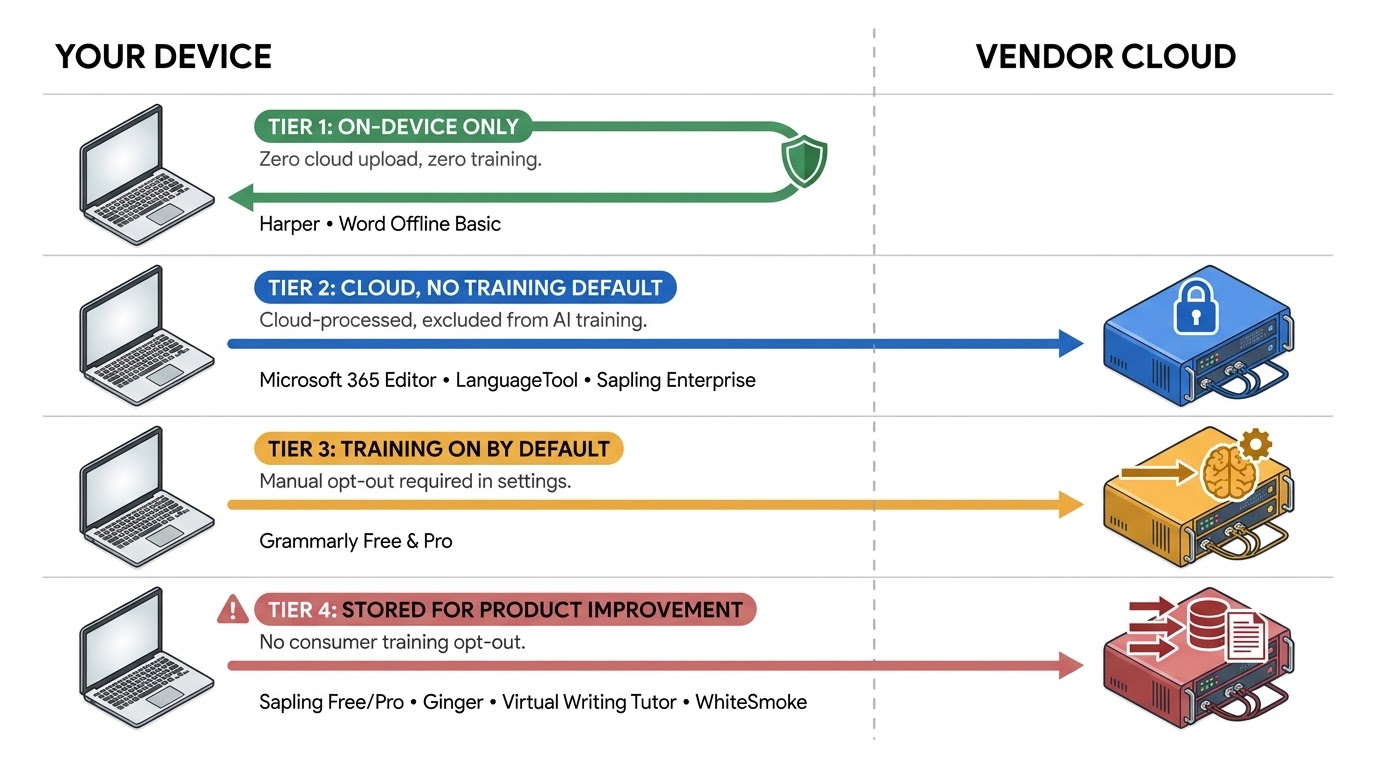
How Harper fails: Because Harper deliberately omits LLMs, independent hands-on tests (It's FOSS, July 2025; XDA Developers, August 2025; MakeUseOf, compiled by Practical Picks in October 2026) confirm that while it reliably catches typos, repeated words, and mechanical slips, it misses subtler sentence-structure and contextual errors that Grammarly flags (Practical Picks, Oct 2026)[12]. It checks English only (unlike LanguageTool's 30+ languages), offers no AI rewriting, tone detection, or plagiarism checking, has no dedicated Microsoft Word add-in, lacks Safari or mobile extensions, and retains open Google Docs bug reports around wrapped-line capitalisation (#2992) and flickering highlights (#3122) despite November 2026 fixes for page breaks and tables (browsers.to, Nov 2026; Harper Releases, Nov 2026; Practical Picks, Oct 2026)[12]. Even with those limits, Harper sits alone at the top of the 2026 manuscript-privacy hierarchy: unlike cloud checkers that ask you to trust contractual opt-outs, Harper's architecture cannot transmit unpublished drafts off your machine (Harper site, accessed Nov 2026; Grambo privacy analysis, 2026)[10].
2. Microsoft Editor — best zero-extra-cost option for Word and Microsoft 365 writers
Microsoft Editor beats Grammarly inside Microsoft Word on Track Changes stability, unlimited desktop manuscript length, and default no-training privacy, yet loses decisively as a cross-web Grammarly alternative because Microsoft retired its Chrome and Edge browser extensions on 31 October 2025 (Microsoft Support, accessed Nov 2026; Chapter, 2026)[16].
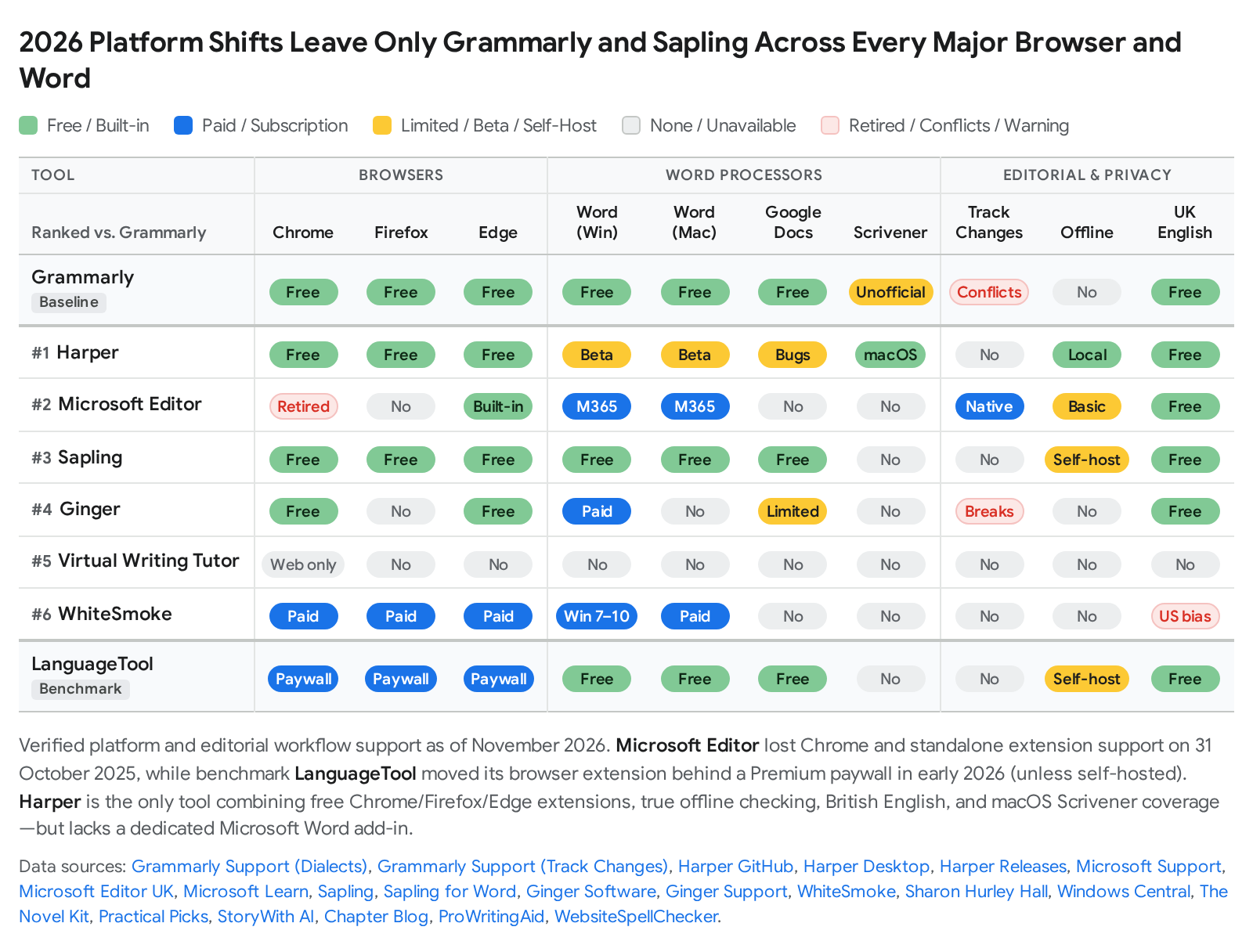
Confirming Microsoft Editor's November 2026 status is essential because older roundups still recommend it as a free Chrome rival to Grammarly. Microsoft officially retired the standalone Microsoft Editor browser extensions for Google Chrome and Microsoft Edge on 31 October 2025, leaving Chrome and Firefox users without Editor support (Microsoft Support, accessed Nov 2026; PCMag UK, Sep 2025)[16]. Today, Editor remains available in two places: built natively into Microsoft Edge (Settings > Languages > Use writing assistance) and integrated across Microsoft 365 applications, led by Word (desktop, web, and mobile) and Outlook (Microsoft UK, accessed Nov 2026; Topedia, 2025)[21]. One licensing trap catches authors off guard: buying the perpetual Office Home 2024 licence (£119.99 one-time, Microsoft UK[20], checked Nov 2026) provides only Word's basic spelling and grammar check—full Microsoft Editor refinements (clarity, conciseness, formality, vocabulary, and similarity checking) require an active Microsoft 365 subscription (£84.99/year Personal, intro offer £58.99 first year; £104.99/year Family; or Business Standard without Teams at £8.30/user/month paid yearly ex-VAT, Microsoft UK[21], checked Nov 2026)[20].
For writers drafting or copy-editing in Word, Microsoft Editor resolves three persistent Grammarly pain points. First, it runs natively alongside Word Track Changes and Comments—the publishing industry standard—whereas Grammarly's troubleshooting docs advise disabling Track Changes markup (and Word Copilot) whenever connection errors occur (Grammarly Support, accessed Nov 2026; Chapter, 2026)[17]. Second, desktop Word imposes no 50,000-word daily or 150,000-word monthly proofing ceilings and handles British English cleanly across 20+ grammar languages and 80+ spellcheck dictionaries (Microsoft Support, accessed Nov 2026; ProofreaderPro, 2026)[21]. Third, Microsoft confirms that personal data collected via Microsoft 365 Connected Experiences is not used to train foundation LLMs (Microsoft Support, accessed Nov 2026; Thurrott, Nov 2024)[18]; Edge deletes text sent for spelling and grammar checks after processing (aside from optional 30-day Text Prediction caching) (Microsoft Support, accessed Nov 2026)[74]; and turning off Connected Experiences—or working offline—drops Word back to local basic proofing with zero data transmitted (Microsoft Learn, updated Jun 2026)[81].
How Microsoft Editor fails: Outside Microsoft's ecosystem—Chrome, Firefox, Safari, Google Docs, or Scrivener—Editor is unavailable, and Edge users report inconsistent unlocking of paid Microsoft 365 refinements in the browser (r/MicrosoftEdge, 2025–2026; Revise, 2026)[76]. Independent evaluations also find shallower detection than Grammarly: peer-reviewed ESL testing (John & Woll, CALICO Journal, 2020) ranked Word's grammar checker behind both Grammarly and Virtual Writing Tutor, while analyst testing (eWeek) found Grammarly flags 10×–20× more phrasing and clarity suggestions than Word Editor[75]. For fiction writers, Editor's conservative, corporate-toned rules frequently object to contractions, dialogue, and deliberate fragments unless you manually untick stylistic options under Grammar & Refinements (Microsoft Support, accessed Nov 2026; Chapter, 2026)[17]. Together with LanguageTool paywalling its free browser extension in early 2026, Microsoft's extension retirement dramatically reshaped where each checker actually runs (SigmaBrowser, Oct 2026)[120].
3. Sapling — best for support teams and regulated enterprises, but ill-suited to fiction
Sapling matches Grammarly Pro's annual price ($144/year, sapling.ai/pricing[22], checked Nov 2026) while outperforming it on CRM messaging macros, developer APIs, and self-hosted enterprise compliance—yet it is a noticeably worse fit for fiction authors and solo writers (Sapling; Grammarist, accessed Nov 2026)[22].
Founded by former Stanford AI researchers, Sapling remains actively maintained in November 2026: its Chrome extension reached v3.2.7.1 on 10 November 2026 (~60,000 users, 4.2/5 rating), its Windows (10/11) and macOS (14–27) desktop apps received 2026 updates, and it covers Chrome, Edge, Firefox, Google Docs, and a side-pane Microsoft Word add-in for Mac and Windows (Chrome Web Store; Sapling Desktop & Word docs, accessed Nov 2026)[82]. Sapling explicitly supports British English alongside American, Canadian, Australian, and multilingual checking across Chinese, German, Spanish, French, Italian, Japanese, and Portuguese (Sapling; Chrome Web Store, accessed Nov 2026)[85]. Pricing starts at $0 (basic checks, 20 snippets, 2,000-character AI-detector cap), rises to Pro at $25/month or $144/year ($12/month) with a no-card 1-month free trial, and scales to Enterprise from $15/seat/month (10-seat minimum) plus a metered developer API starting from a $5 one-time credit (sapling.ai/pricing[22] and API Pricing[27], checked Nov 2026)[22].
Fiction suitability: Sapling is poorly suited to novels, short stories, and literary prose. Independent evaluations confirm it is built for customer-support tickets, sales outreach, and business messaging—enforcing a single professional register with no Creative domain, no Scrivener integration, and no grammar explanations alongside its accept/ignore prompts (Grammarist, accessed Nov 2026; Gitnux, Jul 2026; Sapling Desktop Docs, accessed Nov 2026)[24]. Although Sapling's Style Guide Checker (up to 20 custom rules via web or JSON API) handles corporate brand terminology well, it does not suppress fiction-specific false alarms around dialogue or rhythmic fragments (Sapling API Docs, accessed Nov 2026)[26].
How Sapling fails: First, unverified grammar accuracy and weak AI detection. Sapling claims its neural engine catches "60% more errors" than rule-based systems (Sapling Grammar Check, accessed Nov 2026)[85], yet no independent peer-reviewed grammar-correction benchmark corroborates that figure. Meanwhile, independent evaluations of Sapling's AI content detector fall well short of its vendor claims: AIDetectors.io (April 2026, 500 samples) ranked Sapling 9th at 79.3% accuracy with an 11.5% false-positive rate, aidetector.ac (March 2026) measured 76% accuracy, and competitor GPTZero's hands-on test found Sapling missed Claude outputs (19.2% and 24.3% AI scores) while assigning a 2016 BBC News article a 21.4% AI score (AIDetectors.io, Apr 2026; aidetector.ac, Mar 2026; GPTZero, 2026)[89]. Second, a stark privacy divide between Enterprise and consumer tiers. Enterprise and API buyers gain SOC 2 Type II certification, HIPAA BAAs, PII scrubbing of numbers/emails/URLs, self-serve "zero_retention": true on AI-detector API calls, contractual zero retention, and Docker on-premises self-hosting (Sapling Security & Data Docs, accessed Nov 2026)[23]. By contrast, Sapling's general consumer Privacy Policy states "Your content is stored by us and used only to improve the Service", sets no fixed retention limit, and documents no consumer opt-out toggle for Free or Pro individuals (Sapling Privacy Policy, accessed Nov 2026; aidetector.ac, 2026)[92]. Sapling also omits a plagiarism checker (Grammarist, accessed Nov 2026)[24].
4. Ginger — Grammarly vs Ginger for ESL, dyslexia, and translation
Ginger undercuts Grammarly on promotional annual pricing and adds 60+ language translation plus text-to-speech, but trails Grammarly sharply in independent grammar accuracy, Word workflow reliability, character limits, and privacy transparency (EyeSift, May 2026; Ginger Support, accessed Nov 2026)[28].
Ginger Software remains active in late 2026 (gingersoftware.com v2.8.74, © 2026; Chrome extension v2.15.357 with 500,000 users and 4.0/5 rating; Google Play Ginger Writer updated 10 September 2026 with active developer responses on 2 November 2026)[96]. Its core strengths lie in accessibility and non-native English writing: WCAG 2.1 certification for dyslexic spellchecking, human-voice text-to-speech, a Personal Trainer built around recurring mistakes, an explicit US/UK English toggle, Reverso dictionary definitions, and translation across 40–60+ languages (Ginger Grammar Check, accessed Nov 2026; Kindlepreneur, Oct 2025)[32].
| Grammarly vs Ginger (Nov 2026) | Grammarly | Ginger |
|---|---|---|
| Individual paid pricing | $144/year ($12/month) or $30/month (Grammarly Support[1], checked Nov 2026; UK ~£120/year per GrammarDiscount[8], Jan 2026)[1] | Web store inaccessible Nov 2026 (gingersoftware.com[37])[37]; independent reviews cite $13.99/month or $6.99/month annual(~$83.88/year, Kindlepreneur[38], Oct 2025; promo ~$45/year, WalterWrites[39], Aug 2026); UK iOS IAP £2.49 / £17.49 mobile-only (Apple App Store UK[36], checked Nov 2026)[35] |
| Microsoft Word support | Windows and Mac add-ins (conflicts with Track Changes, Grammarly Support, Nov 2026)[53] | Windows Office add-in only; no Mac Word add-in; cannot scan Track Changes, footnotes, or citations (Ginger Support, Nov 2026)[30] |
| Browser & Google Docs | Chrome, Edge, Firefox, Safari; solid Google Docs (Practical Picks, Oct 2026)[12] | Chrome, Edge, Safari (no Firefox); Google Docs claimed by vendor yet reported broken by reviewers (Ginger Support; Kindlepreneur, Oct 2025; Dreamgrow, 2025)[32] |
| Single-pass length cap | 100k chars web / unlimited desktop (50k words/24h cap for Free/Premium, Grammarly Support, Nov 2026)[2] | 6,000 chars desktop Correct window (~150–600 chars free, Ginger Support, Nov 2026; WalterWrites, Aug 2026; Dreamgrow, 2025)[29] |
| Translation & read-aloud | Translation up to 4,000 chars (19 languages); no read-aloud (Grammarly Support, Nov 2026)[143] | Translation in 60+ languages plus built-in text-to-speech reader (Ginger site; Google Play UK, Sep 2026)[32] |
| Plagiarism checker | Included in Pro (Grammarly Plans, Nov 2026)[7] | None (EditGPT, 2026; DemandSage, 2026)[98] |
Scroll sideways to see all columns →
How Ginger fails: Pricing transparency is weak in November 2026: Ginger's live upgrade store (gingersoftware.com/online_store/ginger_upgrade) failed to load during verification[37], published web prices fluctuate sharply across recurring 65%-off promotions (SaaSCentury, 2026; Ginger homepage, Nov 2026)[63], and Ginger Support warns that Apple App Store or Google Play subscriptions do not unlock desktop or browser extensions (Ginger Support, accessed Nov 2026)[35]. Functionally, Ginger breaks down on book-length or academic drafts: its desktop Correct window caps out at 6,000 characters (~900–1,000 words) (Ginger Support, accessed Nov 2026)[29], there is no Word add-in for Mac[31], and Ginger Support explicitly confirms its Office add-in cannot review documents containing Track Changes, footnotes, citations, or links, instructing authors to strip them out first[30]. Independent testing by EyeSift (May 2026) placed Ginger at 75% error detection (15/20)—behind LanguageTool's 83% (19/23)—while other independent reviews report missed dangling modifiers and rephrasing that alters original meaning (EyeSift, May 2026; EditGPT, 2026; WalterWrites, Aug 2026)[28]. Privacy disclosures raise further red flags: Ginger Support states shared content is "collected and aggrandized for statistical and analytical purposes to improve and enhance the Software" with no opt-out documented[100], the mobile privacy policy permits sharing encrypted identifiers with third-party advertising networks[99], and Google Play's Data Safety panel explicitly lists "Data is not encrypted" for Ginger Writer (Google Play UK, updated Sep 2026)[96].
5. Virtual Writing Tutor — best free IELTS and ESL specialist, not a daily editor
Virtual Writing Tutor outperforms Grammarly Free on structured ESL error drills, IELTS/TOEFL essay rubrics, and transparent non-renewing pricing ($0–$36/year, virtualwritingtutor.com[40], checked Nov 2026), yet fails as a general Grammarly alternative because it is a paste-only website with no extensions, desktop apps, or inline fixes (Virtual Writing Tutor; ProWritingAid review, accessed Nov 2026)[40].
Built by Montreal college ESL teacher Nicholas Walker (Bokomaru Publications), Virtual Writing Tutor runs a modified LanguageTool engine expanded with thousands of custom ESL rules—catching false cognates, missing auxiliaries, tense shifts, and uncountable plurals—alongside automated IELTS Task 1/2, TOEFL, and CEFR essay scoring (VWT homepage & Style Guide, accessed Nov 2026)[40]. Its pricing avoids subscription traps: anonymous visitors check up to 500 words free, a free registered account raises the ceiling to 3,000 words with unlimited grammar checks (and 10 daily clicks on AI essay scoring or rephrasing), and paid access removes click limits via one-off passes that never auto-renew ($3/week, $8/month, $16/3 months, or $36/year, virtualwritingtutor.com[40] and VWT Blog[45], checked Nov 2026)[40]. A June 2026 classroom action study of 15 Vietnamese IELTS students reported statistically significant gains in Grammatical Range and Accuracy (mean 4.40 to 6.03 over eight weeks) when paired with teacher guidance, and learners can export .doc drafts, MP3 pronunciation audio, and PDF feedback reports with voice comments (IJSSHR, Jun 2026; VWT Features, accessed Nov 2026)[43].
How Virtual Writing Tutor fails: Its pedagogical design frustrates working authors. Errors appear in a report below the text box (or side panel) so learners must hold the correction in memory and scroll back up to edit manually—deliberate for students, slow for copy-editing (VWT homepage & Style Guide; ProWritingAid comparison, accessed Nov 2026)[40]. There are zero browser extensions, desktop apps, Word/Google Docs add-ins, or Scrivener integrations, every pass stops at 3,000 words, and no dedicated British English spelling toggle is confirmed (WebsiteSpellChecker, accessed Nov 2026)[45]. Peer-reviewed testing (John & Woll, CALICO Journal, 2020) found VWT matched Grammarly in outperforming Microsoft Word yet missed over half of authentic ESL errors (<50% coverage), a finding echoed in a 2025 International Journal of English for Academic Purposes paper[78]. On privacy, VWT operates under Canadian law, stores logged-in submissions for up to one year (user-deletable at any time), and explicitly reserves the right for developers to use parts of submitted text to refine its error-correction rules with no opt-out toggle (VWT Terms & Privacy, accessed Nov 2026)[106].
6. WhiteSmoke — Grammarly vs WhiteSmoke shows why this legacy tool should be skipped
WhiteSmoke undercuts Grammarly Pro on headline annual pricing ($59.95–$137.95/year, buy.whitesmoke.com[47], checked Nov 2026), yet it loses on nearly every modern metric—imposing no free trial, tight 10,000-character desktop limits, US spelling bias, decade-old privacy terms, and a dismal 1.2/5 customer-support record (WhiteSmoke; Trustpilot UK, accessed Nov 2026)[46].
WhiteSmoke's storefront (buy.whitesmoke.com) and product pages remain live as of November 2026, confirming it is still available for purchase—yet nearly every technical and legal indicator signals a neglected legacy tool (WhiteSmoke site, accessed Nov 2026)[47]. Its checkout page still lists desktop compatibility as Windows 7, 8, and 10[47]; its Online Writing Assistant still names Internet Explorer and excludes Safari[110]; its Terms of Use date to 13 April 2011[47]; and its Privacy Policy has remained unchanged since 17 March 2016[48].
| Grammarly vs WhiteSmoke (Nov 2026) | Grammarly | WhiteSmoke |
|---|---|---|
| Free plan / trial | Free forever plus 7-day Pro trial (Grammarly Plans[7], checked Nov 2026)[7] | No free tier, no free trial (annual upfront only, buy.whitesmoke.com[47], checked Nov 2026)[47] |
| Annual pricing | Pro $144/year ($12/month, Grammarly Support[1], Nov 2026; UK ~£120/year per GrammarDiscount[8], Jan 2026)[1] | Web $59.95/year ($5/month); Premium $79.95/year ($6.66/month, 1 PC); Business $137.95/year ($11.50/month, 3 PCs) — standing 50% promo (buy.whitesmoke.com[47], checked Nov 2026)[47] |
| Document limit per pass | 100,000 chars web / unlimited desktop (Grammarly Support, Nov 2026)[2] | 10,000 chars desktop (~1,500–2,000 words) / 1,000 chars online assistant (DemandSage; EditGPT, Nov 2026; WhiteSmoke Online Assistant, Nov 2026)[109] |
| British English support | Dedicated UK English dialect (Grammarly Support, Nov 2026)[54] | Unconfirmed on product pages; independent tests report UK spellings converted to US English (WhiteSmoke Products; Sharon Hurley Hall; G2)[49] |
| Privacy & manuscript terms | Updated 16 Nov 2026; opt-out from AI training available (Grammarly Privacy, Nov 2026)[3] | Last updated 17 Mar 2016; retains texts for internal product development; plagiarism scans retained by third-party partners; 2011 Terms warn against confidential uploads (WhiteSmoke Legal, Nov 2026)[48] |
| Support & trust record | Active support, SOC 2 Type 2 and ISO/IEC 42001 (Grammarly Blog, accessed Nov 2026)[7] | 1.2/5 "Bad" on Trustpilot UK (63 of 82 reviews are 1-star); reports of revoked "lifetime" licences (Trustpilot UK, Nov 2026; Designrr, 2025)[46] |
Scroll sideways to see all columns →
How WhiteSmoke fails: For fiction and long-form writers, WhiteSmoke's 10,000-character desktop cap forces even a 5,000-word draft into three separate sessions where independent testing (EditGPT, updated Nov 2026) caught later passes contradicting earlier edits, while rigid "too informal" flags drained narrative voice (EditGPT, Nov 2026; Kindlepreneur, accessed Nov 2026)[109]. UK writers encounter US-spelling interference (Sharon Hurley Hall; G2)[49], DemandSage found its plagiarism checker missed copied text[111], and Premium restricts you to a single machine[47]. Worst of all is manuscript privacy: WhiteSmoke's 2016 Privacy Policy retains submitted documents for product development and sends plagiarism checks to third-party partner databases where text may be retained, while its 2011 Terms warn "Please do not transmit any confidential information to or through this Site" (WhiteSmoke Privacy Policy & Terms, accessed Nov 2026)[48]. Anyone drawn to WhiteSmoke's $59.95–$79.95/year (buy.whitesmoke.com[47], checked Nov 2026) price for multilingual work gets a far cleaner, safer product from secondary benchmark LanguageTool Premium ($69.90/year, languagetool.org/premium[116], Oct–Nov 2026; £59.90/year UK, The Novel Kit[118], 2026), which covers 30+ languages and excludes user text from model training by default (LanguageTool Privacy, Oct 2026)[116].
Which should you choose?
- You want the best free, offline, open-source, no-cloud grammar checker: Choose Harper (£0 forever, writewithharper.com[10], checked Nov 2026) for Apache-2.0 on-device checking, British English, Scrivener on macOS, Obsidian, Chrome/Firefox/Edge, and community harper-py in Python—accepting that it catches mechanical slips rather than complex syntactic rewrites (Harper Docs; Practical Picks, Oct 2026)[10].
- You already pay for Microsoft 365 and edit long manuscripts in Word: Use Microsoft Editor inside Word (£0 extra with Microsoft 365 Personal at £84.99/year or Family at £104.99/year, Microsoft UK[21], checked Nov 2026) for native Track Changes, British English, unlimited document length, and no-training privacy, pairing it with Harper in Chrome or Firefox where Microsoft retired its extensions (Microsoft Support, accessed Nov 2026)[16].
- You write fiction in Scrivener or need low-friction prose proofing: Run Harper Desktop on macOS (£0, writewithharper.com/desktop[11], checked Nov 2026) for private mechanical passes inside Scrivener[11], or compile to .docx for Microsoft Editor with business refinements switched off (Chapter, 2026)[17]; if you want paid sentence-level polish at half Grammarly's cost, secondary benchmark LanguageTool Premium (£59.90/year UK, The Novel Kit[118], 2026; $69.90/year US, languagetool.org/premium[116], Oct–Nov 2026) is lighter-handed on fragments and dialect and does not train on your drafts[116].
- You run a customer-support, sales, or HIPAA-regulated enterprise team: Choose Sapling (Enterprise from $15/seat/month for 10+ seats, or metered API from $5 minimum, sapling.ai/pricing[22], checked Nov 2026) for CRM snippets, autocomplete, JSON style-guide checks, zero-retention contracts, and Docker self-hosting—skip Sapling for solo fiction (Sapling Docs; Grammarist, accessed Nov 2026)[22].
- You are an ESL student preparing for IELTS or TOEFL on a tight budget: Use Virtual Writing Tutor ($0 registered account for 3,000-word checks and IELTS rubrics; $36/year one-off non-renewing pass if click limits pinch, virtualwritingtutor.com[40], checked Nov 2026), and avoid pasting confidential manuscripts into it (VWT Privacy, accessed Nov 2026)[40].
- You are dyslexic or want a mobile keyboard with read-aloud and 60+ language translation: Trial Ginger Free ($0, capped) first, verify live cross-platform web-store pricing before paying (avoid mobile-only UK App Store IAPs of £2.49 / £17.49, Apple App Store UK[36], checked Nov 2026, if you need desktop access), and avoid Ginger entirely for Mac Word, Firefox, or Word Track Changes (Ginger Support, accessed Nov 2026)[30].
- You want the widest cross-app grammar accuracy plus AI rewriting and can manage privacy toggles: Stick with Grammarly (Free at $0, or Pro at $60/quarter or $144/year—never $30/month—Grammarly Support[1], checked Nov 2026), and immediately disable Product Improvement and Training in your account privacy settings[1].
- Skip entirely: WhiteSmoke ($59.95–$137.95/year annual upfront only, buy.whitesmoke.com[47], checked Nov 2026)—its missing free trial, 10,000-character desktop cap, UK-spelling friction, 2016 privacy policy, and 1.2/5 Trustpilot record make it uncompetitive in November 2026 (WhiteSmoke; Trustpilot UK, accessed Nov 2026)[46].
Sources and references
- How much does Grammarly Pro cost?, https://support.grammarly.com/hc/en-us/articles/115000090011-How-much-does-Grammarly-Pro-cost
- https://support.grammarly.com/hc/en-us/articles/115000090911-What-are-the-limitations-when-using-Grammarly
- https://support.grammarly.com/hc/en-us/articles/25555503115277-Product-Improvement-and-Training-Control
- Grammarly Pricing 2026: Pro $12/mo, Free & Enterprise - HyperWrite, https://www.hyperwriteai.com/articles/grammarly-pricing
- 10 Best Grammar Checkers in 2026 (Tested) - Flozic, https://www.flozic.ai/blog/best-grammar-checkers
- Grammarly Price (2026): Premium vs Pro Billing - Echoo, https://www.echoo.ai/blog/grammarly-premium-price-what-you-get
- Grammarly Prices and Plans, https://www.grammarly.com/plans
- How Much Is Grammarly Pro? (2026 Subscription Plans), https://grammardiscount.co.uk/how-much-is-grammarly-pro/
- How Much is Grammarly Pro? [2026 Pricing Plans] - DemandSage, https://www.demandsage.com/how-much-is-grammarly-premium/
- Free Grammar & Spell Checker — Private, No AI, https://writewithharper.com/
- Harper Desktop, https://writewithharper.com/desktop
- https://practicalpicks.guide/comparisons/english-proofreading-tools/
- Harper Review 2026: Offline Grammar Checker, https://browsers.to/extensions/harper
- https://writewithharper.com/get
- GitHub - Automattic/harper: Offline, privacy-first grammar checker, https://github.com/automattic/harper
- Microsoft Editor browser extension retirement, https://support.microsoft.com/en-us/office/microsoft-editor-browser-extension-retirement
- 7 Best Grammarly Alternatives for Authors (2026) ✍️ - Chapter Blog, https://blog.chapter.pub/grammarly-alternatives/
- Copilot in Microsoft 365 apps for home: your data and privacy, https://support.microsoft.com/en-us/privacy/copilot-in-microsoft-365-apps-for-home-your-data-and-privacy
- Best ProWritingAid Alternatives for Novelists | NovelOS Blog, https://novelos.studio/blog/best-prowritingaid-alternatives-novelists/
- Compare Microsoft 365 Plans & Pricing (Formerly Office 365), https://www.microsoft.com/en-gb/microsoft-365/buy/compare-all-microsoft-365-products
- Create, Edit and Collaborate in Word Editor | Microsoft Editor, https://www.microsoft.com/en-gb/microsoft-365/microsoft-editor
- Plans and Pricing - Sapling, https://sapling.ai/pricing
- Overview | Sapling.ai Developer Documentation, https://sapling.ai/docs/onprem/overview/
- Grammarly vs Sapling Review - Which is Best? - Grammarist, https://grammarist.com/writing-tools/sapling-vs-grammarly/
- HIPAA Compliant AI Writing Assistant - Sapling, https://sapling.ai/hipaa
- Style Guide Checker — Free AI Writing Style Compliance Tool, https://sapling.ai/utilities/style-guide
- API Pricing | Sapling.ai Developer Documentation, https://sapling.ai/docs/api/pricing/
- Best Free Grammar Checker 2026: Online, No Signup ... - EyeSift, https://www.eyesift.com/blog/best-free-grammar-checker/
- Tips for quick, productive use - Ginger Support, https://help.gingersoftware.com/hc/en-us/articles/31505812556316-Tips-for-quick-productive-use
- Can Ginger review documents with citations, footnotes, track, https://help.gingersoftware.com/hc/en-us/articles/360000055991-Can-Ginger-review-documents-with-citations-footnotes-track-changes-or-links
- Is the Ginger add-in available for Word on Mac?, https://help.gingersoftware.com/hc/en-us/articles/360019441739-Is-the-Ginger-add-in-available-for-Word-on-Mac
- https://www.gingersoftware.com/grammarcheck
- Best Alternatives to Grammarly in 2026 (Tested and Compared), https://blog.contentforce.ai/alternative-to-grammarly/
- Ginger Software Accessibility, https://www.gingersoftware.com/accessibility
- Using my mobile Ginger Writer app premium subscription on my, https://help.gingersoftware.com/hc/en-us/articles/4420000225042-Using-my-mobile-Ginger-Writer-app-premium-subscription-on-my-computer
- Ginger Writer - App Store, https://apps.apple.com/gb/app/ginger-writer/id822797943
- https://www.gingersoftware.com/online_store/ginger_upgrade
- Ginger Software Review: Features, Pricing, Pros and Cons, https://kindlepreneur.com/ginger-software/
- Ginger Sentence Rephraser Review: Is It Still Worth Using in 2026?, https://walterwrites.ai/ginger-sentence-rephraser-review/
- Virtual Writing Tutor: Grammar Check - Free Essay Checker, https://virtualwritingtutor.com/
- Virtual Writing Tutor: Free Grammar Checker & Essay Feedback Tools, https://www.studocu.vn/vn/document/truong-dai-hoc-thuong-mai/quan-tri-nhom-lam-viec/grammar-check-free-essay-checker-virtual-writing-tutor/72156345
- Virtual Writing Tutor vs ProWritingAid: Which Grammar Checker Is, https://prowritingaid.com/virtual-writing-tutor
- A Study of Using the Virtual Writing Tutor Website for Enhancing, https://www.ijsshr.in/v9i6/93.php
- 10 Best Grammarly Alternatives for 2026 (Compared for 2026), https://saasharvest.com/grammarly-alternatives/
- Virtual Writing Tutor Membership Plan Options, https://blog.virtualwritingtutor.com/virtual-writing-tutor-membership-plan-options/
- Read Customer Service Reviews of www.whitesmoke.com | 2 of 4, https://uk.trustpilot.com/review/www.whitesmoke.com?page=2
- Whitesmoke Inc., https://buy.whitesmoke.com/
- Privacy | World-Leading Language Solutions by WhiteSmoke, http://www.whitesmoke.com/privacy.html
- WhiteSmoke Review - Sharon Unlimited, https://sharonhurleyhall.beehiiv.com/p/whitesmoke-review
- 15 best online grammar checkers for 2026 (free and paid), https://techblog.sdstudio.top/en/15-best-online-grammar-checkers-for-2026-free-and-paid
- The 10 Best Grammarly Alternatives That Actually Work in 2026, https://themarketingagency.ca/blog/grammarly-alternatives/
- 15 Best Online Grammar Checker Tools 2026 - FirstSiteGuide, https://firstsiteguide.com/grammar-checker-tools/
- Grammarly for Microsoft Office, https://www.grammarly.com/microsoft-office
- https://support.grammarly.com/hc/en-us/articles/115000089992-Select-between-British-English-American-English-Canadian-English-Australian-English-and-Indian-English
- https://storywith.ai/articles/grammarly-for-novels-370f3c
- Download PDF report of document statistics - Grammarly Support, https://support.grammarly.com/hc/en-us/articles/115000091492-Download-PDF-report-of-document-statistics
- Grammarly Editor user guide, https://support.grammarly.com/hc/en-us/articles/360003474732-Grammarly-Editor-user-guide
- How Reliable is Grammarly's Plagiarism Checker? - Phrasly.AI, https://phrasly.ai/blog/grammarly-plagiarism-checker
- Error: Can't connect to Superhuman Go or Something went wrong, https://support.grammarly.com/hc/en-us/articles/44208949586189-Error-Can-t-connect-to-Superhuman-Go-or-Something-went-wrong
- Error: Can't connect to Grammarly or Something went wrong, https://support.grammarly.com/hc/en-us/articles/5806184637325-Error-Can-t-connect-to-Grammarly-or-Something-went-wrong
- How to deactivate certain suggestions in the Grammarly Editor, https://support.grammarly.com/hc/en-us/articles/360045784631-How-to-deactivate-certain-suggestions-in-the-Grammarly-Editor
- What are Goals? - Grammarly Support, https://support.grammarly.com/hc/en-us/articles/360054679292-What-are-Goals
- 10 Best AI Grammar Checker Tools for 2026, Tested and Reviewed, https://saascentury.com/ai-grammar-checker-tools/
- https://www.grammarly.com/privacy-policy
- Is there Windows desktop app or exe for this ? #4399 - GitHub, https://github.com/Automattic/harper/discussions/4399
- https://github.com/automattic/harper/releases
- Python bindings: pip install harper-py · Issue #4690 - GitHub, https://github.com/Automattic/harper/issues/4690
- FstDictionary::curated() keeps a second copy of the whole dictionary, https://github.com/Automattic/harper/issues/4071
- https://writewithharper.com/docs/weir
- Editor in Word 2024 Office - Microsoft Q&A, https://learn.microsoft.com/en-us/answers/questions/5882748/editor-in-word-2024-office
- Microsoft Editor Extension Alternative for Chrome and Edge - Sapling, https://sapling.ai/microsoft-editor
- Grammarly vs Fictionary: Which One Do You Need in 2026? ⚖️, https://blog.chapter.pub/grammarly-vs-fictionary/
- Check grammar, spelling, and more in Word | Microsoft Support, https://support.microsoft.com/en-us/word/training/check-grammar-spelling-and-more-in-word
- Microsoft Editor checks grammar and more in documents, mail, and, https://support.microsoft.com/en-us/word/microsoft-editor-checks-grammar-and-more-in-documents-mail-and-the-web
- Comparing the New Microsoft 365 Word Editor to Grammarly - eWeek, https://www.eweek.com/enterprise-apps/comparing-the-new-microsoft-365-word-editor-to-grammarly/
- Microsoft Editor for Chrome is gone - Private Writing Assistant, https://privatetext.ai/compare/microsoft-editor/
- AI Grammar Checkers (2026): 8 Best Tools Compared - Revise, https://revise.io/blog/best-ai-grammar-checkers
- (PDF) Using Grammar Checkers in an ESL Context - ResearchGate, https://www.researchgate.net/publication/341933559_Using_Grammar_Checkers_in_an_ESL_Context
- Best Proofreading Software and Apps in 2026 (Free and Paid), https://proofreaderpro.ai/blog/best-proofreading-software-2026
- Microsoft Says it is Not Training Copilot AI on Your Microsoft 365, https://www.thurrott.com/a-i/microsoft-copilot-a-i/313765/microsoft-says-it-is-not-training-copilot-ai-on-your-microsoft-365-data
- https://learn.microsoft.com/en-us/microsoft-365-apps/privacy/connected-experiences
- Sapling for Microsoft Word - AI Writing Assistant, https://sapling.ai/msword
- Sapling for Windows Desktop, https://sapling.ai/desktop/windows
- https://sapling.ai/desktop/mac
- AI Grammar Checker - Sapling, https://sapling.ai/grammar-check
- Sapling Grammar Checker and Writing Assistant - Chrome Web Store, https://chromewebstore.google.com/detail/sapling-grammar-checker-a/pjpgohokimaldkikgejifibjdpbopfdc
- AI Detector | GPT-6, ChatGPT, Claude, Gemini, DeepSeek | Sapling, https://sapling.ai/ai-content-detector
- Style Guide Compliance API | Sapling.ai Developer Documentation, https://sapling.ai/docs/api/styleguide/
- Which AI Detector Is Most Accurate? 10 Tested (2026), https://www.aidetectors.io/blog/most-accurate-ai-detector
- Best AI Detector APIs (2026): Tested and Compared, https://aidetector.ac/blog/best-ai-detector-apis/
- https://sapling.ai/docs/data/
- Sapling Privacy Policy, https://sapling.ai/privacy
- 9 Best AI grammar checkers in 2026 for every use case - TechBlogSD, https://techblog.sdstudio.top/en/9-best-ai-grammar-checkers-in-2026-tested
- Grammarly vs Ginger - The Two Best Writing Assistants of 2025, https://www.dreamgrow.com/grammarly-vs-ginger/
- How can I use Ginger?, https://help.gingersoftware.com/hc/en-us/articles/4403494789778-How-can-I-use-Ginger
- Ginger Writer, Grammar Speller – Apps on Google Play, https://play.google.com/store/apps/details?id=com.gingersoftware.writer&hl=en_GB
- Ginger Software Pros and Cons | User Likes & Dislikes - G2, https://www.g2.com/products/ginger-software/reviews?qs=pros-and-cons
- Grammarly vs Ginger - Which Is Better Choice in 2026?, https://www.demandsage.com/grammarly-vs-ginger/
- privacy policy for ginger software mobile applications, https://www.gingersoftware.com/privacy_app
- How does Ginger store my data?, https://help.gingersoftware.com/hc/en-us/articles/4404339595154-How-does-Ginger-store-my-data
- For Teachers : Virtual Writing Tutor | Check English Grammar, https://virtualwritingtutor.com/teachers.php
- Best alternatives to Grammarly for UK writers in 2026, https://www.websitespellchecker.com/articles/alternatives-to-grammarly
- Membership advantages - Virtual Writing Tutor Blog, https://blog.virtualwritingtutor.com/membership-advantages/
- Grammar Checker Guide - Virtual Writing Tutor, https://virtualwritingtutor.com/files/Virtual-Writing-Tutor-Grammar-Checker-Style-Guide.pdf
- Numbered Diagram of Virtual Writing Tutor Features, https://blog.virtualwritingtutor.com/virtual-writing-tutor-features/
- https://blog.virtualwritingtutor.com/about-the-grammar-check-website/terms-and-privacy/
- Best Proofreading Software For Your Own DIY Transcriptions, https://designrr.io/proofreading-software-tools-list/
- Read Customer Service Reviews of www.whitesmoke.com, https://uk.trustpilot.com/review/www.whitesmoke.com
- Best AI Editor Showdown: EditGPT vs WhiteSmoke – Which Saves, https://editgpt.app/blog/whitesmoke-editgpt-best-ai-editor
- https://www.whitesmoke.com/online-writing-assistant
- WhiteSmoke vs Grammarly (2026) – Which One Is Better?, https://www.demandsage.com/whitesmoke-vs-grammarly/
- WhiteSmoke Reviews 2026: Details, Pricing, & Features - G2, https://www.g2.com/products/whitesmoke/reviews
- WhiteSmoke writing tool review - TechRadar, https://www.techradar.com/reviews/whitesmoke-writing-tool
- 20+ Best Tools to Check Your Spelling and Grammar - SE Ranking, https://seranking.com/blog/spelling-grammar-checking-tools/
- Terms | World-Leading Language Solutions by WhiteSmoke, http://www.whitesmoke.com/terms.html
- Premium - LanguageTool, https://languagetool.org/premium
- LanguageTool pricing and plans - What the tech, https://whathetech.net/ai-compare/tools/languagetool
- LanguageTool Review for Novelists - The Novel Kit, https://www.thenovelkit.com/resources/languagetool-review-for-novelists
- Grammarly alternative is killing its free browser extension, https://www.windowscentral.com/software-apps/a-popular-grammarly-alternative-is-killing-its-browser-extension-unless-you-pay-blames-ai-in-the-process
- Best Grammarly alternatives in 2026 (free, private, no AI), https://www.sigmabrowser.com/blog/grammarly-alternatives
- LanguageTool ends free use of Browser Extension, Are There Good, https://malwaretips.com/threads/languagetool-ends-free-use-of-browser-extension-are-there-good-alternatives.139517/
- 10 Best AI Grammar Checkers (2026), Ranked - Flickthru, https://flickthru.com/software-ai/writing-tools/best-ai-grammar-checkers/
- LanguageTool Privacy Policy Update (December 2024), https://languagetool.org/insights/post/languagetool-service-terms/
- https://languagetool.org/legal/privacy
- Setup your private LanguageTool server - dacbreakpoint, https://dacbreakpoint.com/articles/2022-05-private-languagetool-server/
- Writing Software Compared: Scrivener, Ulysses, Novelcrafter, Atticus, https://texfaber.com/articles/scrivener-ulysses-novelcrafter-atticus-dabble-compared/
- Grammarly Pricing 2026: Free vs Pro, Every Billing Option - gravity.fast, https://gravity.fast/blog/grammarly-pricing-explained/
- Buy Microsoft 365 Personal (formerly Office 365) – Subscription Price, https://www.microsoft.com/en-gb/microsoft-365/p/microsoft-365-personal/cfq7ttc0k5bf
- Private Grammar & Spell Checker - Harper - Chrome Web Store, https://chromewebstore.google.com/detail/private-grammar-spell-che/lodbfhdipoipcjmlebjbgmmgekckhpfb
- harper-py (PyPI) — Safety Package & Vulnerability Database, https://getsafety.com/packages/pypi/harper-py
- Privacy-Focused Writing Tools: What to Use in 2026 | Grambo Blog, https://gramboapp.com/blog/privacy-writing-tools
- RIP Microsoft Editor: Grammarly-Like Chrome, Edge Extension Ends, https://uk.pcmag.com/software-services/159850/rip-microsoft-editor-grammarly-like-chrome-edge-extension-ends-next-month
- Microsoft Editor browser extensions for Edge and Chrome will be, https://blog.topedia.com/posts/microsoft-editor-browser-extensions-for-edge-and-chrome-will-be-retired
- Microsoft Editor extension is being retired. Will the Edge-browser get, https://www.reddit.com/r/MicrosoftEdge/comments/1n5i7d7/microsoft_editor_extension_is_being_retired_will/
- Using Grammar Checkers in an ESL Context - ERIC, https://files.eric.ed.gov/fulltext/EJ1258089.pdf
- Best Proof Reading Software | Independently Tested 2026 - Gitnux, https://gitnux.org/best/proof-reading-software/
- Sapling.ai Detector Review: Tested on 13 Human & AI Samples, https://gptzero.me/news/sapling-ai-detector-review
- Security - Sapling, https://sapling.ai/security
- Pangram Alternative: Sapling AI Detector and API, https://sapling.ai/alternatives/pangram
- Enterprise AI Detection: SOC2 Compliance and Data Privacy, https://aidetector.ac/blog/enterprise-ai-detection-soc2/
- Ginger Software | English Grammar & Writing App, https://www.gingersoftware.com/
- AI Grammar and Spell Checker by Ginger - Chrome Web Store, https://chromewebstore.google.com/detail/ai-grammar-and-spell-chec/kdfieneakcjfaiglcfcgkidlkmlijjnh
- Introducing Grammarly's translation feature, https://support.grammarly.com/hc/en-us/articles/27518589299725-Introducing-Grammarly-s-translation-feature
- 12 Best AI Proofreaders in 2026 (Tested on the Same Paragraph), https://editgpt.app/blog/ai-proofreading-software
- Check text with the Ctrl+C+C shortcut - Ginger Support, https://help.gingersoftware.com/hc/en-us/articles/31509191833500-Check-text-with-the-Ctrl-C-C-shortcut
- How well can GenAI (GPT-4) provide written corrective feedback on, https://www.liverpooluniversitypress.co.uk/doi/full/10.3828/ijeap.2025.2
- http://www.whitesmoke.com/products.html
- Grammarly Pricing in 2026: What Free, Pro, and the Superhuman, https://www.usecarly.com/blog/grammarly-pricing/
- WhiteSmoke Review: Pricing, Features, Pros and Cons, https://kindlepreneur.com/whitesmoke/
- Grammarly Earns ISO/IEC 42001:2023 Certification, https://www.grammarly.com/blog/trust-security/iso-iec-42001-2023-announcement/
Generated by Gemini Deep Research


