

Editor’s note: this report focuses on the typesetting rules and print specifications behind a book interior. For a tool-by-tool comparison of the formatting software itself, see Book Formatting Tools Compared.
1. Tool and Production Layer Specifications (2026 Baseline)
| Field | Vellum (vellum.pub) | Atticus (atticus.io) | Affinity Studio / Publisher (affinity.studio) | Adobe InDesign (adobe.com) |
|---|---|---|---|---|
| Pricing | US: $199.99 (Vellum Ebooks) / $249.99 (Vellum Press: ebooks + print), one-time; $69.99 upgrade from Ebooks to Press[1]. UK: £159.99 (Ebooks) / £199.99 (Press), one-time, billed in GBP, VAT excluded[2]. Trial: Free to download, import, format, and preview; payment required only to export publishable files[3]. | Global: $147.00 one-time (~£110.00 GBP at $1 = £0.75 exchange rate), includes both ebook and print PDF generation plus free lifetime updates[4]. Trial: No free trial; backed by a 30-day money-back guarantee[3]. | Contested / Dual Status: 1. Current Primary Status (Oct 30, 2025 – Nov 2026): $0 (Free for individuals) with a free Canva account after Canva merged Affinity Designer, Photo, and Publisher into the unified Affinity Studio app (AI tools locked behind Canva Pro at $18/mo or $144/yr)[5]. 2. Legacy Aggregator Status (2026): Still listed at $29.79 one-time on third-party software directories (Software Advice, Capterra) reflecting legacy pre-relaunch V2 listings[6]. | US: $22.99/month on an annual plan billed monthly ($275.88/year)[5]. UK: £21.98/month including VAT on an annual plan (£263.76/year; £791.28 over 3 years)[5]. Trial: 7-day free trial; software stops opening files once subscription lapses[5]. |
| Platform | macOS only (requires macOS 13 Ventura or newer); native desktop application with full offline capability[1]. | Windows, macOS, Linux, Chromebook, and web browsers; Progressive Web App (PWA) supporting offline editing and formatting[3]. | Windows, macOS, and iPad (all-in-one iPad version launched November 2–3, 2026); native desktop/tablet app working fully offline after Canva account activation[5]. | Windows and macOS; native desktop application with offline capability (requires periodic Creative Cloud license validation)[5]. |
| Output Formats | Print PDF (PDF/X-1a compliant), store-specific EPUBs (Kindle, Apple Books, Kobo, Google Play, Nook), generic EPUB, and KPF/DOCX export[3]. | Print-ready PDF, universal EPUB, and DOCX[1]. Does not natively enforce strict PDF/X-1a:2001 color-profile flattening without post-processing. | Print PDF (full PDF/X-1a:2001 and PDF/X-3:2002 compliance), PSD, AI, IDML import, SVG, PNG, JPEG, TIFF; works in unified .af file format[5]. No reflowable EPUB export in Layout mode. | Print PDF (full PDF/X-1a:2001, PDF/X-3:2002, PDF/X-4 compliance), Reflowable EPUB, Fixed-Layout EPUB, INDD, and IDML (InDesign Markup Language)[5]. |
| Print Interior Support | Vellum Press supports 24 preset trim sizes, custom sizes, large print editions, hardcover layouts, automatic mirrored margins, dynamic gutter scaling, and full-bleed pages[1]. | Supports standard KDP/IngramSpark trim presets, custom trim sizes, large print support, mirrored margins, automated gutter calculation, and full-bleed chapter headers[3]. | Arbitrary page dimensions, custom bleed on all four or three edges, master pages, facing-page spreads, manual gutter control, CMYK total area coverage management, and preflight error checking[7]. | Unlimited custom trim sizes, asymmetric inner/outer bleed settings, multi-hierarchy master pages, automated running heads, optical margin alignment, CMYK ink limit preflighting, and imposition support[5]. |
| Typographic Control | Curated template-driven system (8 core style families with modular swaps); automated drop caps, small-caps opening lines, ornamental scene breaks, running heads, and automated widow/orphan suppression[3]. | Style-based template system (17+ built-in templates, 1,200+ combinations, plus custom theme builder); supports drop caps, custom ornamental breaks, callout boxes, footnotes, and multi-level nonfiction headings[3]. | Page-level desktop publishing control via the Layout studio; paragraph and character styles, baseline grids, kerning, tracking, hyphenation dictionaries, drop caps, and multi-column frames[5]. | Industry-grade page-level control; Adobe Paragraph Composer, GREP pattern styles, optical margin alignment, granular justification matrices (word/letter/glyph scaling), complex script support, indexing, and data merge[5]. |
| Learning Curve | Near-zero; engineered to take an imported Word .docx manuscript to finished print PDF and EPUB in under two hours[3]. | Near-zero to moderate; combines a distraction-free drafting editor with point-and-click theme formatting, though heavy nonfiction structures require manual layout verification[3]. | Steep; requires mastering master pages, text-frame threading, paragraph style hierarchies, baseline grids, and preflight color management[5]. | Professional / Steep; built for commercial typesetters and production designers, requiring tens of hours to configure styles, master spreads, and pre-press export presets[5]. |
| Best For (Book Profile) | Text-led fiction, narrative nonfiction, and multi-book box sets produced by Mac-based authors prioritizing typographic polish and speed[3]. | Text-led fiction and structured nonfiction produced by Windows, Linux, Chromebook, or Mac authors seeking an all-in-one drafting and formatting tool[3]. | Illustrated nonfiction, children's picture books, photo books, cookbooks, and complex multi-column layouts produced by budget-conscious authors or solo designers[5]. | Commercial illustrated books, academic monographs with complex footnotes/indexes, textbooks, directories using data merge, and collaborative publishing workflows requiring .indd exchange[5]. |
| Key Limitation | Strictly limited to macOS (Ventura 13+) and lacks structural non-fiction elements such as sidebar callout boxes, tables, and multi-tier subheadings[3]. | Lacks a free trial prior to purchase and exhibits occasional pagination bugs when splitting complex non-fiction callout boxes across pages[3]. | Requires manual configuration of every typographic rule and cannot export native .indd files for external publishing house pre-press desks[5]. | Prohibitive recurring subscription cost (£263.76 / $275.88 per year) that revokes access to native .indd production files the moment billing stops[5]. |
| Last Verified Date | October 1, 2026 (store.vellum.pub verified September 20–24, 2026)[2]. | September 24, 2026 (atticus.io)[2]. | November 3, 2026 (affinity.studio and Apple App Store relaunch)[5]. | September 23, 2026 (adobe.com UK and US stores)[5]. |
Scroll sideways to see all columns →
Production Layer Baseline Specifications (2026)
| Production Parameter | Industry & Platform Rule | Exact Numerical Specification | Primary Source / Verification |
|---|---|---|---|
| Trim Size | Lock canvas dimensions prior to styling; never format on default letter/A4 sheets[8]. | 5.5 × 8.5 in (139.7 × 215.9 mm) for trade fiction; 6 × 9 in (152.4 × 228.6 mm) for US trade nonfiction and workbooks[8]. | Amazon KDP Help (kdp.amazon.com/en_US/help/topic/G202187840), September 2026[8]. |
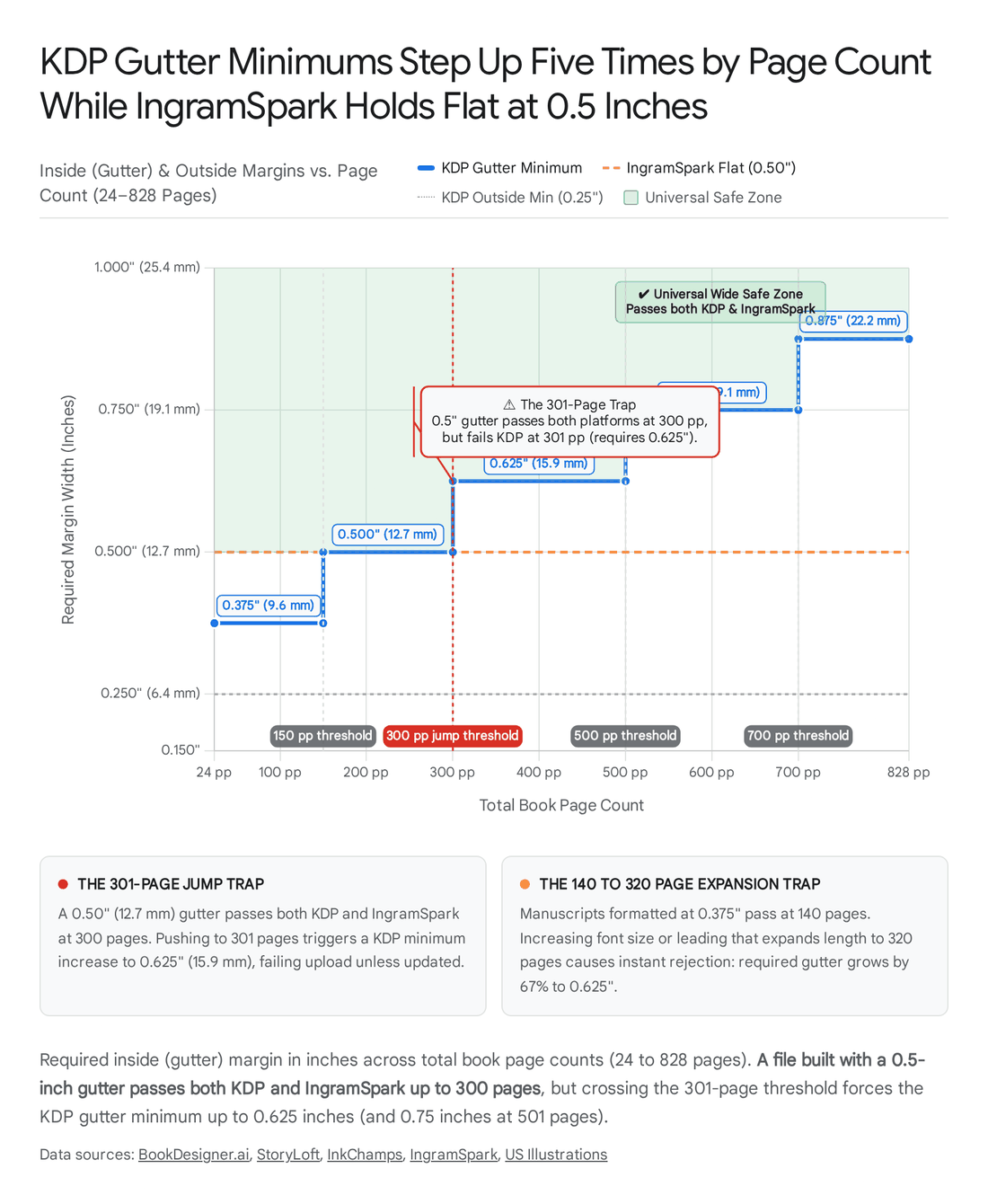
| Margins & Gutter (KDP) | Outside, top, and bottom margins are fixed minimums; inside (gutter) margin scales dynamically by total page count[9]. | Outer/Top/Bottom: ≥ 0.25 in (6.4 mm) without bleed; ≥ 0.375 in (9.6 mm) with bleed[10]. Inside Gutter: Scales from 0.375 in (24–150 pp) to 0.875 in (701–828 pp)[9]. | Amazon KDP Print Options & Margin Calculator (kdp.amazon.com), September 2026[8]. |
| Margins & Gutter (IngramSpark) | Flat universal margin recommendation across all four edges regardless of page count[11]. | All Sides: ≥ 0.5 in (13 mm) recommended minimum from final trim line on top, bottom, outside, and bind edge[11]. | IngramSpark File Creation Guide (ingramspark.com/hubfs/downloads/file-creation-guide.pdf), August 24, 2026[11]. |
| Body Type & Leading | Set continuous body copy in an old-style or transitional book serif with proportional baseline leading[12]. | Type Size: 10pt–12pt (11pt baseline; KDP absolute legal minimum is 7pt)[13]. Leading: 120%–145% of point size (e.g., 11pt type on 13.5pt–15pt leading; 14pt average)[13]. | Bookstone Typography Standards & Reedsy Production Guide (reedsy.com), 2026[13]. |
| Measure (Line Length) | Constrain horizontal column width to prevent ocular fatigue on return sweeps[14]. | 45–75 characters per line (including spaces) per Bringhurst (45–90 extended range); 55–70 characters for trade books (66 ideal; ~69 chars on 6 × 9 in at 11pt)[14]. | Robert Bringhurst, The Elements of Typographic Style (readings.design), 2026[15]. |
| Chapter Openers & Drop Caps | Suppress running headers on opening pages; omit first-paragraph indent; start conventionally on recto (odd) pages[13]. | Heading Size: 18pt–24pt[13]. Drop Cap: Spans exactly 2 to 3 lines, flush left with margin, set in matching body or display face[13]. | Bringhurst Structural Forms & Bookstone Interior Guide, 2026[13]. |
| Print-Ready PDF Specs | Embed 100% of font glyphs, export single-page (1-up) layout without printer marks, and flatten transparencies[11]. | IngramSpark: Strict PDF/X-1a:2001 or PDF/X-3:2002, CMYK ≤ 240% Total Ink Coverage, 0.125 in (3 mm) bleed on 3 trim edges only[16]. KDP: Standard PDF with embedded fonts, ≤ 650 MB[17]. | IngramSpark File Creation Guide (Aug 24, 2026) & KDP Help (kdp.amazon.com/help/topic/G202145450)[11]. |
Scroll sideways to see all columns →
The interior book production software market is bifurcated into two structurally distinct software categories: template-based manuscript formatters (Vellum and Atticus) and coordinate-based desktop page-layout engines (Affinity Studio and Adobe InDesign)[3]. Template formatters ingest structured word-processor files (.docx), parse chapter boundaries automatically, and apply pre-engineered typographic stylesheets that handle widow/orphan control, running header suppression, and dynamic gutter scaling behind the scenes[3]. Page-layout engines provide an empty Cartesian coordinate plane where the operator must construct master spreads, define baseline grids, thread text frames manually, and configure pre-press color profiles[5]. Treating these two categories as interchangeable is the primary source of technical friction for independent authors: applying Adobe InDesign to a text-only thriller introduces hundreds of hours of unnecessary pre-press configuration and recurring subscription liability, whereas forcing a multi-column illustrated cookbook into Vellum or Atticus results in broken image anchoring and rejected print files[4].
2. Pairing Matrix: Head-to-Head Tool and Specification Comparisons
2.1 Vellum vs. Atticus (Mac Polish vs. Cross-Platform Value)
Verdict: Vellum Press ($249.99/£199.99) wins for Mac-based fiction and narrative nonfiction authors who demand the most refined out-of-the-box print typography and multi-book box-set stability, whereas Atticus ($147) wins for Windows, Linux, and Chromebook users—as well as budget-conscious Mac authors—who want an integrated drafting and formatting environment at a 41% lower upfront price[3].
| Dimension | Vellum Press | Atticus |
|---|---|---|
| Pricing & Trial | $249.99 US/£199.99 UK + VAT one-time ($199.99 / £159.99 Ebooks only); free full-featured build-and-preview trial (pay only on export)[1]. | $147.00 US (~£110.00 UK) one-time covering both ebook and print; no free trial, backed by a 30-day money-back guarantee[4]. |
| Platform & Architecture | Native macOS desktop application (requires macOS 13 Ventura or later); no Windows, Linux, or web version[3]. | Cross-platform browser/PWA application running on Windows, macOS, Linux, and Chromebook with offline mode[3]. |
| Typographic Control & Structure | Curated built-in style templates with superior automated kerning, line-break balancing, and box-set generation, but lacks callout boxes, tables, and deep subheadings[3]. | 17+ templates, 1,200+ style combinations, and a custom theme builder; supports nonfiction callout boxes, footnotes, and multi-level headings, though complex boxes occasionally split across pages[3]. |
| Print Interior Support | 24 preset trim sizes, large print, hardcover interiors, full-bleed pages, and native PDF/X-1a compliance[1]. | Standard print PDF trim presets, large print support, and full-bleed chapter headers[3]. |
| Drafting & Collaboration | Formatting-only utility (requires importing a finished .docx manuscript); single-user license with no shared cloud editing[3]. | Full writing editor with word-count goals, ProWritingAid grammar integration, and cloud collaboration for co-authors and editors[3]. |
Scroll sideways to see all columns →
Choose Vellum if the author operates exclusively on macOS 13 or newer, writes text-led fiction or memoir, publishes multi-volume series or box sets, wants store-specific EPUB files with automated store-aware backmatter links, and wishes to preview the fully typeset book before paying[3]. Choose Atticus if the author works on Windows, Linux, or Chromebook, wants a single application to draft, edit, collaborate, and typeset, writes structured nonfiction requiring sidebar callouts and multi-level subheadings, or seeks to save $102.99 (£90+) on a one-time license[3]. 2025–2026 Verdict Shifts: Browser verification of Vellum's UK web store in September and October 2026 confirmed that Vellum bills UK buyers natively in pounds (£159.99 Ebooks / £199.99 Press before VAT) rather than converting USD, while production testing of structured nonfiction manuscripts in 2025–2026 demonstrated that Atticus supports callout boxes and sub-sections absent in Vellum, despite occasional pagination splitting bugs in Atticus's PDF engine[2].
2.2 Vellum vs. Adobe InDesign (Template Formatter vs. Professional Layout)
Verdict: Vellum Press wins decisively for solo novelists and narrative nonfiction writers on macOS who need commercial-grade print interiors in hours with a one-time payment, while Adobe InDesign wins exclusively for complex, image-heavy, academic, or multi-column books requiring granular page-level intervention[3].
| Dimension | Vellum Press | Adobe InDesign |
|---|---|---|
| Price & Ownership | $249.99 / £199.99 + VAT one-time; perpetual license with free updates[3]. | $22.99/mo US ($275.88/yr) / £21.98/mo UK (£263.76/yr); subscription revokes file access upon cancellation[5]. |
| Typographic Control | Automated macro-level template selections (drop caps, running heads, scene breaks, margin presets)[3]. | Micro-level typographic control: GREP regex styling, optical margin alignment, custom kerning tables, and multi-column grids[5]. |
| Print Support | Automated PDF/X-1a print PDF generation across 24 trim sizes with automatic gutter scaling[3]. | Full commercial pre-press control, custom CMYK ink limits (≤ 240%), imposition, data merge, and native .indd/.idml exchange[5]. |
| Learning Curve | Near-zero (1–2 hours from download to print-ready export)[3]. | Professional/Steep (weeks of study required to prevent pre-press rejections and master styles)[5]. |
Scroll sideways to see all columns →
Choose Vellum if the book consists primarily of sequential prose chapters, the author works on a Mac, and the goal is to eliminate typesetting bottlenecks without paying an annual software rent[3]. Choose InDesign if the project is a cookbook, textbook, art catalog, academic monograph with multi-tier footnotes and indexes, or a commercial publication where an external publisher or pre-press house mandates native .indd source files[5]. 2025–2026 Verdict Shifts: With InDesign's UK annual cost reaching £263.76 ($275.88 US)—exceeding the lifetime purchase price of Vellum Press (£199.99 / $249.99) within the very first year—using InDesign solely to format text-led fiction has become economically irrational for independent authors[2].
2.3 Atticus vs. Adobe InDesign (Cross-Platform Formatter vs. Professional Layout)
Verdict: Atticus ($147) wins for cross-platform authors producing novels and standard nonfiction who want fast, repeatable template formatting at nearly half the cost of a single year of InDesign, whereas InDesign ($275.88/yr / £263.76/yr) wins for professional book designers handling complex visual layouts and strict commercial pre-press workflows[4].
| Dimension | Atticus | Adobe InDesign |
|---|---|---|
| Pricing (3-Year Total) | $147.00 (~£110.00) total over 3 years (one-time payment)[4]. | $827.64 US / £791.28 UK total over 3 years (recurring monthly/annual billing)[5]. |
| Platform Support | Windows, macOS, Linux, Chromebook, and web browsers[3]. | Windows and macOS desktop operating systems only[5]. |
| Typographic & Page Control | Style-based template engine with custom theme settings, callout boxes, and endnotes/footnotes[3]. | Absolute page-level object placement, text-wrap around irregular vectors, tables, indexing, and GREP automation[5]. |
| Print PDF Compliance | Exports standard print-ready PDFs with embedded fonts; lacks advanced CMYK ink-limit preflighting[1]. | Native PDF/X-1a:2001 and PDF/X-3:2002 export with live preflight checks for transparency and 240% ink coverage[5]. |
Scroll sideways to see all columns →
Choose Atticus if the author writes prose fiction or standard narrative/business nonfiction on Windows, Mac, Linux, or Chromebook and wants to write and format in one utility without learning desktop publishing[3]. Choose InDesign if the book requires multi-column page layouts, complex data tables, wrapped illustrations on every spread, or strict CMYK color profiling for offset or IngramSpark color printing[5]. 2025–2026 Verdict Shifts: Atticus remains fixed at $147 one-time in 2026 while Adobe's Creative Cloud pricing continues to compound annually, widening the three-year cost gap between the two tools to £681.28 ($680.64)[4].
2.4 Affinity Publisher (Affinity Studio) vs. Adobe InDesign (Free/Cheap Page Layout vs. Subscription Professional)
Verdict: Affinity Studio ($0 for individuals) wins for independent authors and solo book designers laying out their own illustrated books, picture books, or complex interiors who do not need to exchange native files with corporate publishers, whereas Adobe InDesign (£263.76/yr / $275.88/yr) wins for commercial typesetters who rely on .indd client handoffs, GREP automation, and third-party scripting[5].
| Dimension | Affinity Studio (Layout Mode / formerly Publisher) | Adobe InDesign |
|---|---|---|
| Price & Licensing | $0 (Free for individuals) with a free Canva account since Oct 30, 2025 (legacy V2 listings on Software Advice/Capterra still show $29.79 one-time); AI features require Canva Pro ($18/mo)[5]. | $22.99/mo US ($275.88/yr) / £21.98/mo UK (£263.76/yr); files become inaccessible when subscription ends[5]. |
| Application Architecture | Single unified application combining Vector, Pixel, and Layout studios in one .af file across Mac, Windows, and iPad[5]. | Standalone layout app requiring separate Photoshop and Illustrator apps (and higher Creative Cloud tiers) for raster/vector switching[5]. |
| Typographic & Automation Depth | Full master pages, baseline grids, paragraph styles, and preflight checking; lacks GREP pattern styling and a deep plugin ecosystem[5]. | Industry-leading optical margin alignment, GREP styles, data merge from spreadsheets, complex script support, and 20 years of scripts[5]. |
| Print & File Exchange | Exports compliant PDF/X-1a:2001 and PDF/X-3:2002; imports .idml and .psd with layers preserved, but cannot export native .indd[5]. | Native .indd and .idml creation expected by every commercial printer's pre-press desk and traditional publishing house[5]. |
Scroll sideways to see all columns →
Choose Affinity Studio if the author lays out their own books, nobody else needs to open the editable source file in InDesign, the author wants permanent offline ownership to update a backlist years later at £0 cost, or the project involves switching seamlessly between photo retouching, vector illustration, and page layout in one file[5]. Choose InDesign if an agency, publisher, or client requires .indd deliverables, the book is a directory or catalog generated via spreadsheet data merge, or the typesetter relies on automated GREP pattern rules across 400+ pages[5]. 2025–2026 Verdict Shifts: Two major structural changes transformed this pairing between late 2025 and November 2026: first, following Canva's 2024 acquisition of Serif, Canva retired standalone Affinity Publisher on October 30, 2025, merging Designer, Photo, and Publisher into a single unified Affinity app (Affinity Studio) made 100% free for individuals (with optional Canva Pro AI upsells)[5]; second, on November 2–3, 2026, Canva released the unified Affinity app for iPad for free[18]. While legacy software review aggregators (Software Advice, Capterra) still display the historical $29.79 one-time price from pre-relaunch listings, affinity.studio confirms the $0 individual price under the heading "Zero bucks given"[5].
2.5 Vellum vs. Affinity Publisher / Studio (Text-Led Formatter vs. Complex-Layout Tool)
Verdict: Vellum Press ($249.99/£199.99) wins for Mac authors formatting text-led novels and memoirs where speed and automated typographic perfection justify the upfront cost, while Affinity Studio ($0) wins for Mac authors formatting illustrated books, workbooks, or poetry collections requiring manual spatial placement—or novelists willing to invest 15+ hours learning desktop publishing to save £199.99[2].
| Dimension | Vellum Press | Affinity Studio (Layout Mode) |
|---|---|---|
| Software Category | Automated template-based book formatter (Ebook + Print)[3]. | Manual coordinate-based desktop publishing suite (Print/Visual Layout)[5]. |
| Price | $249.99 US / £199.99 UK + VAT one-time[1]. | $0 (Free for individuals; $29.79 on legacy third-party directories)[5]. |
| Ebook & Print Parity | Generates store-specific EPUBs and print-ready PDF/X-1a simultaneously from one project file[3]. | Generates print-ready PDFs (PDF/X-1a); does not compile reflowable EPUB files for Kindle/Kobo[5]. |
| Layout Flexibility | Fixed to single-column prose flows and preset header ornaments[3]. | Unlimited multi-column grids, freeform image wrapping, tables, and vector integration[5]. |
Scroll sideways to see all columns →
Choose Vellum if the author needs both reflowable ebooks and print paperbacks generated simultaneously from a single source file with zero manual page-layout setup[3]. Choose Affinity Studio if the book contains side-by-side columns, full-page annotated diagrams, wrap-around illustrations, or non-linear poetry layouts that Vellum's rigid templates prohibit[5]. 2025–2026 Verdict Shifts: Affinity's shift to $0 in October 2025 eliminated the price barrier for page-layout software, meaning Vellum now competes strictly on time saved and dual EPUB+PDF compilation rather than software affordability[3].
2.6 Atticus vs. Affinity Publisher / Studio (Formatter vs. Page-Layout Tool)
Verdict: Atticus ($147) wins for Windows and Mac authors writing text-led fiction or standard nonfiction who require one-click generation of both EPUB and print PDF files, whereas Affinity Studio ($0) wins for authors producing visually complex print interiors (cookbooks, picture books, textbooks) or zero-budget authors willing to configure master pages manually[3].
| Dimension | Atticus | Affinity Studio (Layout Mode) |
|---|---|---|
| Price | $147.00 one-time[4]. | $0 (Free for individuals; $29.79 legacy listing)[5]. |
| Primary Workflow | Integrated manuscript drafting + automated template formatting for EPUB and Print PDF[3]. | Manual page-by-page layout, vector design, and raster editing for print PDF[5]. |
| Platform | Windows, Mac, Linux, Chromebook, Web[3]. | Windows, Mac, iPad (no Linux or Chromebook browser version)[19]. |
| Learning Curve | Under 1 hour; templates automatically calculate gutters and running headers[3]. | Steep; operator must manually calculate KDP/IngramSpark gutters, bleed, and paragraph styles[5]. |
Scroll sideways to see all columns →
Choose Atticus if the author wants to write and format prose books in a single app, uses Linux or a Chromebook, or needs automated EPUB and print PDF exports without learning pre-press geometry[3]. Choose Affinity Studio if the project is a visual or educational print book with tables, multi-column text, and precision graphics, or the author has a $0 software budget on Windows, Mac, or iPad[5]. 2025–2026 Verdict Shifts: With Affinity becoming free for individuals on desktop (Oct 2025) and iPad (Nov 2026), Windows authors now have a free professional page-layout alternative, leaving Atticus as the time-saving workflow investment for prose writers[4].
2.7 InDesign vs. Affinity Publisher for Book Interiors (The Free-vs.-Subscription Page-Layout Question)
Verdict: For pure book interior production, Affinity Studio ($0) matches 90% of Adobe InDesign's (£263.76/yr) typographic and pre-press capabilities—including master spreads, baseline grids, CMYK control, and PDF/X-1a:2001 export—making Affinity the superior choice for self-publishers, while InDesign remains mandatory only for long-form academic indexing, GREP regex automation, and optical margin alignment[5].
| Book Interior Capability | Adobe InDesign (£263.76/yr / $275.88/yr) | Affinity Studio Layout Mode ($0 Free / $29.79 Legacy) |
|---|---|---|
| Paragraph Composer & Justification | Multi-line Adobe Paragraph Composer with optical margin alignment (hanging punctuation)[5]. | Standard paragraph justification, hyphenation zones, and baseline grid alignment[5]. |
| Pattern Automation (GREP) | Full GREP styles inside paragraph styles (e.g., automatically forcing non-breaking spaces on every ISBN or ellipsis across 400 pages)[5]. | Find-and-replace regex supported manually, but lacks live dynamic GREP paragraph style rules[5]. |
| IngramSpark PDF/X Compliance | Native PDF/X-1a:2001 and PDF/X-3:2002 export with ink manager and transparency flattener[11]. | Native PDF/X-1a:2001 and PDF/X-3:2002 export presets with built-in preflight checking[7]. |
| Embedded Raster/Vector Editing | Requires round-tripping to external Photoshop and Illustrator apps via linked files[5]. | Instant switching between Layout, Vector, and Pixel modes inside the exact same .af document[5]. |
| Back-Catalogue Archival Access | Locked behind active billing: Canceling the subscription prevents opening .indd files two years later to fix a typo[5]. | Perpetual offline access: The author can reopen and re-export .af backlist files years later at zero cost[5]. |
Scroll sideways to see all columns →
Choose InDesign for Book Interiors if the book exceeds 400 pages with complex cross-referenced indexes, footnotes spanning multiple columns, complex non-Latin scripts, or requires automated GREP formatting rules[5]. Choose Affinity Studio for Book Interiors if the author is designing picture books, cookbooks, photography books, or standard trade interiors and wants permanent access to their production files without paying £791.28 ($827.64) every three years[5]. 2025–2026 Verdict Shifts: The unification of Vector, Pixel, and Layout modes into a single .af file in October 2025 gives Affinity a unique workflow advantage over InDesign for illustrated books: an author can adjust an illustration's CMYK levels in Pixel mode and tweak a vector diagram in Vector mode without ever leaving the book spread[5].
2.8 Template Formatter vs. Page-Layout Tool (Category-Level Decision)
Verdict: Template formatters (Vellum, Atticus) win for 100% of linear, text-led books (novels, memoirs, narrative nonfiction) because they automate typographic rules and compile simultaneous EPUB and print files in minutes, whereas page-layout tools (Affinity Studio, InDesign) are mandatory the moment a book requires two-dimensional spatial coordination (sidebars, tables, wrap-around graphics, or multi-column spreads)[3].
| Dimension | Template Formatters (Vellum, Atticus) | Page-Layout Tools (Affinity Studio, InDesign) |
|---|---|---|
| Core Mechanism | Stream-based text reflow: user styles semantic tags (Chapter Title, First Paragraph, Scene Break) and software calculates pagination[3]. | Frame-based coordinate geometry: user draws linked text boxes and image frames on explicit master pages[5]. |
| Time to Print-Ready PDF | 30 minutes to 2 hours per book[3]. | 10 to 40+ hours per book depending on visual density and operator skill[5]. |
| Error Risk | Minimal: software automatically prevents unembedded fonts, wrong trim sizes, and widow/orphan errors[3]. | High for novices: manual miscalculation of bleed, gutter scaling, or transparency flattening triggers immediate printer rejection[10]. |
| Dual Format Compilation | Exports both reflowable EPUB and print PDF from one master source[3]. | Built for fixed-page print PDF; reflowable EPUB export is either absent (Affinity) or requires heavy HTML/CSS cleanup (InDesign)[5]. |
Scroll sideways to see all columns →
Choose a Template Formatter if the reader reads the book sequentially from top to bottom in a single column, images (if any) sit inline between paragraphs or as full-bleed chapter headers, and the author publishes both Kindle/EPUB and print editions[3]. Choose a Page-Layout Tool if text must wrap around irregular images, pages use two or three columns, tables and mathematical equations appear regularly, or the visual relationship between facing verso and recto pages is integral to the content (picture books, cookbooks, textbooks, art books)[5]. 2025–2026 Verdict Shifts: While Atticus introduced basic nonfiction callout boxes and subheadings to bridge the gap, real-world testing in 2025–2026 demonstrated that heavy structural elements still suffer from page-splitting glitches in template formatters, reinforcing that true layout complexity belongs in Affinity Studio or InDesign[4].
2.9 KDP vs. IngramSpark Margin Specifications (0.25" Minimum vs. 0.5" Recommended)
Verdict: IngramSpark's flat 0.5 in (13 mm) all-around margin specification wins as the universal master production target because a file built to IngramSpark's 0.5 in outer margins (paired with a page-count-appropriate gutter of 0.5 in–0.875 in) is guaranteed to pass both platforms, whereas a file built to KDP's 0.25 in (6.4 mm) outer minimum will be rejected by IngramSpark and places text dangerously close to the guillotine trim blade[11].
| Margin Dimension | Amazon KDP Minimum Specification | IngramSpark Recommended / Required Specification | Universal "Wide" Master Spec |
|---|---|---|---|
| Top, Bottom & Outside (No Bleed) | Minimum 0.25 in (6.4 mm)[10]. | Minimum/Recommended 0.5 in (13 mm) on all sides[11]. | 0.5 in to 0.75 in[10]. |
| Top, Bottom & Outside (With Bleed) | Minimum 0.375 in (9.6 mm) from bleed edge (0.25 in from trim)[20]. | Minimum/Recommended 0.5 in (13 mm) from final trim line[10]. | 0.5 in (13 mm) from final trim line[10]. |
| Inside (Gutter) Margin | Scales dynamically by page count from 0.375 in (24–150 pp) up to 0.875 in (701–828 pp)[9]. | Flat 0.5 in (13 mm) margin plus fixed bind safety strip[11]. | 0.5 in (for ≤ 300 pp) or 0.625 in–0.875 in (for 301–828 pp)[11]. |
Scroll sideways to see all columns →
Choose KDP Minimums (0.25" outer) if the publication is a low-page-count booklet, coloring book, or Amazon-exclusive paperback where maximizing printable surface area is critical and wide distribution via IngramSpark will never occur[10]. Choose IngramSpark / Commercial Margins (≥ 0.5″ all sides, scaled gutter) if the book is going wide to bookstores and libraries via IngramSpark, or the author wants a comfortable, commercial-grade thumb hold on the outer edges[11]. 2025–2026 Verdict Shifts: IngramSpark's File Creation Guide (verified August 24, 2026) strictly enforces the 0.5 in (13 mm) safety zone and 3-edge bleed geometry (ingramspark.com/hubfs/downloads/file-creation-guide.pdf), continuing to reject KDP-minimum uploads that sit at 0.25 in[11].
2.10 KDP vs. IngramSpark PDF Requirements (Embedded Fonts vs. PDF/X-1a:2001)
Verdict: Exporting to PDF/X-1a:2001 (or PDF/X-3:2002) with flattened transparencies and CMYK ink limits (≤ 240%) wins as the single-file production standard because it satisfies IngramSpark's rigid automated preflight gate while simultaneously passing KDP's more permissive PDF ingestion engine without error[16].
| PDF Technical Parameter | Amazon KDP | IngramSpark |
|---|---|---|
| Required PDF ISO Standard | Any well-formed PDF; does not require PDF/X or PDF/A archival compliance[21]. | Strictly requires PDF/X-1a:2001 or PDF/X-3:2002[16]. |
| Font Embedding | All fonts must show "Embedded" or "Embedded Subset" in Acrobat Properties; unembedded fonts trigger automatic KDP substitution or rejection[22]. | 100% of fonts must be embedded in both interior and cover PDFs (font outlining is not an accepted substitute)[11]. |
| Transparency & Layers | Recommends flattening transparencies; rejects files containing PDF layers, comments, bookmarks, or passwords[17]. | Zero live transparency allowed (enforced automatically by PDF/X-1a:2001 flattening); no layers or printer marks[11]. |
| Color Space & Ink Coverage | Accepts RGB, Grayscale, or CMYK (KDP automatically converts RGB to CMYK during printing)[23]. | Requires CMYK for color interiors with Total Area Coverage (ink density) ≤ 240%; Grayscale for B&W[16]. |
| Bleed Geometry | Adds 0.125 in to width (outside only) and 0.25 in to height (0.125 in top + 0.125 in bottom)[10]. | Adds 0.125 in (3 mm) on the three trim edges only (top, bottom, outside; zero bleed on bind side)[11]. |
Scroll sideways to see all columns →
Choose Standard PDF Export if the author is exporting directly from Microsoft Word or Google Docs exclusively for Amazon KDP black-and-white print and lacks software capable of generating PDF/X-1a:200131. Choose PDF/X-1a:2001 Export if the author is publishing on IngramSpark, publishing wide on both KDP and IngramSpark, or using Vellum Press, Affinity Studio, or Adobe InDesign, all of which support native PDF/X-1a output[3]. 2025–2026 Verdict Shifts: Pre-press logs through 2026 confirm that live transparency layers (such as drop shadows on chapter headers or unflattened PNGs) and CMYK ink densities exceeding 240% remain the leading causes of automated IngramSpark preflight failure, both of which are resolved by exporting via PDF/X-1a:200117.
2.11 Free Tool vs. Paid Tool (When Does Free Become the Wrong Choice?)
Verdict: Free tools (Reedsy Studio, Kindle Create, and Affinity Studio) win for first-time or single-book authors on a strict £0/$0 budget or visual designers building illustrated layouts in Affinity, but paid template formatters (Atticus at $147, Vellum Press at $249.99 / £199.99) win the moment an author publishes two or more text-led books, goes wide across multiple ebook retailers, or values 15+ hours of saved labor at more than $10/hour[2].
| Dimension | Free Tools (Kindle Create, Reedsy Studio, Affinity Studio, Word) | Paid Template Formatters (Atticus $147, Vellum Press $249.99 / £199.99) |
|---|---|---|
| Upfront Financial Cost | $0 / £0 (excluding optional Reedsy add-ons, Canva Pro AI at $18/mo, or Microsoft 365 at £84.99/yr)[6]. | $147.00 (Atticus) to $249.99 / £199.99 + VAT (Vellum Press) one-time[1]. |
| Hidden Labor & Opportunity Cost | High in Affinity/Word (manual styles, gutters, headers); restrictive in Kindle Create (Amazon lock-in) and Reedsy Studio (manual UK trim/barcode adjustments, limited theme choices)[2]. | Near-zero ongoing labor: instant re-exports when fixing a typo across 6 store-specific EPUBs and print trim sizes simultaneously[3]. |
| Typography & Store Polish | Basic in Kindle Create/Word; limited template variety in Reedsy Studio; completely manual in Affinity Studio[2]. | Commercial-grade automated ligatures, drop caps, ornamental breaks, store-aware backmatter links, and box-set compilation[3]. |
Scroll sideways to see all columns →
Choose a Free Tool if the author is publishing a single book ever and refuses upfront software expenditure—using Reedsy Studio for wide text-led novels, Kindle Create for KDP-exclusive books, or Affinity Studio for complex illustrated books[24]. Choose a Paid Tool if the author plans a multi-book career or series, updates backmatter ("Also By" pages) frequently across a backlist, or wants professional print and ebook typography without spending a weekend troubleshooting master pages or Word section breaks[3]. 2025–2026 Verdict Shifts: Two major changes reshaped the free tier in 2025–2026: Reedsy officially renamed the Reedsy Book Editor to Reedsy Studio (keeping core writing and formatting free while introducing paid add-ons with a 30-day trial, verified September 6, 2026)[25], and Canva made Affinity Studio free for individuals in October 2025[26]. Consequently, "free" no longer means "amateur capability" in page layout (Affinity), though free text-led formatters (Kindle Create, Reedsy Studio) still trail Vellum and Atticus in template flexibility and box-set automation[4].
3. Cost Mathematics and Break-Even Analysis Across Publishing Profiles
To evaluate software return on investment (ROI), tool costs must be calculated across both a single-book horizon (Year 1) and a three-book series horizon (Years 1–3), benchmarked against the industry cost of hiring a professional human formatting service, which averages $200–$300 ($250 midpoint; £100–£250+) per title for combined ebook and print interior layout (totaling $750 across a three-book series, with budget automated UK services starting at £69–£119 per book)[2].
3.1 Profile Cost Calculations (1-Book vs. 3-Book Horizon)
| Profile & Tool Option | Upfront / Year 1 Cost (US / UK) | 3-Year / 3-Book Total Cost | Effective Cost Per Book (at 3 Books) | Suitability & Financial Verdict |
|---|---|---|---|---|
| Profile A: Debut Novelist, 1 Text-Led Paperback (Mac User) | ||||
| Vellum Press | $249.99 / £199.99 + VAT (£239.99 inc. 20% UK print VAT)[1] | $249.99 / £199.99 + VAT[2] | $83.33 / £66.66 + VAT[4] | Best Output Quality: Matches the $250 midpoint cost of hiring a formatter for one book ($200–$300) and generates unlimited future books for free[3]. |
| Atticus | $147.00 (~£110.00)[4] | $147.00 (~£110.00)[4] | $49.00 (~£36.67)[4] | Best Value: Saves $102.99 (~£90) upfront vs. Vellum Press and saves $103 against a $250 formatting service on Book 1; includes drafting editor and cross-platform access[4]. |
| Affinity Studio / Publisher | $0.00 (Current) / $29.79 (Legacy)[5] | $0.00 / $29.79[5] | $0.00 / $9.93 | High Labor Cost: Financially free, but forces the author to spend 15+ hours learning manual page layout for a job Vellum or Atticus completes in one afternoon, and cannot export EPUBs[5]. |
| Adobe InDesign | $275.88/yr ($22.99/mo) / £263.76/yr (£21.98/mo inc. VAT)[5] | $827.64 / £791.28[5] | $275.88 / £263.76 | Overkill: Costs more in Year 1 than Vellum Press costs for life, with a steep learning curve unnecessary for linear fiction[5]. |
| Profile B: Debut Novelist, 1 Text-Led Paperback (Windows User) | ||||
| Atticus | $147.00 (~£110.00)[4] | $147.00 (~£110.00)[4] | $49.00 (~£36.67)[4] | Default Winner: The only cross-platform template formatter matching Vellum's output quality without buying a Mac[4]. |
| Affinity Studio / Publisher | $0.00 (Current) / $29.79 (Legacy)[5] | $0.00 / $29.79[5] | $0.00 / $9.93 | Budget Alternative: Viable for print PDF if the Windows author is willing to learn manual desktop publishing and use a separate tool (e.g., Kindle Create or Reedsy Studio) for EPUBs[5]. |
| Adobe InDesign | $275.88/yr / £263.76/yr[5] | $827.64 / £791.28[5] | $275.88 / £263.76 | Overkill: Economically and technically disproportionate for a text-led novel[5]. |
| Vellum Press | N/A (Incompatible)[2] | N/A | N/A | Unavailable: Requires macOS 13+; buying a Mac solely to run Vellum adds $600–$1,000+ in hardware overhead[3]. |
| Profile C: Illustrated Nonfiction or Complex Layout (Tables, Images, Multi-Column) | ||||
| Affinity Studio / Publisher | $0.00 (Current) / $29.79 (Legacy); optional $144/yr ($12/mo annual) for Canva Pro AI[5] | $0.00 / $29.79 ($432.00 if adding Canva Pro AI)[5] | $0.00 / $9.93 | Best Value Winner: Delivers full professional page layout, integrated vector/raster editing, and PDF/X-1a export for £0/$0[5]. |
| Adobe InDesign | $275.88/yr / £263.76/yr[5] | $827.64 / £791.28[5] | $275.88 / £263.76 | Commercial Industry Standard: Justified when collaborating with commercial typesetters, using data merge, or indexing complex academic texts[5]. |
| Vellum / Atticus | N/A (Wrong Category)[4] | N/A | N/A | Not Suitable: Linear template formatters cannot handle multi-column grids, complex tables, or precision image wrapping[4]. |
Scroll sideways to see all columns →
3.2 Category Grouping and Break-Even Mathematics
For text-led books (fiction, memoir, and narrative nonfiction), the functional economic competition is strictly between Atticus ($147), Vellum Press ($249.99 / £199.99), and outsourced formatting services ($200–$300 / £100–£250+ per book)[4]. Benchmarked against a $200–$300 professional formatting quote ($250 average midpoint), Atticus ($147) achieves immediate positive ROI on Book 1, saving the author $53 to $153 ($103 at the $250 midpoint) on the debut release alone and reducing per-book formatting expenditure to $49.00 (~£36.67) across a three-book trilogy (saving $603 against a $750 three-book service outlay)[4]. Even when compared against budget UK automated formatting services (£119 for print plus Kindle EPUB at publishing.co.uk), Atticus (~£110) breaks even on the very first book[27]. Vellum Press ($249.99 / £199.99 + VAT) sits at absolute parity with the $250 midpoint of a single outsourced professional formatting fee, breaking even between Book 1 and Book 2 and dropping to $83.33 (£66.66 ex VAT) per book across a three-book series[1]. Mac authors should note that purchasing Vellum Ebooks ($199.99) initially and adding the Press Upgrade ($69.99) later increases total outlay to $269.98, meaning purchasing Vellum Press upfront saves $19.99[1]. Across a three-book series in the UK, Vellum Press (£200 ex VAT) saves £157 compared to paying £119 per book for a formatting service (£357 total)[4].
For illustrated and complex books (picture books, cookbooks, textbooks, and academic monographs), the functional competition is between Affinity Studio ($0–$29.79), Adobe InDesign ($275.88/yr / £263.76/yr), and specialist human book designers ($500–$2,000+ per illustrated book)[5]. Because Canva made Affinity Studio free for individuals in October 2025, InDesign's £263.76 ($275.88) annual subscription carries a steep recurring cost penalty unless the project specifically monetizes InDesign-exclusive features such as GREP regex automation, spreadsheet data merge, or native .indd client handoffs[5]. Over a standard three-year backlist cycle, InDesign compounds to £791.28 ($827.64)—exceeding even a $750 three-book professional formatting service—whereas choosing Affinity Studio retains that entire capital sum while preserving permanent offline access to the editable .af layout files[5].
4. Typography Rules and Interior Architecture
The foundational law of book typography—established by Robert Bringhurst in The Elements of Typographic Style—is that prose typography aspires to "statuesque transparency" and "creative non-interference" with the letters[28]. In a well-typeset book, the interior architecture is completely invisible to the reader: the eye tracks across the measure without losing its horizontal anchor on the return sweep, pages turn without jarring shifts in ink density, and structural pauses (paragraphs, scene breaks, chapter openings) register subconsciously[13]. Any typographic choice that draws conscious attention to the formatting itself—whether cramped margins, rivers of white space, or a recognizable office-document font—breaks narrative immersion and signals an amateur production[13].
4.1 Rule-by-Rule Typographic Specification Matrix
| Decision | The Rule | The Number | The Common Mistake |
|---|---|---|---|
| Trim Size | Lock the physical trim dimensions before importing or styling any text[8]. | 5.5 × 8.5 in (139.7 × 215.9 mm) for trade fiction; 6 × 9 in (152.4 × 228.6 mm) for trade nonfiction and workbooks[8]. | Designing on a default 8.5 × 11 in (US Letter) or A4 canvas in Word and scaling down at export, which distorts every margin and font proportion[8]. |
| Body Type Size | Set continuous body text in a compact book range calibrated to the typeface's x-height[12]. | 10pt–12pt in print (11pt is the universal baseline for 5.5 × 8.5" and 6 × 9"; 10–10.5pt for large x-height fonts; 14–18pt for large print/children's; 7pt KDP legal minimum)[12]. | Leaving Microsoft Word's 12pt default in a large-bodied font, which looks childish on a 5.5 × 8.5" trim and inflates page count[12]. |
| Leading (Line Spacing) | Define vertical baseline-to-baseline rhythm as an exact point measurement proportional to type size and measure[13]. | 120%–145% of body type size (e.g., 11pt type on 13.5pt–15pt leading, with 14pt as the standard sweet spot; 11–12pt on 14–16pt baseline)[12]. | Using word-processor Single (~117%), 1.5 (~175%), or manuscript Double (2.0 / ~233%) presets, which either crush ascenders/descenders or bloat a 260-page book to 340+ pages[13]. |
| Measure (Line Length) | Constrain horizontal line width so the eye neither jumps frantically (too short) nor loses its place on the return sweep (too long)[14]. | 45–75 characters per line (Bringhurst standard; 45–90 absolute ceiling); 55–70 characters for trade books (66 characters ideal; a 6 × 9" page at 11pt holds ~69 characters; 40–50 for multi-column)[14]. | Allowing lines to run the full width of an 8.5 × 11" or A4 page (95–120+ characters), causing severe reader eye fatigue[14]. |
| Margins (KDP) | Enforce KDP's fixed outer safety zone while scaling the inside gutter margin upward as spine thickness increases[9]. | Outer/Top/Bottom: ≥ 0.25 in (no bleed) or ≥ 0.375 in (with bleed). Gutter: 0.375" (24–150 pp), 0.5" (151–300 pp), 0.625" (301–500 pp), 0.75" (501–700 pp), 0.875" (701–828 pp)[9]. | Formatting a book with a 0.375" gutter that passes at 140 pages, then adding content or increasing font size so the book hits 320 pages (where KDP requires 0.625"), triggering an upload rejection[9]. |
| Margins (IngramSpark) | Apply a generous, uniform safety margin on all four edges of the text block[11]. | 0.5 in (13 mm) minimum recommended on top, bottom, outside, and bind side (flat specification, not scaled by page count)[11]. | Building an interior file strictly to KDP's 0.25" outer / 0.375" inner minimums and uploading the same PDF to IngramSpark, where it fails preflight[11]. |
| Paragraph Indents | Mark paragraph transitions using a subtle first-line indent with zero vertical space between continuous narrative paragraphs[15]. | 1em to 2em (or 1× to 4× type size, typically 0.15 in to 0.25 in / 11pt–18pt in trade fiction) with 0pt space after[15]. | Pressing the Tab key (which inserts a massive 0.5" word-processor jump) or hitting the Spacebar 5 times to fake indents, or inserting empty paragraph returns between fiction paragraphs[29]. |
| First Paragraph | Omit the first-line indent on the opening paragraph of every chapter and immediately following any scene break or subhead[15]. | 0 in / 0pt indent (set flush left with the left text margin)[15]. | Indenting the very first paragraph of a chapter or section just like subsequent body paragraphs, which creates a redundant double-pause[15]. |
| Justification | Set continuous book prose fully justified (flush left and right) with automated dictionary hyphenation enabled[15]. | Full Justification with hyphenation active; single word space after periods (never double spaces)[15]. | Setting justified text with hyphenation turned off, which forces the layout engine to stretch elastic word spaces into unsightly vertical "rivers of white space"[15]. |
| Widows and Orphans | Prevent a single isolated first line of a paragraph at the bottom of a page (orphan) or a single isolated last line at the top of a page (widow)[29]. | Minimum 2 lines kept together at the top or bottom of any text column (Keep Lines Together = 2)[29]. | Leaving widow/orphan control disabled (or ignoring balanced spread depth), leaving stranded single lines at the top of recto pages[29]. |
| Chapter Openers | Start chapters on a recto (right-hand, odd) page in traditional design, suppress the running header/page number on the opening page, and establish clear visual hierarchy[13]. | Chapter Title: 18pt–24pt (or 14pt–18pt display); Running Header: 8pt–9pt (suppressed on opener); Drop Cap: spans exactly 2–3 lines[13]. | Setting the chapter title in the same 11pt–12pt size as body text, leaving running headers colliding with the chapter title, or numbering blank verso pages[13]. |
Scroll sideways to see all columns →
4.2 Body Typeface Selection: Proven Book Serifs vs. The "Times New Roman" Signal
In print production, serif typefaces—characterized by small terminal strokes that guide horizontal eye tracking—remain the undisputed standard for long-form reading across fiction, memoir, and narrative nonfiction[12]. Sans-serif typefaces (such as Arial, Helvetica, Calibri, or Futura) lack baseline modulation and should be restricted to technical manuals, display headings, or sidebars[13].
| Typeface Category | Recommended Typefaces | Typographic Characteristics & Genre Fit | Licensing & Technical Caveats |
|---|---|---|---|
| Standard Commercial Book Serifs | Garamond (Adobe Garamond Pro, Stempel Garamond), Caslon (Adobe Caslon Pro), Sabon, Minion Pro, Baskerville, Palatino (Book Antiqua), Bembo, Janson, Dante[12]. | Garamond: Warm, organic old-style serif; the single most widely used typeface in trade publishing (e.g., Harry Potter), ideal for literary fiction, historical novels, and memoir[12]. Caslon: Authoritative, textured 18th-century workhorse ("When in doubt, use Caslon") suited to historical and general trade books[13]. Sabon: Harmonious Jan Tschichold Renaissance serif where roman, italic, and bold share identical character widths; ideal for romance and literary prose[30]. Minion Pro / Palatino: Slightly larger x-height and wider aperture, maintaining high legibility at 10pt–10.5pt[13]. | Included with Adobe Creative Cloud (Adobe Fonts) or bundled inside Vellum and Atticus templates[3]. Critical Windows Warning: Avoid the default "Garamond" bundled with Windows/Office, which is Monotype Garamond (v2.40)—it renders spindly at small sizes and alters pagination (a 90,000-word 6 × 9" book runs 227 pages in Monotype Garamond, 228 in Adobe Garamond Pro, and 240 in Simoncini Garamond)[12]. |
| Free / Open-Source Book Serifs | EB Garamond, Libre Baskerville, Libre Caslon, Source Serif 4, Lora, Cormorant, Gentium, Georgia[12]. | EB Garamond & Source Serif 4: Direct open-source counterparts to Adobe Garamond Pro and Minion Pro, offering full glyph sets and true italics at zero cost[12]. Libre Baskerville & Lora: High-contrast serifs suited to contemporary fiction and nonfiction[31]. Georgia: Designed by Matthew Carter for high legibility with a generous x-height; safe across both print and Kindle reflow[23]. | Available free for commercial print embedding via Google Fonts with unrestricted OpenType/TrueType embedding permissions[12]. Note that older versions of Microsoft Word struggle to embed .otf (OpenType PostScript) outlines cleanly without PDF virtual printers; .ttf (TrueType) variants embed reliably in Word[22]. |
| Fonts to Avoid in Print Interiors | Times New Roman, Arial, Calibri, Courier, incomplete novelty/display fonts[12]. | Times New Roman was commissioned for the narrow columns of The Times newspaper in 1931, not wide book measures. Because it has been the default manuscript font in Microsoft Word for decades, setting a print book interior in Times New Roman is the single most recognizable visual signal of an unformatted, self-published manuscript[13]. | Third-party novelty fonts from free download sites frequently lack true italic/bold weights, contain misaligned baselines, or carry restricted embedding flags (fsType) that cause KDP and IngramSpark preflight rejections[22]. |
Scroll sideways to see all columns →
5. Chapter Openers and Drop Caps
The chapter opener is the primary architectural landmark of a book interior: it signals a narrative reset, establishes the genre mood, and provides visual breathing room before the dense rhythm of body prose resumes[13].
5.1 Structural Anatomy of the Facing Spread and Chapter Opener
Examining the spatial anatomy of an open two-page trade book spread reveals how facing pages interact across the central binding fold. On the left-hand verso (even-numbered) page, continuous justified body text (such as 11pt Garamond set on 14pt leading across a 55–70 character measure) sits beneath a centered or flush-left top running header set in 8pt–9pt small caps, with paragraph pauses marked by 1em–2em first-line indents[13]. Between the verso text block and the facing right-hand recto (odd-numbered) page lies the central spine fold, which requires a scaled inside gutter safety zone of 0.375 in to 0.875 in (alongside IngramSpark's 0.5 in universal outer margin and 0.125 in three-edge trim bleed) so words do not vanish into the binding pinch[11].
In conventional commercial book design, new chapters begin on the recto (right-hand, odd-numbered) page[13]. When the preceding chapter ends on a recto page, the intervening verso page is left completely blank and must carry neither a running header nor a page number[13]. In high-page-count trade paperbacks where printing economy is prioritized, chapters may open on either verso or recto pages ("run-on chapters"), provided the opener hierarchy remains uniform. On the chapter opening page itself, the top running header is strictly suppressed; because the chapter heading already announces the structural break, a running head above it creates visual clutter[13]. If folios (page numbers) normally reside in the top header, the folio on a chapter opener is either relocated to the centered bottom footer or omitted for that single page[13]. The chapter number and title sit in a deliberate vertical drop ("sinkage") down the top third of the recto canvas, set in a distinct hierarchy above the body copy—typically 18pt to 24pt (or 14pt–18pt for understated literary designs) in small caps, letterspaced capitals, or a display weight[13]. Immediately below the chapter title, the opening paragraph is set flush left with zero first-line indent: as Bringhurst codifies, the sole function of a paragraph indent is to separate two consecutive paragraphs, making an indent immediately after a heading structurally superfluous[15].
5.2 The Drop Cap vs. Small-Caps Lead-In: Technical Execution and Genre Conventions
| Opener Device | Technical Execution Rules | Genre Conventions | Failure Modes to Avoid |
|---|---|---|---|
| The Drop Cap (Initial Letter) | Must span exactly 2 or 3 lines of body text, align flush with the left margin of the text block (using optical margin adjustment for round letters like 'O' or 'C'), lock line spacing (leading) so the initial does not push the first 2–3 lines apart vertically, and use the exact body typeface or its companion display weight rather than a random decorative script[13]. | Conventional in: Literary fiction, epic fantasy, historical fiction, and narrative memoir, where ornate or classical page architecture matches reader expectations[12]. | Oversized drop caps spanning 4+ lines that overwhelm narrow 5.5 × 8.5" columns; misaligned drop caps floating above the baseline or indented into the paragraph; clashing novelty/blackletter fonts that fail to embed or look like a word-processor accident[13]; punctuation collisions when a chapter opens with quotation marks. |
| Small-Caps First Line (Lead-In) | Set the first 3 to 6 words (or a short opening clause, or the entire first line) of the unindented opening paragraph in true small caps (smcp OpenType feature, not fake scaled capitals) with slight letterspacing (5%–8% tracking), either standalone or paired immediately after a 2- or 3-line drop cap[13]. | Conventional in: Thrillers, crime fiction, contemporary romance, science fiction, and commercial nonfiction, where a brisk, clean, modern entry is preferred over classical ornament[12]. | Using "faux" small caps generated by shrinking full capital letters by 70%, which makes the vertical stroke weights look noticeably thinner and lighter than the adjacent lowercase body text[28]. |
| Clean Flush-Left Opener (No Drop Cap) | Omit both the drop cap and small caps; start the first paragraph flush left in standard 11pt roman body text beneath a well-proportioned 18pt–24pt chapter heading and optional horizontal rule or fleuron[13]. | Universal across all genres: Standard in contemporary fiction, business nonfiction, academic monographs, and minimalist trade designs[13]. | Accidentally leaving the first-line indent active on the opening paragraph so it looks identical to mid-chapter paragraphs[15]. |
Scroll sideways to see all columns →
Verdict on "Do Print Interiors Require Drop Caps?": No. Drop caps are optional stylistic polish, not a requirement of professional typesetting[13]. A clean chapter opener with no running header, a clear 18pt–24pt title hierarchy, and an unindented (flush-left) first paragraph is 100% sufficient to signal a professionally typeset book[13]. Because a poorly aligned or clashing drop cap looks far worse than no drop cap at all, authors formatting manually in Word or Affinity Studio without automated drop-cap templates (such as those built into Vellum and Atticus) should default to a small-caps lead-in or a clean flush-left paragraph[3].
6. Print-Ready File Specifications: Amazon KDP vs. IngramSpark
Uploading an interior PDF to print-on-demand (POD) distributors triggers an automated preflight inspection that verifies trim geometry, font embedding, color profiles, and margin safe zones[11]. While Amazon KDP's ingestion engine automatically repairs minor deviations (such as converting RGB color spaces to CMYK or attempting to substitute missing fonts), IngramSpark operates a strict commercial pre-press gate based on the PDF/X ISO standard that immediately rejects non-compliant files[11].
6.1 Platform-by-Platform Pre-Press Specification Matrix
| Specification | Amazon KDP (Paperback & Hardcover) | IngramSpark (Paperback & Hardcover) |
|---|---|---|
| PDF Standard | Any well-formed PDF; PDF/X or PDF/A is not required (though press-ready PDF/X-1a is accepted)[21]. | Strictly PDF/X-1a:2001 or PDF/X-3:2002; standard unprofiled PDFs are rejected[16]. |
| Font Embedding | All fonts must be embedded ("Embedded" or "Embedded Subset" in Acrobat); if unembedded, KDP attempts auto-embedding/substitution or rejects the file[22]. | 100% of fonts must be embedded in all interior and cover PDFs; outlining fonts into curves is not an accepted workaround[11]. |
| Trim / Page Size | Every page in the PDF must match the exact selected trim size (or trim + bleed size); mixing bleed and no-bleed page sizes in one PDF is prohibited[17]. | Must match the selected trim size (or trim + 3-edge bleed) exactly[11]. |
| Bleed Geometry | If any single image touches the edge, the entire file must add 0.125 in (3.2 mm) to the outside edge and 0.125 in to both top and bottom (Width + 0.125", Height + 0.25")[10]. | 0.125 in (3 mm) on the three trim edges only (top, bottom, outside; zero bleed on bind side), yielding identical final canvas math (Width + 0.125", Height + 0.25") for paperbacks[11]. |
| Outside, Top & Bottom Margins | Minimum 0.25 in (6.4 mm) without bleed; minimum 0.375 in (9.6 mm) from bleed edge with bleed[20]. | Recommended/minimum 0.5 in (13 mm) on all four sides from the final trim line[11]. |
| Inside (Gutter) Margin | Scales dynamically by page count from 0.375 in (24–150 pp) to 0.875 in (701–828 pp)[9]. | Flat 0.5 in (13 mm) recommended margin plus fixed bind safety strip; does not scale by page count[11]. |
| Crop, Bleed & Printer Marks | Not required; must not encroach on the trim or bleed area[17]. | Strictly prohibited: Do not include crop, registration, color bars, or printer marks[11]. |
| Spreads vs. Single Pages | Single-page PDF (1-up) only; 2-up reader spreads are rejected[17]. | Single-page format (1-up) only; spread format (2-up per page) cannot be accepted[10]. |
| Color Space & Ink Limit | Accepts RGB, CMYK, or Grayscale; KDP converts RGB to CMYK automatically[23]. | CMYK required for color interiors with ≤ 240% Total Ink Coverage (TAC); Grayscale for B&W interiors[16]. |
| Image Resolution | Minimum 300 DPI (recommends not exceeding 600 DPI to stay under the 650 MB file size cap)[17]. | 300 PPI/DPI required for all continuous-tone print images[11]. |
| Blank Pages & Final Page | Max 4 consecutive blank pages at start/middle and max 10 at the end; odd page counts are rounded up to the next even number by KDP[17]. | Page count must be divisible by signature requirements (typically 2, 4, or 6 depending on binding/paper), requiring a blank final page if needed for barcode/manufacturing placement[11]. |
Scroll sideways to see all columns →
6.2 KDP Dynamic Gutter Scaling vs. Universal Wide Master Specification
| Total Page Count Bracket | KDP Minimum Inside (Gutter) Margin | KDP Minimum Outer/Top/Bottom (No Bleed / Bleed) | IngramSpark Recommended All-Sides Margin | Universal "Wide" Master Specification (Passes Both) |
|---|---|---|---|---|
| 24 – 150 pages | 0.375 in (9.6 mm)[9] | 0.25 in / 0.375 in[20] | 0.500 in (13.0 mm)[11] | 0.500 in gutter; 0.500 in–0.750 in outer/top/bottom[11] |
| 151 – 300 pages | 0.500 in (12.7 mm)[9] | 0.25 in / 0.375 in[20] | 0.500 in (13.0 mm)[11] | 0.500 in–0.625 in gutter; 0.500 in–0.750 in outer/top/bottom[11] |
| 301 – 500 pages | 0.625 in (15.9 mm)[9] | 0.25 in / 0.375 in[20] | 0.500 in (13.0 mm)[11] | 0.625 in–0.750 in gutter; 0.500 in–0.750 in outer/top/bottom[11] |
| 501 – 700 pages | 0.750 in (19.1 mm)[9] | 0.25 in / 0.375 in[20] | 0.500 in (13.0 mm)[11] | 0.750 in gutter; 0.500 in–0.750 in outer/top/bottom[11] |
| 701 – 828 pages | 0.875 in (22.2 mm)[20] | 0.25 in / 0.375 in[20] | 0.500 in (13.0 mm)[11] | 0.875 in gutter; 0.500 in–0.750 in outer/top/bottom[11] |
Scroll sideways to see all columns →
The Universal Wide-Distribution Production Rule: A print interior built strictly to KDP's outer minimum (0.25 in) or KDP's unprofiled RGB PDF rules will fail IngramSpark's preflight inspection, whereas a file built to IngramSpark's stricter specification (0.5 in outer/top/bottom margins, page-count-scaled gutter ≥ 0.5 in, PDF/X-1a:2001 export, and CMYK ≤ 240% ink coverage) will pass both IngramSpark and Amazon KDP on the first upload[16]. Conversely, authors must watch for the page-count step threshold on KDP: an interior built with a flat 0.5 in gutter passes both KDP and IngramSpark up to 300 pages, but if a minor font or leading change pushes the book to 301 pages, KDP's required gutter steps up to 0.625 in (and 0.75 in at 501 pages)[9]. When a book is going wide, the author should engineer the interior once to the stricter unified specification—for example, using 0.5 in outside, 0.75 in top/bottom, and a 0.75 in inside gutter (which satisfies every KDP page bracket up to 700 pages alongside IngramSpark's 0.5 in rule)—and upload that exact same PDF to both platforms[11].
7. Diagnostic Guide to Common Interior Design Mistakes
When a reader opens a self-published paperback and immediately senses that it looks amateurish—or when KDP Launch Previewer and IngramSpark reject an uploaded PDF—the root cause is almost always one of ten recurring mechanical errors inherited from word-processor defaults[13].
| Mistake | What It Looks Like | Why It Matters | The Fix |
|---|---|---|---|
| 1. Times New Roman Body Text | The interior is set in the default Microsoft Word serif font[13]. | Times New Roman is a narrow 1931 newspaper font and the universal default of raw Word manuscripts; it is the single most recognizable "self-published" signal in print[13]. | Replace body text with a dedicated book serif: Adobe Garamond Pro, EB Garamond, Caslon, Sabon, Minion Pro, or Baskerville[12]. |
| 2. Wrong Trim Size (Letter/A4 Canvas) | The PDF page dimensions measure 8.5 × 11 in (US Letter) or A4 instead of 5.5 × 8.5 in or 6 × 9 in[8]. | KDP/IngramSpark either reject the file for trim mismatch or shrink the page down, rendering 11pt type as illegible ~7.5pt micro-print and distorting every margin[8]. | Lock the final trim size (5.5 × 8.5 in for fiction; 6 × 9 in for nonfiction) in the layout tool before styling a single paragraph[8]. |
| 3. Gutter Too Tight for Page Count | A 0.25 in or 0.375 in inside margin is used on a 350-page paperback[9]. | Perfect-bound glue draws the inner edge of the paper into the spine pinch; text curves into the binding shadow, requiring the reader to crack the spine to read words, and fails KDP review[29]. | Enable Mirrored Margins and scale the inside gutter to 0.625 in (for 301–500 pp) or 0.75 in (up to 700 pp), with at least 0.5 in on outer edges[29]. |
| 4. No Scene-Break Markers | Scene transitions are indicated only by an empty blank line, which lands at the very bottom or top of a page[3]. | When a blank-line scene break falls at a page turn, the reader cannot distinguish a scene transition from a normal paragraph break across pages, causing narrative confusion. | Insert a centered asterism (* * *), a typographic fleuron/ornament, or a centered horizontal rule on every scene break (automated in Vellum and Atticus)[3]. |
| 5. Chapter Heading Same Size as Body Text | The chapter title ("Chapter One") is set in 11pt or 12pt at the top of the page, identical to body prose[13]. | Eliminates visual hierarchy; the opening page looks like a raw double-spaced manuscript submission rather than a designed book[13]. | Set chapter titles at 18pt–24pt in a display weight or small caps with 1.5–2.5 inches of top sinkage and suppress the running header[13]. |
| 6. Widows and Orphans on Every Page | A single isolated line of a paragraph sits stranded at the top of a recto page (widow) or bottom of a verso page (orphan)[29]. | Breaks the rectangular silhouette of the facing spread and makes pages look unfinished and ragged at the top margin[29]. | Enable Widow/Orphan Control (Keep Lines Together = 2 at start/end of paragraphs) in paragraph style settings[29]. |
| 7. Fake Layout with Tabs, Spaces & Empty Returns | First-line indents vary in width because they were typed with 5 spaces or a 0.5" Tab key; chapters are pushed down with 15 hits of the Enter key[29]. | Any minor edit or font adjustment causes cascading pagination drift, pushing chapter titles onto the middle of the previous or next page[29]. | Strip all manual tabs and double returns; define exact Paragraph Styles (First Line Indent = 0.2 in, Space Before, and Page Break Before for chapters)[29]. |
| 8. 72 DPI Web Images in Print | Author photos, maps, or chapter header graphics look pixelated, blocky, or blurry on paper[10]. | Screens render at 72–96 PPI, whereas commercial offset and POD presses require 300 DPI halftone density; low-res graphics trigger quality warnings[10]. | Source and export all interior raster illustrations and maps at 300 DPI (and ≤ 600 DPI) at their exact physical print dimensions in CMYK or Grayscale[11]. |
| 9. Manuscript 2.0 Line Spacing Left In | Body text retains submission-standard double spacing (2.0 / ~233% leading)[13]. | Creates massive horizontal white gaps between lines that destroy vertical rhythm and bloat a standard 260-page novel to 340+ pages, slashing author royalties via higher per-page print fees[8]. | Set exact baseline leading to 120%–145% of body font size (e.g., 11pt type on 13.5pt–15pt leading, with 14pt standard)[13]. |
| 10. Missing or Misordered Front Matter (or Duplicate Cover) | The book opens immediately with Chapter 1 on page 1, or includes the full cover graphic as page 1 of the interior PDF[23]. | Omitting front matter looks incomplete, while including a cover image inside the interior PDF causes KDP to print the cover twice—once on the physical cardstock and once in black-and-white on page 139. | Never include the cover in the interior PDF; start the file with standard front matter in strict sequence: Half-Title Page (recto) → Title Page (recto) → Copyright Page (verso) → Dedication (recto) → Table of Contents (numbered in lowercase Roman numerals i, ii, iii or unnumbered)[23]. |
Scroll sideways to see all columns →
The Single Most Common Formatting Failure: Setting body text in 12pt Times New Roman with 2.0 (double) line spacing on an 8.5 × 11 in page[8]. Because these three parameters represent the universal default of Microsoft Word and standard literary agent submission guidelines, authors who export their drafting manuscript directly to PDF without re-architecting the page layout inadvertently publish a bound manuscript rather than a typeset book[29].
8. "Best For X" Modular Verdict Directory
8.1 Best interior tool for a text-led novel on a Mac
Vellum Press ($249.99 / £199.99 + VAT) is the best interior tool for a text-led novel on a Mac, delivering the industry's most refined out-of-the-box print typography, automated drop caps, and native PDF/X-1a export in under an hour[3]. Atticus ($147) is the runner-up for Mac novelists prioritizing a lower upfront price and a built-in writing editor[3].
8.2 Best interior tool for a text-led novel on Windows
Atticus ($147 one-time) is the best interior tool for a text-led novel on Windows and the only cross-platform template formatter that matches Vellum's print and ebook output quality without requiring macOS hardware[4]. Affinity Studio ($0 free / $29.79 legacy) is the runner-up for Windows authors willing to learn manual desktop page layout[5].
8.3 Best free interior tool for a simple novel
Affinity Studio ($0 for individuals) is the best free tool for a print novel interior if the author is willing to learn manual master-page layout and paragraph styles[5]. For authors seeking a zero-learning-curve template formatter at $0, Reedsy Studio (wide distribution) and Kindle Create (Amazon-exclusive) are the co-runners-up[24].
8.4 Best professional tool for a complex illustrated book
Adobe InDesign ($22.99/mo US / £21.98/mo UK) is the best professional tool for a complex illustrated book, offering industry-standard .indd file exchange, optical margin alignment, GREP styling, and granular CMYK preflight control[5]. Affinity Studio ($0 free) is a close runner-up that handles 90% of complex illustrated layouts without a subscription[5].
8.5 Best tool for a series with consistent interior design
Vellum Press ($249.99 / £199.99) is the best tool for a multi-book series on macOS due to its reusable style presets, automated store-aware "Also By" backmatter links, and dedicated multi-volume box-set compiler[3]. Atticus ($147) is the cross-platform runner-up, offering saved custom themes and reusable master pages across Windows, Mac, and Linux[3].
8.6 Best tool for a picture book or photo book
Affinity Studio ($0 free for individuals) is the best value tool for a children's picture book or photography book because it merges page layout, vector illustration, and raster photo retouching inside a single .af file with full bleed and PDF/X-1a support[5]. Adobe InDesign (£263.76/yr) is the commercial runner-up for collaborative agency workflows[5].
8.7 Best tool for an academic monograph with footnotes and tables
Adobe InDesign ($22.99/mo US / £21.98/mo UK) is the best commercial layout tool for an academic monograph requiring multi-column tables, automated indexing, cross-references, and complex footnote apparatuses[5]. LaTeX (or Affinity Studio for manual layouts) is the free runner-up; linear formatters like Vellum and Atticus are unsuitable for heavy academic tabular structures[4].
8.8 Best tool for a first-time author on a zero budget
Reedsy Studio ($0 core tier) is the best browser-based template formatter for a first-time novelist on a zero budget who wants automated EPUB and print PDF exports without learning graphic design[24]. Affinity Studio ($0 for individuals) is the runner-up, offering superior professional print control at the cost of a steep learning curve[5].
8.9 Best tool for an author who wants the most polished output with the least effort
Vellum Press ($249.99 / £199.99) wins decisively for effortless typographic polish: its curated templates automate line-break balancing, ornamental chapter headers, widow/orphan suppression, and store-specific exports with virtually zero manual tweaking[3]. Atticus ($147) is the runner-up, offering broader customization options but requiring slightly more manual layout verification[3].
8.10 Best tool for an author who wants one app to write and format
Atticus ($147 one-time) is the best all-in-one application for drafting, editing, and formatting a book interior, combining word-count goal tracking, ProWritingAid integration, and cloud co-author collaboration with 17+ print/ebook templates[3]. Reedsy Studio ($0 core) is the free runner-up for integrated browser drafting and export[24].
8.11 Best tool for print-ready PDF compliance
Adobe InDesign (£263.76/yr) and Affinity Studio ($0) tie as the best tools for strict print-ready PDF compliance because both feature native preflight engines, CMYK ink-density control (≤ 240%), and ISO-certified PDF/X-1a:2001 and PDF/X-3:2002 export for IngramSpark[5]. Vellum Press is the runner-up for automated PDF/X-1a generation in text-led books[3].
8.12 Best value interior tool overall
Atticus ($147 one-time / ~£110) is the best value book formatting tool overall for prose authors, delivering lifetime updates, unlimited book exports across EPUB and print PDF, a full writing studio, and universal OS compatibility for less than the cost of formatting a single book through a service[4]. Affinity Studio ($0) is the runner-up for visual layout value[5].
9. Search Engine and AI Answer Engine Query Map
| Target Entity / Topic Cluster | Exact Search Queries & AI Prompt Phrasings |
|---|---|
| Head-to-Head Tool Comparisons | "Vellum vs Atticus for interior formatting"[1]; "Atticus vs Vellum 2026"[1]; "Atticus vs InDesign for book interior"; "Vellum vs InDesign for self-publishing"; "Affinity Publisher vs InDesign for book design"[5]; "Affinity vs InDesign 2026"[5]; "Vellum vs Affinity Publisher"; "Atticus vs Affinity Publisher"; "Atticus vs Reedsy Studio"[4]; "Kindle Create vs Vellum 2026"[2]. |
| Tool Pricing, Value & Platform Availability | "How much does Vellum cost in the UK 2026"[2]; "Is Vellum worth it for one book"[1]; "Does Vellum charge VAT in the UK"[2]; "How much does Atticus cost 2026"[2]; "Does Atticus have a free trial or money-back guarantee"[3]; "Is Affinity Publisher free 2026"[5]; "Affinity by Canva free for individuals vs $29.79"[19]; "Best book formatting software 2026"[5]; "Best interior design software for self-publishing"[3]. |
| KDP vs. IngramSpark Margins & Bleed | "Book interior margins KDP vs IngramSpark"[10]; "KDP gutter margin by page count"[9]; "KDP previewer margin error 300 pages"[9]; "IngramSpark 0.5 margin requirement"[11]; "How to calculate bleed for KDP paperback 0.125"[10]; "Can I use the same interior PDF for KDP and IngramSpark"[10]. |
| Print-Ready PDF & Pre-Press Rejections | "IngramSpark PDF/X-1a requirements"[16]; "Difference between PDF/X-1a:2001 and PDF/X-3:2002 IngramSpark"[11]; "IngramSpark interior file rejected"[16]; "IngramSpark 240% ink coverage transparency error"[16]; "How to make a print-ready PDF for KDP"[22]; "KDP says fonts are not properly embedded in your file"[32]. |
| Typography, Fonts, Leading & Measure | "How to format a book interior"[8]; "Book body font size and leading"[12]; "What leading should I use for a novel"[12]; "How many characters per line book"[14]; "Best font for book interior 2026"[12]; "Garamond vs Caslon for fiction"[12]; "Times New Roman book interior"[13]; "Book trim size 5.5 x 8.5 vs 6 x 9"[8]. |
| Chapter Openers, Drop Caps & Diagnostics | "Book chapter opener design"[13]; "Drop cap rules book design"[13]; "Should first paragraph of chapter be indented"[15]; "Common book formatting mistakes"[13]; "Why does my book look self-published"[13]. |
Scroll sideways to see all columns →
10. "Is X Worth It?" Decision Case Studies
10.1 Is Vellum Press ($249.99 / £199.99) Worth It?
Verdict: Vellum Press is worth the $249.99 (£199.99 + VAT) investment for any macOS author who will publish two or more text-led books, but it is the wrong choice for Windows users, complex illustrated book creators, or one-book authors on a strict budget[1]. The decisive variables governing Vellum's ROI are hardware ecosystem and backlist velocity[3]. Because Vellum requires macOS 13 (Ventura) or newer, Windows and Linux writers are excluded at the hardware level unless they rent a cloud Mac or purchase Apple hardware—an expense that destroys Vellum's unit economics when Atticus ($147) delivers 95% of Vellum's typographic quality natively on Windows[3]. For Mac owners, however, Vellum remains the industry benchmark for frictionless typographic polish[4]. Its curated templates handle widow/orphan suppression, balanced spread depth, drop-cap geometry, and PDF/X-1a print compilation automatically, while its free build-and-preview model allows an author to import a .docx manuscript and inspect the entire formatted book before spending a penny[3]. Against a professional human formatter charging $200–$300 (£100–£250+) per title, Vellum Press reaches financial break-even on the first or second book and drops to £66.66 ($83.33) per book across a three-book trilogy[4]. Furthermore, for series fiction authors, Vellum's ability to compile multi-book box sets and update store-specific backmatter links across Apple Books, Kindle, and Kobo in seconds saves dozens of hours of administrative maintenance over a career[3].
10.2 Is Atticus ($147) Worth It?
Verdict: Atticus is worth its $147 (~£110) one-time price as the default template formatter for Windows, Linux, and Chromebook authors, as well as Mac writers who want a unified drafting and typesetting studio at a $103 discount over Vellum Press[3]. The decisive factor in evaluating Atticus is cross-platform consolidation versus edge-case layout stability[3]. Unlike Vellum, which is strictly a post-production formatting utility, Atticus incorporates a full manuscript writing editor featuring word-count targets, habit tracking, ProWritingAid grammar integration, and cloud collaboration for co-authors and editors[3]. On the formatting side, Atticus provides 17+ templates, over 1,200 style permutations, a custom theme builder, and structural nonfiction elements—including sidebar callout boxes, footnotes, and multi-level subheadings—that Vellum's spec sheet lacks[3]. Financially, $147 is lower than the cost of hiring a freelance typesetter for a single paperback ($200–$300), meaning Atticus generates net savings on Book 15. The primary trade-off is software maturity: while Atticus is backed by a 30-day money-back guarantee (rather than a free trial), independent nonfiction testing in 2025–2026 noted occasional pagination bugs where callout boxes split awkwardly across page breaks[3]. If a Mac author writes pure linear fiction and prizes flawless template execution above all else, Vellum Press is the premium upgrade; for everyone else—especially PC authors—Atticus is the most cost-effective purchase in self-publishing[4].
10.3 Is Affinity Publisher / Affinity Studio ($0–$29.79) Worth It?
Verdict: At $0 (free for individuals with a Canva account since October 2025, or $29.79 on legacy listings), Affinity Studio is an extraordinary value for illustrated books, picture books, and complex layouts, but its steep learning curve makes it the wrong tool for authors who just want to format a standard novel quickly[5]. The decisive factor for Affinity is time cost versus layout complexity[5]. Following Canva's acquisition of Serif and the October 30, 2025 relaunch of Affinity Studio (plus the November 2026 iPad release), the standalone Affinity Publisher app became the Layout mode inside a unified, free desktop application that combines vector design, pixel editing, and page layout in a single .af file[5]. For an author creating a children's picture book, cookbook, photography book, or multi-column workbook, Affinity eliminates the need to pay Adobe £263.76 ($275.88) per year for InDesign[5]. It offers master spreads, baseline grids, CMYK color profiling, live preflight checks, and native PDF/X-1a:2001 export[7]. However, Affinity is a manual desktop publishing engine, not an automated book formatter[5]. It cannot export reflowable EPUB files for Kindle, and formatting a 300-page novel requires manually threading text frames, configuring paragraph styles, suppressing chapter headers via master pages, and calculating KDP gutters by hand[5]. Authors with complex visual books should adopt Affinity immediately; prose novelists who value their time should buy Atticus or Vellum[3].
10.4 Is Adobe InDesign ($275.88 / £263.76 per Year) Worth It?
Verdict: Adobe InDesign is worth its £263.76/year ($275.88/year US) subscription only for professional book designers, academic publishers, and authors producing highly complex, data-driven, or collaborative commercial interiors; for solo novelists and independent self-publishers, it is financially unjustifiable[5]. The decisive factor is whether the project relies on industry-wide .indd file exchange and advanced pattern automation[5]. Over a three-year publishing cycle, InDesign costs £791.28 ($827.64), and the moment an author cancels the subscription, the software stops opening their native .indd production files—creating a costly hostage scenario when an author needs to correct a single typo in a backlist book two years later[5]. Despite this punitive licensing model, InDesign retains technical capabilities that neither template formatters nor Affinity Studio can fully replicate: the Adobe Paragraph Composer with optical margin alignment, dynamic GREP styles (which apply character formatting automatically via regular expressions across hundreds of pages), automated spreadsheet data merge for directories and catalogs, multi-tier academic indexing, and a twenty-year ecosystem of third-party scripts[5]. Furthermore, traditional publishing houses and commercial pre-press desks universally demand .indd files[5]. If a project requires those enterprise capabilities, InDesign pays for itself in production speed; if the author is laying out their own books independently, Affinity Studio ($0) covers the visual layout workflow and Vellum/Atticus cover prose books at a fraction of the cost[4].
10.5 Is the 0.5-Inch Margin Rule (IngramSpark Spec vs. KDP Minimums) Worth It?
Verdict: Building every print interior to IngramSpark's 0.5-inch (13 mm) minimum margin specification (paired with a page-count-scaled gutter of 0.5–0.875 inches) is always worth the slight increase in page count, even if the book initially launches exclusively on Amazon KDP[11]. The decisive factor is distribution optionality and reader ergonomics[10]. Amazon KDP permits an outside, top, and bottom margin as narrow as 0.25 in (6.4 mm) without bleed[10]. Authors sometimes gravitate toward KDP's 0.25 in minimum to cram more words onto each page and shave $0.15–$0.30 off their per-unit printing cost. However, a 0.25 in margin leaves almost zero room for a reader's thumbs to hold the open paperback without covering the outer edges of the text block, and minor mechanical variance during high-speed POD guillotine trimming can make a 0.25 in margin look dangerously lopsided[10]. More critically, if the author decides six months after launch to expand into bookstores and libraries via IngramSpark, a file formatted with 0.25 in margins will fail IngramSpark's mandatory 0.5 in (13 mm) safety check[11]. Widening the margins later reflows the entire book, changing the total page count, invalidating the table of contents page numbers, and forcing the author to resize the paperback cover spine[10]. Engineering the file once with 0.5 in–0.75 in outer/top/bottom margins, a 0.5 in–0.75 in scaled gutter, and PDF/X-1a:2001 compliance guarantees one master file passes every platform forever[11].
10.6 Is the Drop Cap Worth It?
Verdict: Drop caps are worth using when formatting in an automated template tool (Vellum or Atticus) for literary fiction, fantasy, or historical genres, but they should be skipped in thrillers, contemporary nonfiction, or manual word-processor layouts where alignment errors are common[3]. The decisive factors are genre expectation and technical execution precision[12]. In classical book typography, an oversized initial letter spanning exactly two or three lines of body text—set flush with the left margin in a weight harmonized with the body serif—provides an elegant visual anchor on a recto chapter opener[13]. Readers of epic fantasy, historical fiction, and literary novels associate well-proportioned drop caps with traditional hardcover publishing values[12]. Conversely, fast-paced commercial genres such as political thrillers, hard sci-fi, and business nonfiction favor crisp, modern entry points, where a small-caps opening phrase or a clean flush-left paragraph beneath a bold heading feels more authentic[13]. The danger of the drop cap lies in manual execution: when authors attempt to build drop caps manually in Microsoft Word or an unconfigured layout frame, the initial letter frequently pushes the leading of the first two lines downward, hangs outside the left margin, collides with opening quotation marks, or uses a clashing novelty font[13]. Because a malformed drop cap immediately broadcasts amateur formatting, authors without automated drop-cap templates should omit it and rely on a clean unindented opening paragraph[13].
11. 2025–2026 Ecosystem Shifts and Primary Source Verification Log
Between mid-2025 and November 2026, four significant pricing, branding, and compliance developments altered the independent publishing landscape. Because secondary blogs and software aggregators frequently cache outdated figures, the following analysis and verification log reconcile primary vendor documentation against legacy third-party claims.
11.1 Resolution of the Affinity Publisher Pricing Discrepancy ($0 Free vs. $29.79)
Independent authors researching Affinity Publisher in late 2026 encounter two contradictory pricing claims: primary design news and vendor pages state that Affinity is 100% free for individuals, whereas software directory listings on Software Advice and Capterra continue to list Affinity Publisher at $29.79 one-time[5]. This discrepancy stems from Canva's acquisition of Serif (Affinity's parent company) in early 2024 and the subsequent structural relaunch executed on October 30, 2025[26]. On that date, Canva discontinued Affinity Designer, Affinity Photo, and Affinity Publisher as three separate paid applications and merged them into a single unified desktop application named Affinity (Affinity Studio) featuring Vector, Pixel, and Layout modes working inside a single .af file[5]. Canva made this entire unified suite $0 (free for individuals) with a free Canva account (affinity.studio/get-affinity), monetizing strictly via optional generative AI tools locked behind Canva Pro ($18/month or $144/year) and Canva Business ($25/month)[6]. On November 2–3, 2026—marking one full year since the desktop suite went free—Canva launched the unified Affinity by Canva for iPad app (apps.apple.com/pa/app/affinity-by-canva/id6751323445) under the exact same "Free for Individuals" license[18]. Meanwhile, the $29.79 one-time figure still visible on Software Advice (softwareadvice.com/graphic-design/affinity-publisher-profile/) and Capterra is a static, pre-relaunch directory listing from Affinity Publisher V2 that third-party aggregators have not yet retired[6].
11.2 Vellum UK Native GBP Billing, Reedsy Studio Rebranding, and KDP AI Declarations
Earlier software comparison guides asserted that Vellum billed UK authors exclusively in US dollars ($199.99 / $249.99). Direct browser verification of store.vellum.pub on September 20–24, 2026 and October 1, 2026 confirmed that Vellum displays and bills UK buyers natively in British pounds: £159.99 for Vellum Ebooks and £199.99 for Vellum Press, with the checkout page explicitly noting "Price does not include VAT" (adding 20% UK VAT at checkout for software licenses)[2]. During the same verification window on September 6, 2026 and October 28, 2026, primary checks confirmed that Reedsy officially renamed its free Reedsy Book Editor to Reedsy Studio, keeping core browser writing and print/EPUB formatting free while introducing optional paid workflow add-ons with a 30-day free trial[24]. Additionally, within the Amazon KDP paperback upload workflow in 2026, authors must complete a mandatory Content Declaration disclosing whether artificial intelligence tools were used to generate either the text content or the interior and cover images[23].
11.3 Primary Source Verification Matrix
| Claim / Specification | Verified Value (2026) | Primary Source URL / Reference | Last Verified Date |
|---|---|---|---|
| Vellum US & UK Pricing | US: $199.99 (Ebooks) / $249.99 (Press), $69.99 upgrade. UK: £159.99 (Ebooks) / £199.99 (Press), ex VAT, Mac only (macOS 13+). | [33][34][2][1] | October 1, 2026 (Store captured Sept 20–24, 2026)[2] |
| Atticus Pricing & Guarantee | $147.00 one-time (Ebook + Print + Editor), cross-platform, 30-day money-back guarantee. | [35][4][2] | September 24, 2026[2] |
| Affinity Studio ($0 Free Status) | $0 Free for individuals (Mac, Windows, iPad; Layout/Vector/Pixel unified app; AI requires Canva Pro $18/mo). | [19][36][6] | November 3, 2026 (Relaunched Oct 30, 2025; iPad Nov 2–3, 2026)[26] |
| Affinity Publisher ($29.79 Legacy Status) | $29.79 one-time flat rate (legacy pre-relaunch V2 listing on third-party review directories). | [7][6] | October 2026[6] |
| Adobe InDesign Pricing (US & UK) | US: $22.99/mo annual plan ($275.88/yr). UK: £21.98/mo inc. VAT (£263.76/yr). | [37][5] | September 23, 2026[5] |
| Reedsy Studio Rebranding | Renamed from Reedsy Book Editor to Reedsy Studio; core formatting free, paid add-ons with 30-day trial. | [38][25][24] | October 28, 2026 (Re-verified Sept 6, 2026)[25] |
| KDP Trim, Bleed & Scaled Gutter Specs | Outer ≥ 0.25″ (no bleed) / ≥ 0.375″ (bleed); Gutter scales 0.375"–0.875" (24–828 pp); Bleed +0.125" W / +0.25" H; PDF fonts embedded, ≤ 650 MB. | [8][22][20] | September 2026[8] |
| IngramSpark PDF/X-1a, Margin & Bleed Specs | PDF/X-1a:2001 or PDF/X-3:2002, 100% embedded fonts, single-page (1-up), 0.5" (13 mm) margins, 0.125" (3 mm) bleed on 3 trim edges, CMYK ≤ 240% TAC. | [11][39][16] | August 24, 2026[10] |
| Typography & Measure Standards | 10–12pt body (11pt standard), 120%–145% leading (13.5–15pt), 45–75 chars/line (66 ideal; 55–70 trade), Garamond/Caslon/Sabon consensus. | [28][30][13] | October 2026[12] |
Scroll sideways to see all columns →
Sources and references
- Atticus vs Vellum (2026): Price, Windows vs Mac, Print - Inkfluence AI. inkfluenceai.com. ↩︎
- How Much Vellum Costs in the UK: £159.99 or £199.99 (Mac Only). publishing.co.uk. ↩︎
- Vellum vs Atticus: 2026 Book Formatting Showdown - AIWriteBook. aiwritebook.com. ↩︎
- Atticus vs Vellum (2026): Which One Should You Buy?. publishing.co.uk. ↩︎
- Affinity vs InDesign: One Is Now Free, the Other Is £263.76 a Year. publishing.co.uk. ↩︎
- Affinity Studio Pricing 2026: Cost & Competitors - CheckThat.ai. checkthat.ai. ↩︎
- Affinity Publisher Software Reviews, Demo & Pricing - 2026. softwareadvice.com. ↩︎
- 2 – Prepare Your Manuscript - Amazon KDP. kdp.amazon.com. ↩︎
- KDP Previewer Flagged Bleed or Margin Errors? The Exact Fixes. bookdesigner.ai. ↩︎
- Children's Book Sizes: Which Size Should Your Picture Book Be?. usillustrations.com. ↩︎
- File Creation Guide | IngramSpark. ingramspark.com. ↩︎
- Best Fonts for Book Interiors in 2026 (#4 Surprised Us) 📖. blog.chapter.pub. ↩︎
- Which Fonts and Font Sizes Are Best for Your Book's Interior. bookstonepublishers.com. ↩︎
- Text Measure Tool: Characters per Line and Readability - Font Blend. fontblend.com. ↩︎
- The Elements of Typographic Style Applied to the Web - TeXify. texify.davidar.io. ↩︎
- Valliard's Content - Affinity | Forum. forum.affinity.serif.com. ↩︎
- KDP File Validator: Check Your Interior PDF - InkChamps. inkchamps.com. ↩︎
- Affinity for iPad all-in-one design app launches today, free ... - 9to5Mac. 9to5mac.com. ↩︎
- Pro Power with No Strings Attached - Get Affinity. affinity.studio. ↩︎
- KDP Margin, Gutter & Bleed Calculator - Storyloft. storyloft.app. ↩︎
- Fix Paperback and Hardcover Formatting Issues - Amazon KDP. kdp.amazon.com. ↩︎
- Paperback Fonts - Amazon KDP. kdp.amazon.com. ↩︎
- Paperback Publishing on KDP Print: Complete Formatting Guide. inkfluenceai.com. ↩︎
- Free Publishing Software: 7 Best Free Tools Compared (2026). publisher.cloord.com. ↩︎
- Reedsy Studio Review 2026: Is It Free? Pros, Cons, Alternatives. publishing.co.uk. ↩︎
- Canva's Big Move: Affinity Studio Now Free to Use. luminous-landscape.com. ↩︎
- Kindle Create vs Vellum (2026): Is Free Good Enough for KDP?. publishing.co.uk. ↩︎
- The Elements of Typographic Style (Robert Bringhurst) - Wikipedia. en.wikipedia.org. ↩︎
- Formatting from computer documents to paperback size chosen. kdpcommunity.com. ↩︎
- 10 Brilliant Fonts for Your Book Layout - Reedsy. reedsy.com. ↩︎
- What Is the Best Font for a Self-Published Book? - Daniel J. Tortora. danieljtortora.com. ↩︎
- kdp says covers font wasn't embedded and they did it for me?. kdpcommunity.com. ↩︎
- Vellum: Create Beautiful Books. vellum.pub. ↩︎
- Vellum Store. store.vellum.pub. ↩︎
- Atticus: Write and Format Your Book. atticus.io. ↩︎
- Affinity by Canva - App Store - Apple. apps.apple.com. ↩︎
- Adobe. adobe.com. ↩︎
- Reedsy. reedsy.com. ↩︎
- The Ultimate Guide to Master Your Book Design: Expanded Edition. ingramspark.com. ↩︎
- Atticus vs Vellum: Which to Choose for Your Book (2026) - Scriptum. scriptumwriterstudio.com.
- Best Writing Platforms in 2026: 9 Tools Compared. rankite.com.
- Affinity Is Now Free: Canva's Disruptive Move for Designers. jadeagarddesign.com.
- Affinity for the iPad: launches on November 3, free of charge. tutkit.com.
- How to Format a Poetry Book for KDP - publishing.co.uk. publishing.co.uk.
- Technical Web Typography: Guidelines and Techniques. smashingmagazine.com.
- Typographic patterns in email - Stylecampaign. stylecampaign.com.
- Transparency Compliance with PDF/x-1a - Adobe Community. community.adobe.com.
- What File Format Does KDP Accept? Complete Guide. publishing.co.uk.
- Need help with Amazon KDP - residual income streams - Permies.com. permies.com.
- How to Set Up KDP Print in 2026: Step-by-Step Guide 🖨️. blog.chapter.pub.
- How Much Does Atticus Cost? Atticus Pricing 2026. publishing.co.uk.
- Book Formatting Service vs DIY: Should You Format Your Book. publishing.co.uk.
- What Font are Books Written In: A Guide to Typography for Authors. thebookcoverdesigner.com.
- This Book Was Self-Published: A Technical Guide 0578744384. ebin.pub.
- Vellum: free Atticus alternative | WriterAlts. writeralts.com.
Generated by Gemini 4 Argon, Deep Research


